That actually isn’t a bug. I spoke with the developers about this and FLAC is only supported in the MKV container. Currently, if an audio track is not the 1st/primary audio track then the file gets remuxed with the video stream and the single audio track you have selected. Because FLAC only is supported in MKV’s the FLAC get’s converted to AAC during the remux process.
Other scenarios are all MKV containers. Ok, I will test with primary FLAC track and others as secondary. What should we do about lost frames - open separate discussion thread for lost frames issue? IMHO, we should close this one as no transcoding is performed now and original issue is resolved.
The other thread has examples of people still experiencing transcode of HEVC HDR → 1080p and loss of HDR (myself included). I agree that it is better than before with some files not transcoding at all (though with lost frames). I’ve not been able to pinpoint what is triggering it in my case. I’m also getting some that regularly buffer (every 15 seconds or so) contrary to what you’ve posted. I’ve provided logs to @Moussa.
I’ve passed on all the information I can with all the issues you posted about. The only one that had a quick answer was the FLAC only works in a direct played MKV, so I got instant feed back about that one that I was able to relay back.
I know typically with separate issues it’s better to separate them out to new topics so when people are searching for help they’re not trying to find their issue at the end of the topic instead near the beginning.
Update:
Plex version: 2.17.1.70
OS version: 17757.2002 rs5 1810.180909.1920
Now after latest OS update initial buffering message is gone. Tested on 2 streams without soft subs. MKV containers 4K+HDR+TrueHD primary/secondary tracks.
One file produces 52Mbps stream (AC3 primary, though TrueHD is selected converting to AAC), second file produces 56Mbps stream (TrueHD primary). Both work without transcoding for 10 minutes and 3-4minutes respectively. Lost frames are present.
Having said that, I encountered buffering now on another movie. With MKV container and 4K+HDR and AC3 as primary track and TrueHD as secondary, no subs. Not sure what is the difference. File produces stream of 62Mbps which is higher than previously tested of 51Mbps and 55Mbps and I used before and it seems that bug is still present. From my point of view it looks like it is dependent on the bandwidth ir memory available to Plex on Xbox.
So issue may still be present for some scenarios. Not sure what causing it - throttling bugs, memory handling? Plex server sends data in chunks instead of constant stream like PC does. Chunks are bigger but probably need to be delivered in shorter periods. And if not?
Look at the both Xbox and PC network utilization attached.
Xbox view from server in the middle of the movie - both AC3/TrueHD:

PC view from server (DirectPlay):
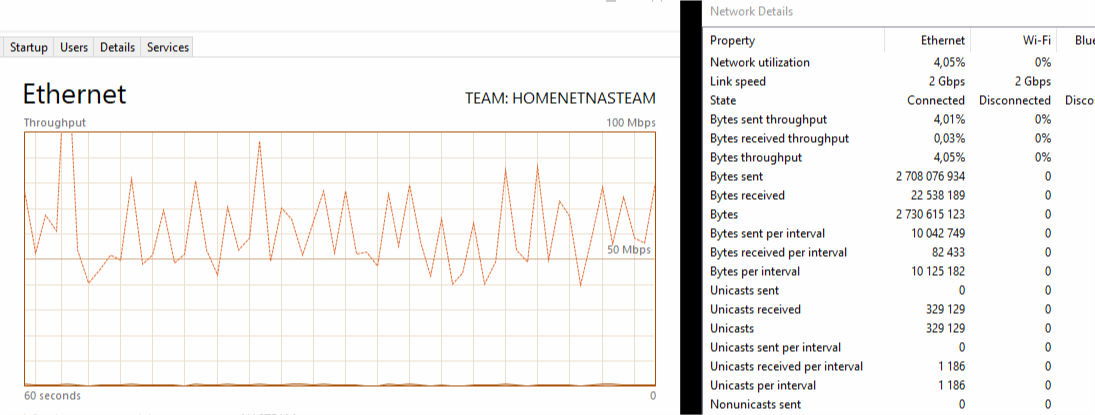
You can see that utilization of the server is almost none. Except network and network utilization is very different. If read ahead aggressiveness and buffer is not managed properly then of course we may encounter buffering, right?
Ok, but what about first several minutes? Here is how it looks like from server side:
AC3 - directplay mode. You may see that Plex sends data very aggressively at first to fill the buffer and later sends chunks of data as it was showed above in the middle of the moview.

Let’s look at TrueHD to AAC conversion now that direct stream. We can see that CPU and memory utilization increased, but not critical. Now plex sends data in chunks right from the start of playback without actually trying aggressive start of filling the buffer.

Let see now what is happening with MP4 containers. It is completely different story. It is constant stream of around 40Mpbs with short aggressive start.
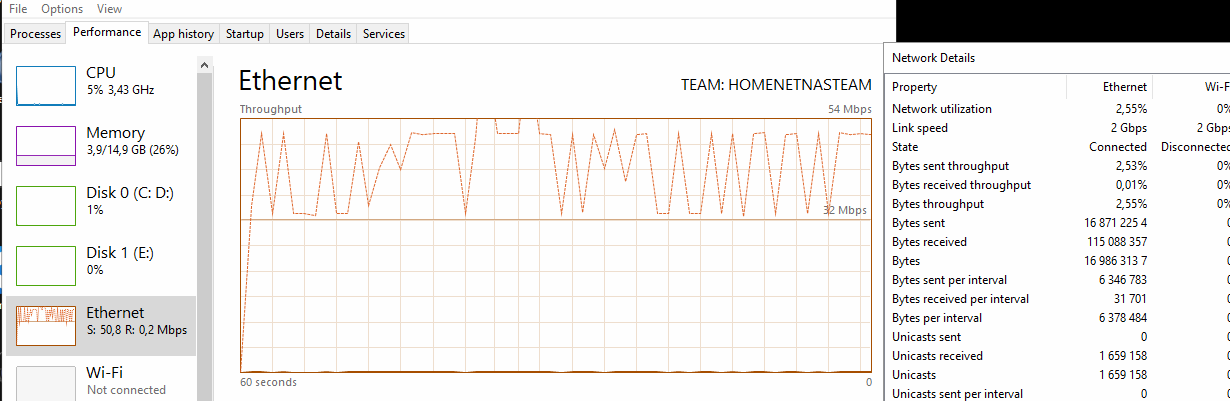
Now what about 1080p SDR movies - same chunks behavior is observed and transmission speeds reach above 300Mbps. Is it really needed?
This chunkiness does not impact 16-20Mbps movies. In chunks transmission speed reaches 360Mbps, but even that does not help. Constant speed of 60-80Mbps would resolve the problem IMHO as it is done on PC as it is done with MP4 containers. Current architecture punishes the network and may struggle in constantly increasing stream bandwidths. Of course running 4K YouTube on the same network with games broadcasting will have negative effect. 100Mbps adapters - do they have a chance for 4K? Probably not.
So what about our problematic file? 4K + HDR + AC3 primary in MKV container in DirectPlay mode. Arrow indicates where buffering occurs and after that switch to transcoding happens. Aggressive start but then after several chunks reaching above 500Mbps, problem appears.

Hopefully information provided is useful and will help to improve.
1 Like
I can confirm that with 1080p and FLAC 5.1 primary in MKV it works without conversion. DirectPlayed.
I can confirm that as well - see my observations on network utilization. IMHO it is related to network stack of either Xbox Plex app/media framework for dash mode or Plex Server or both.
Thanks for the information provided, very useful to see for your setup. Another helpful step would be to get some sample media that you experience the issue with.
Samples provided via PM
Thanks @dxhelios! Will look into them soon.
1 Like
Good. I tested same sample on LG TV Plex app and captured how network utilization looks like. Movie is DirectPlayed in 4K+HDR+AC3 selection. No lost frames, no transcoding or buffering issues.
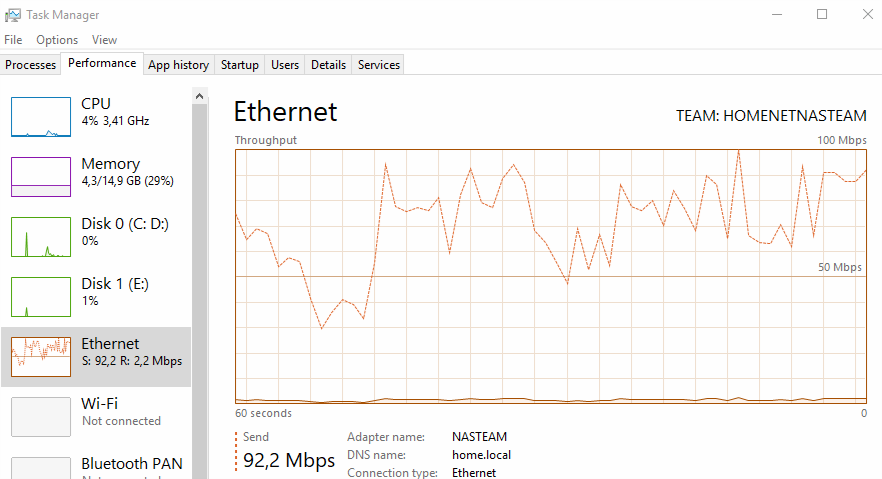
Constant stream ranging from around 40 to up to 100 Mbps. TV adapter is 100Mbps. This is another argument to look into network stack.
I have an update:
Xbox OS: rs5 1810.180920-1920
Plex Client: 2.18.3.70
Plex Server: 1.13.8.5395
Plex Server OS: 17134.286 - just updated to Falls Creators update and installed HEVC extensions.
I have found that when first buffering message appears when Plex switches from DirectPlay to DirectStream. In sample provided it happens after 50 sec of playback. Sample provided seems to be a stable repro. Also I tested on other movie and got same result. After 50 sec.
This must be tested carefully, because if you stop playback on the server, then you may not get HDR playback again until console is restarted. Testing gives consistent results, if not - restart console and test again.
DirectStream starts buffering later as usual.
Another update comparing performance and stability on LG TV Plex app.
As I have figured out previously on Xbox Plex app playback starts in DirectPlay mode then after 50seconds switch to DirectStream happens - indication on the client is short buffering message, playback continues in HDR.
After couple of minutes of playback - depends on content, up to 4-5 minutes - switch to transcoding happens.
On LG (4K HDR + AC3) container format that is used for DirectStream is diffrerent from Xbox (ts vs m4*, please do not confuse with original container which is MKV and it is the same for both clients) and smaller chunks (about 10-15MB with audio, instead of 40-50+MB for video only on Xbox) are delivered. LG cannot display it because of constant buffering messages. Having said that, switch to transcoding never happens. Network load is very similar to DirectPlay 40-70Mbps. TrueHD audio switch has no impact on DirectStream - still converting to AAC, but that is a different story.
Current conclusion is such, that less powerful TV processor and much less powerful network adapter gives us better stability than Xbox Plex app.
I will try to test dash streams - to see how Xbox platform performs.
1 Like
So I was having pretty good luck, watched a couple of 4k HDR videos in full without issue. I’m at work and my wife texts me about why Plex is buffering every 10 mins, I ask her what she is watching and it’s a 4k HDR video.
So seems the issue can still crop up. I hope this thing is fixed once and for all one day
Was it Atmos? Mine works good with DTS soundtrack but errors out with Atmos.
The issue is still present. Sample provided with stable repro as it was stated above.
It is not related to Atmos specifically. In both cases Atmos or DTS audio transcoding is performed. Issue persists with AC3 as well. Please make sure that you performed everything correctly because we may end up with different issues.
It must MKV + 4K + AC3 primary + any secondary audio, stream speed should be around 60Mbps. Less than 55 Mbps should work fine.
How can you tell if a video is transcoding or not?
Go to Plex server and click status. Hover mouse over the playing video and it shows the status.
Update:
Xbox OS: rs5 1811.181002-1900
Plex Client: 2.19.3.70
Plex Server: 1.13.8.5395
Plex Server OS: Windows 10 Pro 17134.286
Problem persists with 4K HDR AC3 primary in MKV containers. Also 4K HDR EAC3 primary in MKV containers.
