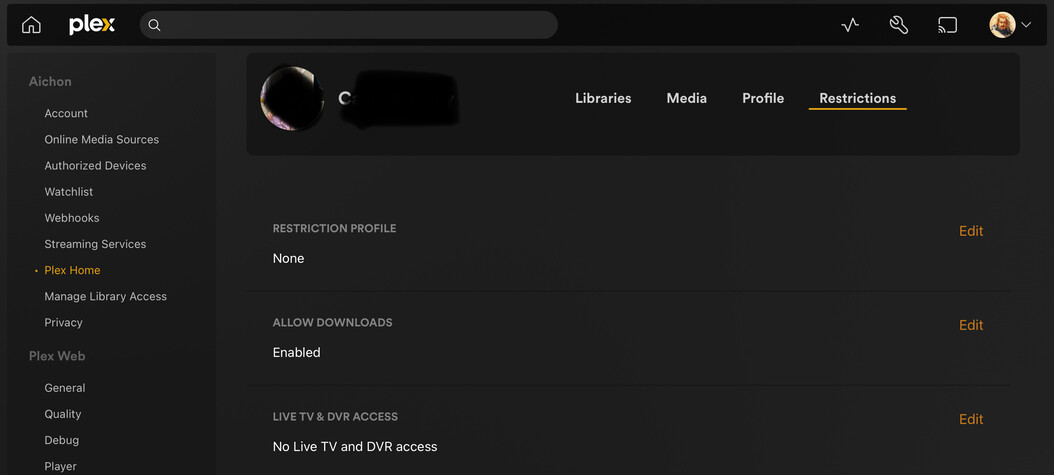
In our Plex Home, we have a managed user shared by our 6yo and 3yo. In it, we’ve set the restriction for “No Live TV and DVR access”.
Expected behavior: the children’s managed user has no access to Live TV. The web client and clients running older versions continue to exhibit this behavior, as seen below.
Actual behavior: my children’s managed user has unrestricted access to Live TV on any clients in my home that have been updated to the new app experience.
Is live TV set to “Disabled for managed accounts” or “Disabled” in your online media sources settings?
https://app.plex.tv/desktop/#!/settings/online-media-sources
I feel like the answer’s probably “yes,” as it seems unlikely you would have disabled Discover Source and Movies & Shows, but not Live TV.
If these are recent changes, you might try switching to your profile and back to see if the changes are reflected then.
Good clarifications. It is disabled, yep.
Regarding recency, these settings had been in place without issue for years, and still work fine on the older clients today. But I did try cycling all of the settings, just in case something got reset somehow, as well as signing out and back in, switching users, force quitting the apps, etc.. So far no dice.
The only other thing I can think of to suggest right now is to try creating a new managed user and applying the same restriction to see if the behavior is the same.
I just double-checked my managed user account on the new app (both Android and iOS clients) and there was no sign of Live TV. Sorry, I know that doesn’t help you, I just wanted to confirm that it can work.
That’s honestly really helpful in itself, since it means it’s presumably solvable. Much appreciated.
I hadn’t thought to try a new user yet, and I’m afraid it didn’t do the trick, but now that I know it’s working for someone else, I’ll poke at other settings tomorrow to see if I can find the magic bullet. Thanks again.
Apparently I hadn’t cycled the Online Media Sources settings earlier after all: I had only confirmed that they were set as I expected. Cycling all of the settings on that screen (just for good measure) to Disabled, saving them, and then restoring them back to Disabled for Managed Accounts before saving again just did the trick!
Thanks for your suggestions and encouragement, pshanew. It’s very much appreciated!
No problem, glad you got it sorted out!
This is still a problem in the app that was released to everyone. Flipping the settings still fixes it though.
Hopefully Plex addresses this because the only way to know restrictions aren’t working as expected in the upgrade is to log in as a managed account.
Noted, and captured this info to get some eyeballs on it. Thanks for the feedback here on this one!