I previously reported on the forum about the issue of translations not being recognized and applied by Plex, and I have recently encountered the problem again with some additional concerns.
For example, in the Dashboard, when I tested using Plex for Mac, right after launching Plex for Mac, if I performed some actions, I could see that all the interface languages in the Dashboard successfully pulled the translation data and displayed according to the user’s language settings.
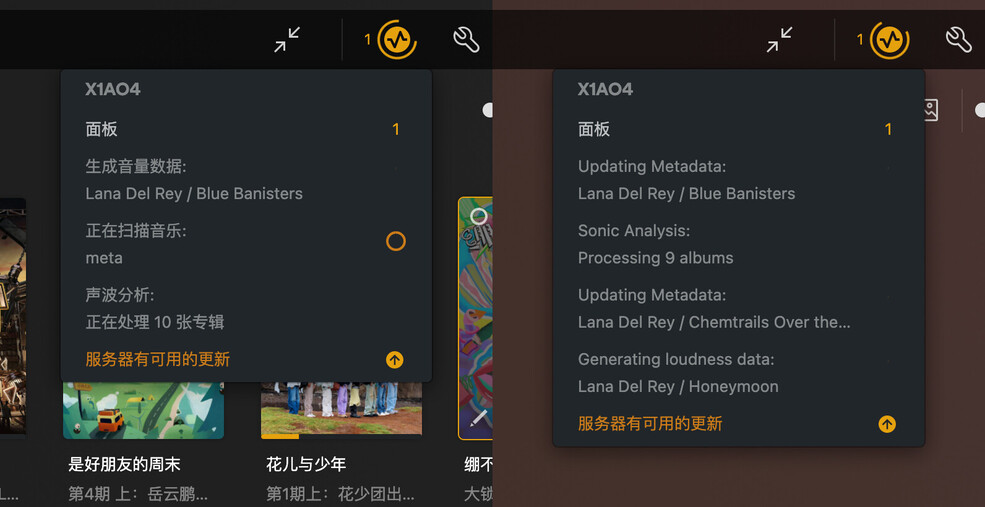
However, after a certain period of time, though I’m not sure exactly how long, the display language of the Dashboard reverts back to English. Meanwhile, other parts of Plex for Mac continue to display the user’s set language correctly, with only the Dashboard reverting to English and unable to call the translation data.
This issue seems to have been ongoing. I’ve been using Plex for almost two years now, and the Dashboard has mostly displayed in English. Occasionally, it shows the user’s language, but most of the time, it’s in English. Aside from this part, there are also many other areas of the software where the translation cannot be invoked, which I have mentioned in previous posts.
For example, some notification messages within Alerts.
For example, options under Settings - Library - Video play completion behavior.
Currently, there are parts of Plex’s UI where the translation cannot be successfully invoked. Regardless of the language set, it always displays in English. Even though there are corresponding translations in Plex’s language pack, they cannot be called. Please check the cause and fix this bug.
