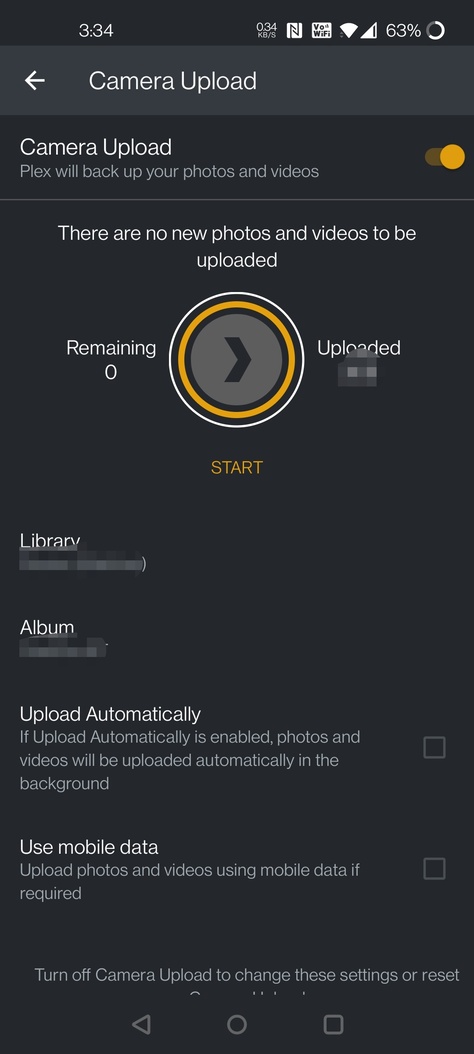
Not sure when this started (have synced pictures/videos fine until approximately Jan 23rd, last time I tried) but now Plex for Android is saying I have no images/videos to upload.
Haven’t changed anything aside from just updating the mobile app and server builds on my WD PR4100. No configuration changes.
I just get this any time I go into the sync page on Android. Definitely have taken lots of photos and videos since Jan 23. On the latest builds as of today for Plex Pass users (Android/Server)
FYI, I tried resetting the camera upload in the Plex app with no success.
I then cleared both cache and data for the Plex app, which of course forced me to sign in again to the Plex app, and re-setup the camera upload. It then prompted me to allow the Plex app permissions to files and media, and the camera upload is now working. Of course it is uploading ALL of the photos and videos on my phone, regardless of if they previously had been uploaded, so be prepared for that. I have a holding directory where Plex uploads photos and video, and then I manually move photos elsewhere as needed, so it isn’t a big deal for me.
It appears likely that in my case the Plex app had lost permissions to files and media, though I can’t fully verify.
Thanks for the update. Clearly there is a bug here so before I try anything annoyingly drastic I’m hoping someone from Plex can chime in here. It’s not clear, even if we use a workaround, that the issue is understood and won’t just happen again (on upgrade of server/app?).
Ok, I actually figured out a more optimal workaround based on yours and tested it and it works:
All you have to do when you get in this state is go into the Plex Android app settings, remove permissions to Files and Media, then kill the app entirely, then give permissions back to the app for Files and Media, then start the app and it not only will sync again, but it also still remembers the media it has previously synced from the device. Back in business.
There’s definitely a bug with the Android app at least though since it thought it already had permissions…something must have got mangled on upgrade…
Plex team brings features we don’t need and break the one we like and always with the same excuse.
What app can I use to upload my photos in my plex library ?