Server Version#: Version 1.21.1.3830
Player Version#: latest on firecube
Anyone have an idea why this plays perfectly fine? 
And then this buffers to absolute non-playabale (first 20 seconds take 5 minutes)
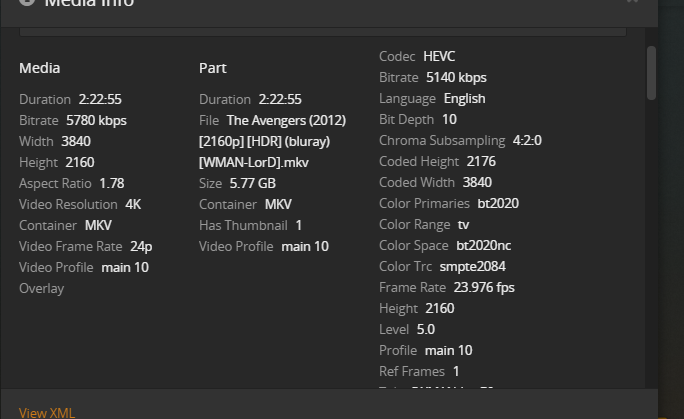
Bother direct play top to bottom, I tried copying the avengers into an mp4 using Xmedia and same thing. Both files play perfectly fine on PC in plex web and in VLC, and like I said, Die Hard streams without a hiccup.
Are they both HDR or just the one that is not playing correctly? Does your TV support HDR?
Also what’s the Audio codec on those copies and what client are you playing them back on. The audio codec seems almost identical but the audio could be what’s derailing the stream
Alucard1Plex Pass
14h
Are they both HDR or just the one that is not playing correctly? Does your TV support HDR?
Both are HDR. As I also said, Die Hard plays fine so I have to assume my tv supports HDR (manual says so) and the fact it plays makes me agree.
drslevyPlex Pass
12h
Also what’s the Audio codec on those copies and what client are you playing them back on. The audio codec seems almost identical but the audio could be what’s derailing the stream
Die Hard is OPUS - 6CH , Avengers is AC-3 6CH. Again, bothe direct play without issue. Firecube doesn’t give any client options to play something else (at least not easily such as MXplayer or VLC) so I haven’t messed with plex using anything but their media player. ANd in KODI it does the same thing.
TeknoJunkyPlex Ninja (Moderator)
Buy a shiled pro as an answer? as stated, Die Hard works fine, Avengers does not. New hardware is not the answer. and since nothing is transcoding, I am not sure what filtering the log to find out what is transcoding is going to do.
if you are truly direct playing both, then maybe it sounds like a bad encoding, or client issue.
you can try posting the client logs, to see if anything obviously wrong or broken.
otherwise, you can create a small sample and see if the problem can be reproduced on something else.
if it is reproducable elsewhere, then it is probably a bad encoding.
either rerip or reaquire a different one.
if either is transcoding, then how to find out why is
Q: how can I determine exactly why plex is transcoding?
- A: go to Plex > settings > console > filter > type “mde” without the quotes
- play the video on the device in question
- examine the log entries with the MDE: and TPU: lines, these should help explain why plex is transcoding.
in the logs, look for entries with
mde: will tell WHY something is transcoded
tpu: will tell you WHAT cpu/or gpu transcoder mode is used
you can see/filter the logs @ https://app.plex.tv/desktop > settings > console
or settings > troubleshooting > download logs
Don’t appreciate your condescending attitude. Not like I am surprised though. This is typical support, has to be A. Your setup. B The file C. Gremlins inside your firecube. The answer is never a plex issue. Here you go, but as I said which busts your bad encode theory, it plays just fine If anything was transcoding, I wouldn’t be wasting my time asking here, the answer would be plain as day in front of me. But since the file plays just fine outside of plex, the file itself is OK. So the question is what about that movie is not playing in the plex media player?
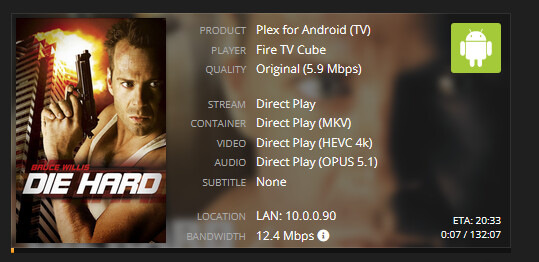
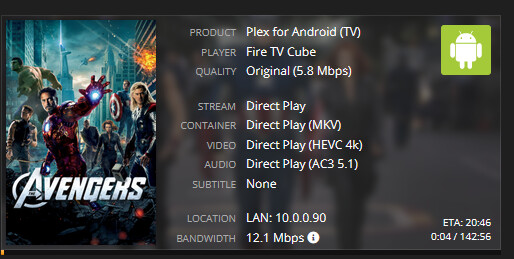
Nothing has been played since grabbing those captures, so here is the server log. Hey, at least you are trying. Thanks for that
(File removed)
I’m sorry, I’m not trying to be condescending, I’m simply trying to help with the information you had provided.
Thank you for the screens and server logs.
Jan 04, 2021 18:23:28.486 [9532] DEBUG - Completed: [10.0.0.90:60503] 200 GET /video/:/transcode/universal/decision?audioBoost=100&autoAdjustQuality=0&directPlay=1&directStream=1&directStreamAudio=1&fastSeek=1&hasMDE=1&location=lan&maxVideoBitrate=200000&mediaBufferSize=86656&mediaIndex=0&partIndex=0&path=%2Flibrary%2Fmetadata%2F140171&protocol=*&session=6c05b7d554500451-com-plexapp-android&subtitleSize=100&videoBitrate=200000&videoQuality=100&videoResolution=3840x2160 (13 live) GZIP 15ms 2681 bytes (pipelined: 5)
Jan 04, 2021 18:23:28.547 [9532] DEBUG - Auth: authenticated user 1 as jackmeat
Jan 04, 2021 18:23:28.547 [30076] DEBUG - Request: [10.0.0.90:60510 (Allowed Network (Subnet))] GET /library/parts/373363/1591624394/file.mkv?autoAdjustQuality=0&hasMDE=1&location=lan&mediaBufferSize=86656 (14 live) Signed-in Token (jackmeat) (range: bytes=0-)
Jan 04, 2021 18:23:28.552 [30076] DEBUG - Content-Length of V:\Flix New Releases\New Releases\The Avengers (2012)\The Avengers  (2012) [2160p] [HDR] (bluray) [WMAN-LorD].mkv is 6195676342 (of total: 6195676342).
Jan 04, 2021 18:23:28.764 [9528] DEBUG - Auth: authenticated user 1 as jackmeat
Jan 04, 2021 18:23:28.765 [30076] DEBUG - Request: [10.0.0.90:60511 (Allowed Network (Subnet))] GET /library/parts/373363/1591624394/file.mkv?autoAdjustQuality=0&hasMDE=1&location=lan&mediaBufferSize=86656 (15 live) Signed-in Token (jackmeat) (range: bytes=6195672156-)
Jan 04, 2021 18:23:28.770 [30076] DEBUG - Content-Length of V:\Flix New Releases\New Releases\The Avengers (2012)\The Avengers  (2012) [2160p] [HDR] (bluray) [WMAN-LorD].mkv is 4186 (of total: 6195676342).
Jan 04, 2021 18:23:28.771 [9532] DEBUG - Completed: [10.0.0.90:60511] 206 GET /library/parts/373363/1591624394/file.mkv?autoAdjustQuality=0&hasMDE=1&location=lan&mediaBufferSize=86656 (15 live) 6ms 4186 bytes (range: bytes=6195672156-)
Jan 04, 2021 18:23:28.774 [9528] DEBUG - Failed to stream media, client probably disconnected after 1572864 bytes: 10054 - An existing connection was forcibly closed by the remote host
Jan 04, 2021 18:23:28.774 [9528] DEBUG - Completed after connection close: [10.0.0.90:60510] 206 GET /library/parts/373363/1591624394/file.mkv?autoAdjustQuality=0&hasMDE=1&location=lan&mediaBufferSize=86656 (15 live) 226ms 1572864 bytes (range: bytes=0-)
Jan 04, 2021 18:23:28.783 [9528] DEBUG - Auth: authenticated user 1 as jackmeat
you can see from this snippet, that the stream is being forcibly closed by the client.
so something on the client side, is not liking the file.
the seemingly only thing different, from the information provided, is the audio codec.
I would not expect problems from the ac3 audio, because that is likely one of the most common and commonly supported audio codec around.
so if it is possible you could provide the client logs during the time that video was having problems, then we can see if there is any similar information from your cube that will explain why it kept disconnecting that stream from server.
If a file is Direct Playing, the client device is responsible for decoding it as-is. If one file plays, and another doesn’t, that’s a strong indication that it’s a file+device compatibility issue.
Try turning off Direct Play, but leave Direct Stream enabled. If the file is poorly muxed, allowing Plex to remux it may help.
Agreed with the recommendation to provide client logs.
Edit: Another thing you can try is remuxing manually with MKVToolNix, removing any unneeded streams. Total conjecture, but sometimes extra subtitle streams bother clients.
Edit2: I’m able to play that file on iPhone & Roku & Apple TV, for what it’s worth.
Edit3: Geeeeeeezzz that’s some dark HDR.
I am forcing it to close. it just is buffering and I stop it. The log says the exact same thing for Die Hard. I am stopping it within a matter of moments just to get the direct play verification.
Jan 04, 2021 18:21:01.840 [37908] DEBUG - Content-Length of V:\Flix Archives\Action\Collections\Die Hard 1-5 Collection*Die.Hard.1988.2160p.UHD.BluRay.10bit.HDR.x265-HazMatt.mkv* is 165427 (of total: 5839830154).
Jan 04, 2021 18:21:01.845 [9532] DEBUG - Failed to stream media, client probably disconnected after 1310720 bytes: 10054 - An existing connection was forcibly closed by the remote host
Jan 04, 2021 18:21:01.846 [9532] DEBUG - Completed after connection close: [10.0.0.90:60473] 206 GET
Anyway, here is the client log. I again did the same thing, only let each movie play for long enough for tautulli to display it is direct play. I let avengers run about 45 seconds longer. firecube_log.txt (1.1 MB)
Hope fully something makes sense, I don’t see anything specifically but again, i am just comparing one to the other. One thing I noticed that is perplexing to me and most likely is unrelated is that the mode detected says “Current mode detected as 1920x1080 @ 59.9401Hz (2)” I know my tv used to display mode as 4K in the upper right, but now is stuck on 1080P so seems I have some other issue to figure out as well. ARRGHHH EDIT: Simple. Somehow the TV was set back to default. it had some software update that most likely did it. reinstalled youtube back on me as well. Yes, I just tested both again, still same thing. Thanks
As @Volts said, remux it using mkvtoolnix and remove that PGS you have in the file. The player is all the time complaining about it.
When I ran it through Xmedia and put the file in an MP4 container, I removed the subtitles since I knew they had caused issues before. Suppose I should’ve mentioned that. I haven’t tried it on Roku here, but I have one in the other room. Slight problem is that Roku player is really old.Might be before there were even generations of them (it can connect to the TV with RCA cables to give you an idea) so not sure that would be the best test, but I will try it. thanks for the ideas.
This topic was automatically closed 90 days after the last reply. New replies are no longer allowed.
