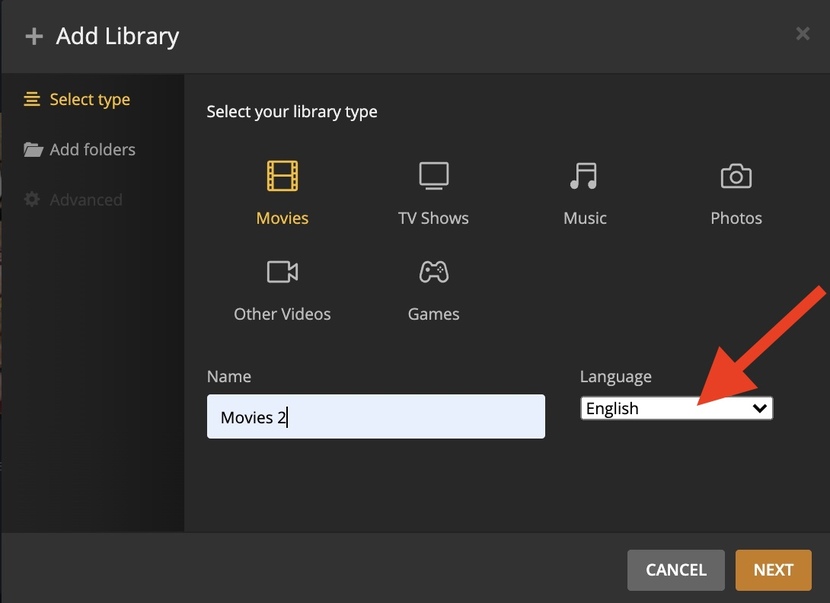
Server Version#: 1.25.3.5409
OS: macOS 10.14.5 Mojave
For some reason i can’t add a new library to my Server. Following the instructions on https://support.plex.tv/articles/200288926-creating-libraries/
doesn’t really help, because when i’m in Settings-Manage-Libraries, for some reason there is no “Add Library” button.
The prior Server version 1.24.xx i had installed, had the same problem. Update to the latest server version did not help. I don’t know what might be causing the problem, and i’m guessing it is not a general issue, otherwise a lot more people would be talking about this.
What am i doing wrong?
Thank you for the quick reply.
Yes it is my server.
But the other path you showed worked fine. Thank you.
Also using a different browser helped. Which means that safari isn’t capable of showing the page correctly anymore. No idea when that happened or was introduced. I can’t imagine it’s something from my system. Deactivating add blockers didn’t help with safari.
I have temporarily disabled all add ons and add blockers and tried again. But it still doesn’t appear. The light grey bar appears, but only partially, so there is no space for the buttons to appear.
Therefore in Safari i can’t add Libraries, but i can live with that. Maybe it’s because i’m using Mojave as my server.
Thank you for your help.
I have seen this issue and often a restart of server resolves. One tell tail thing I have noticed, if the Language in the add library panel is marked none or does not appear the issue will be apparent.
At times I have had to swap out the Plex Server app in applications, to be able to add a new Library. This issue has been around for as long as I can remember, never bothered reporting as it’s a quick fix.
Interesting. I actually have “None” as chosen language. Have a couple of different languages in there. Now i can’t even change language for the existing libraries, no matter which browser i use.
The other things you mention i tried. Restarting the server and computer didn’t help. And updating the Plex Server app, by manually replacing it in the Applications folder, didn’t help either.
I agree, that it’s not a big deal. When i need to add a library i’ll just use another browser instead of Safari, as long as the bug continues to exist. No problem.