What I like about Filebot is that I can drag any old file onto the window, and it does a good job of figuring out the show or movie name, and it renames the files. It doesn’t matter if that file is on my desktop or a ripper folder. I do not have to let Filebot “manage” my media. It just renames files.
Every other renamer I have found wants to manage your whole library structure. They won’t rename files unless those files are already in a special magical place with the right name.
That is not my workflow, I don’t want that. I want something like Filebot – but free.
Imagine this file is on my desktop:
Barney.Miller.S01E01.Ramon.mp4
I want to open an app, select that file – or drag & drop the file onto the app window – and I want that app to say “hey I think that should be Barney Miller - 1x01 - Ramon.mp4.”
My version is old and API changes at the metadata sources cause problems.
I don’t want to spend money if there is a free option.
I appreciate the link. Unfortunately I have looked at those already and they don’t really do what I am looking for – other than Filebot.
As far as I can see, other than Filebot, every other renamer wants you to build a hierarchy for it to manage, but I am looking for something like this:
c:/temp/Magic_Rename_Stuff *.mp4
And it just looks up the likely name of the show/movie, asks you to confirm the changes, and just renames the files where they are.
What I want may not exist, I may need to give up and use something like TMM or Sonarr. But I don’t like “media managers,” and in fact my Plex libraries are on read-only volumes, so that would be a big change for me.
I think there is an older version of tinyMediaManager https://www.tinymediamanager.org which is free but to be honest if you purchase Filebot your future self will thank you so much. It’s OUTSTANDING software and worthy of praise.
I have that exact old TMM and it does not offer the kind of workflow I am looking for.
I have and use Filebot right now, I know how it works, but the older versions are no longer working properly due to API changes. And, again, I am first looking for a free solution.
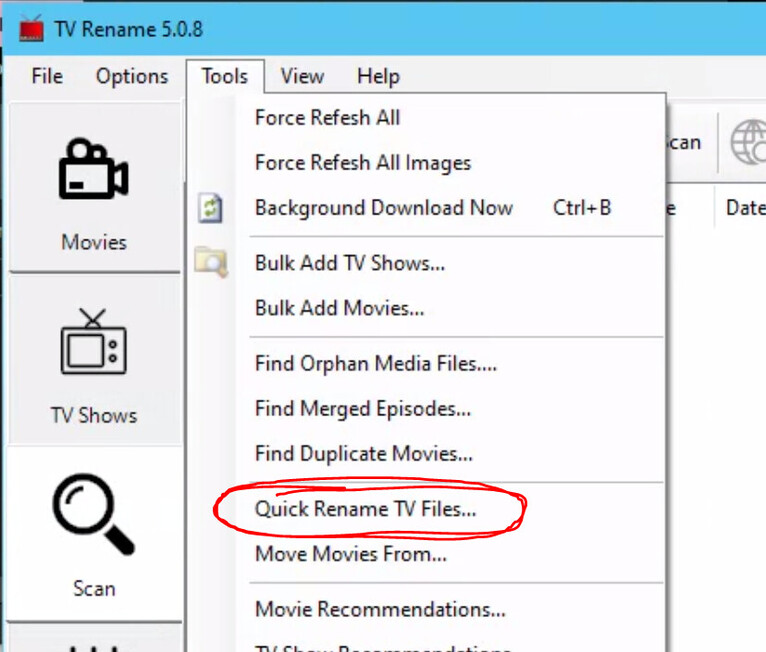
OK, that Reddit thread led me to a utility I had not yet seen: TV Rename
This tool is intended to be a “media manager” and directly touch all your library files, which I don’t want… But it also contains a feature that will rename files in place, called “Quick Rename TV Files.” That is just what I was looking for.
While I have definitely seen the app do some flaky things, like ignoring a file that I dragged ‘n’ dropped until I did that a couple more times… It looks like it will do the job. And you can also mix different shows in one rename queue which Filebot does not allow, at least not the old version I have been using.
After I use this for a while I may even let it copy the files to their new home, which is how it is supposed to work – I am just very conservative with these tools, because I don’t want a misconfiguration to make big changes (or deletions) that I did not intend.
Thank you @napolij, your link was the lead I needed.
I’ve done this research before, don’t know why I didn’t find that software but I am glad I have it now.
I still use a simple app called rename4u, which is completely free, when i need to, but i found it easier to just write a basic script to strip out file extensions i don’t like, and use that. So when i type in mymove.bat it runs my move batch file and does a file/folder rename, as well as moves any eng .srt files to the primary folder, so the subtitles are on hand for foreign movies… it was easy enough to write and test just using basic…