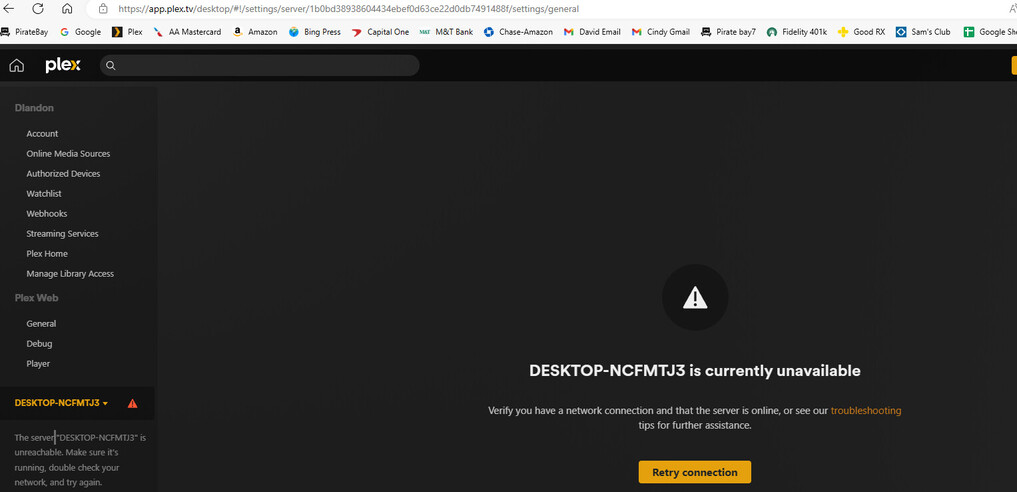
Server Version#: 4.120.1
Player Version#:
I’ve been using Plex on my laptop for years and yesterday, all my media was unusable. Couldn’t connect to Desktop. I wound up uninstalling Plex and Plex Server, and re-downloaded. Now when I sign in, there is no (“more…”) or the “Add Media” tab on the left.
I did see that the entries I removed using the Registry Editor, are back.
I looked at your Method 2 above, but don’t understand how to get the full contents of the Register into Notepad. Using Registry Editor, I see no function to copy the full contents.
You are not supposed to copy stuff from the registry into notepad.
You just copy the text block from the forum post.
There is a button in the upper right corner of it, when you move your mouse pointer over it, which will copy all of its contents into the clipboard. From there you paste it into notepad.
Thanks Otto. I used Method 2 above. I started the server via the icon & used Plex It states it cannot connect securely.
I repeated the above process and used http://localhost:32400/web/ This version lets me claim the server & works correctly (i.e. I can see and use my local files)
The problem is that my desktop version still doesn’t work & Roku can’t connect.
Anything else I can try? Thanks,
David
Otto, my mistake on this statement below. I had failed to start the Plex Server before going to the websites. I can access them now. (But desktop is still unavailable and Remote access in not allowed.
I wanted to add that I have tried all three methods that Otto suggested above, including the original post to delete the Registry Entries for “PlexonLine” lines.
In all cases, I re-claim the server, using the local host address, and everything works fine.
Your DNS resolver in your local network (usually integrated in your internet router, unless when you use VPN or DNS-based filtering like Privoxy, or Pi-hole etc.)
may have a feature called “DNS rebinding protection”. If that is active, it prevents local clients from resolving the domain name of your server – which is required for secure connections
If the DNS resolver provides a setting to disable this protection for certain domains, add the domain plex.direct to the list of exceptions. Background info: https://support.plex.tv/articles/206225077-how-to-use-secure-server-connections/
Another possibility is the DNS server of your ISP.
Typically, the ISPs DNS sevrer is used by default. Some of them are rather slow to update new records, or are employing some blocking rules which are not always well thought-out.
Try setting your DNS server to one of the known-good alternatives, like 8.8.8.8 (Google) or 1.1.1.1 (Cloudflare)