If you want to use your Smart TV to use Plex it needs to sign in. That requires WAN access
I show your server NAS-32TB as being signed in 5 minutes ago
Do you have two separate network cards on you nas that you are using simultaneously?
and did you change the 3rd octet to 167 for some reason
BigWheel, I would gather any changes made on your end were of assistance. I then went to the Sonicwall and opened from LAN to WAN ports TCP 32400 and also UDP 1900. Again I had closed these ports about 5 weeks ago due to vulnerabilities. Once I performed this action a few minutes ago, I was able to Sign In and Claim the Server. Public now shows vs. Unknown. All seems to be working. I did check the Samsung TV and its fine an the 32TB now shows as an Authorized Device in my plex.tv account. On the local side, Plex still shows I need an update but I will disregard as its been applied previously (same version)
So that I can compile all that was done, WD just called and asked if you could provide what you did on your end, I will add my notes then close the case. Many thanks for your devout efforts.
I did absolutely nothing on my end
I have another NAS drive with a 167. This no longer has Plex running as of 4 or 5 weeks ago. I did note despite the Plex server not being installed on 167, an old cache of some sort was showing up with thumbnails etc within my Login. All were inaccessible of course. This was at the same time I added the Firewall rules. My Plex account was hanging to this cached data for some reason
BigWheel…all was fine yesterday. Today I go to use the 32TB NAS drive today, all is accessible from windows PC’s but the same issue is back with Plex only.
Locally, at the .166 octet address (the 32-TB NAS drive) I get the Claim Server issue again and cannot claim. I log into my Plex.tv account, sign out sign in and this is the error:
The server “NAS-32TB” is unreachable. Make sure it’s running, double check your network, and try again."
No changes were made of any kind anywhere. Back to the account / communication issue. Plex ports are open on the router.
This erroneous message still shows: Version 1.18.6.2368 An update is available. Please install manually. though the latest update is installed
Hi all. I have had the same issue for months. Everything stopped working after the new year. Ive not been able to utilize my account for over 2 months now because of this error. Ive tried 3 different email accounts, cancelling each previous plex account before trying a new one. Ive not found a fourum topic yet that has solved this. i have tried everything possible i know from a non tekkie standpoint. In addition to having the unclaimed server issue, i also get…
“Version 1.18.7.2457 Something went wrong. Please install manually.”. No matter how many times i reinstall Plex, I still get both these issues.
Some things ive tried:
Uninstalled and reinstalled plex
Installed current software version
Opened new account
Changed PC name (old one had a dash in it, thought it might not like that)
Opened port 32400 for IP 192.168.50.216
Changed preferred network interface from 192.168.50.216 to Any and back.
Temporarily disabled Bitdefender
Disabled all Firewalls…router and IPv6
After all of these steps I always signed out of plex and then back in. I have not installed any new equipment since this issue surfaced. The only thing i did was move my router from downstairs to upstairs. Its the only thing i can think of that happened around the same time Plex stopped working. I would hope that this issue could continue to be researched as i really like Plex and miss the interface.
Plex Media Server Logs_2020-02-26_15-57-52.zip (2.8 MB)
Looks like you have the security setting in PMS disabled, but you are still trying to access it using https. That won’t work. Try using this URL instead.
http//192.168.50.216:32400/web/index.html?secure=0
If that works, turn the security setting back on and access it normally.
I appreciate the quick response. I copy pasted that into the Chrome browser window and i get a “site cant be reached” error.
Ok, then it sounds like you’ve blocked 32400 in your Windows Firewall settings. I know you said you turned it off. In Windows, turning off the firewall doesn’t actually turn it off. It turns on some other stupid security mode. Turn it back on. The easiest way to reset the firewall for PMS is to uninstall and reinstall PMS. Otherwise you can set them manually https://support.plex.tv/articles/201543147-what-network-ports-do-i-need-to-allow-through-my-firewall/.
Looks like the culprit was Adgaurd. I disabled it and boom…everything connected. To be sure it was actually Adguard i turned it back on again and sure enough…same error messages. i also have all of windows firewalls down but run Bitdefender and Router firewalls so im not too concerned about leaving them off. I dont know how I overlooked this one stupid app but talking thru it with you helped me look at some things that i didnt think of before. Thank you so much!
1 Like
Gretchen - you shouldn’t have to disable AdGuard completely but merely add plex.tv to the white list feature as well as any other necessary URL such as your NAS login. I found this White List option in AdBlocker Plus, a similar program to your AdGuard. This will allow AdGuard to stay enabled yet allow the plex.tv web site as an example . Also, the zip file with your logs might contain sensitive info. I would recommend deleting that zip file off this forum for your own protection. I don’t work for Plex, just a Plex user.
My issue still persists whereas I am unable to claim the server and have the latest BIOS update 1.18.6.2368 installed on our NAS drive.
Anyone know how else to get the TV or Film proper matching icons to display when viewing on a Smart TV vs. the generic icon on every single file and folder?
Today 3/2/2020 - this entire issues has resurfaced again. No changes were made of any kind to the Router, FW, etc. just out of the blue. I’ve installed the latest firmware today for Plex, worked with WD level 2 support via Putty and removed all traces of Plex AFTER uninstall plex off the Media server. Removed the Authorized device also.
After the full cleanup and reinstall of the latest plex, no success in my Plex account seeing this drive. Port 32400 “is” open. lastly, there used to be a section called “Network” via my plex account off the local drive. That entire section is no longer there.
I suspect there still may be some other remnants on the NAS drive that the Plex server software is seeing. Again I have installed the latest version of Plex as of March 2 2020. The last 4 digits were 2457 with respect to the version.
After you re-enabled PMS on your WD NAs, have you tried to claim it. You need to access the locally hosted Plex Web at the IP of your NAS. If this isn’t working, can you provide a screen shot of what you see.
Latest update as of 3pm PST 3.2.20.
WD Level 2 support was able to further cleanup corrupt remnants of Plex within the HD using WinSCP and Putty. We did a full reboot, reinstall version .2457. The device now shows up. Previously Putty was not able to remove all remnants thus the added UI of Win SCP was of initial help.
All that is left is to CLAIM the server which we cannot. WD was unsuccessful. I have opened port 32400 but that’s of no help and would prefer to have no remote WAN type access. How can I claim the server? It never finds my account. Been down this path before. I can send logs but please specify exactly which log of the large ZIP is needed. Also if you look further up this thread, Big Wheel claimed there was a communication issue but could never resolve. How can I help such as screen capture log file etc?
Here’s a few screen shots. Note
Why Plex claims there’s an update but in fact the latest version is already installed. This also happened on the last version.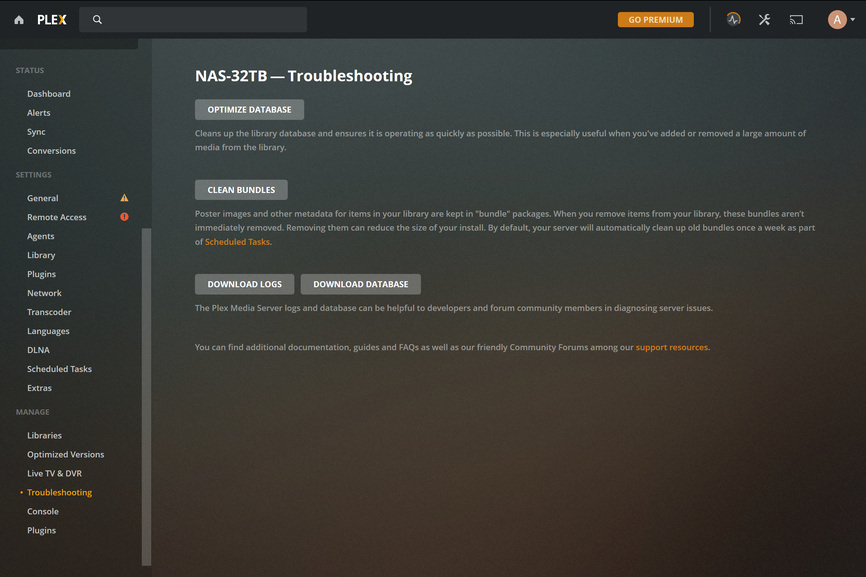
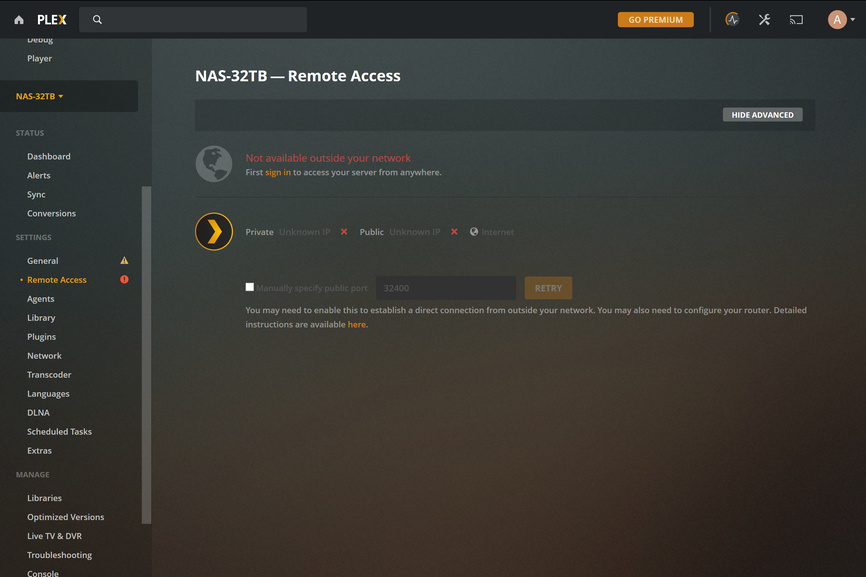

The Sign In option does nothing (does not resolve)
Fix the setting for Server Update Channel – “unknown” seems like a bad choice there.
Unknown is the Only Option in this drop down menu
