Server Version#: 1.40.2.8395
Player Version#: 1.93.0.144-9b2f4a13
I’m unable to download logs from this Windows client. When I click “tools/manage/troubleshooting/download logs”, it takes me to a weird URL .
https://192-168-100-144.21b8da05f5014eabb8ce31adaa42492c.plex.direct:32400/diagnostics/logs?X-Plex-Token=
Notice how the IP address has numbers separated by dashes instead of dot, and there is no slash after the IP. I’m not sure how this is supposed to work.
I’m able to download the logs from Plex web or locally at https://servername:32400
The weird URL is normal and expected.
After a small waiting time, my web browser is presenting me with the Download modal where I can set the download location or open the download directly.
Take a look into the folder where your web browser is storing the downloads by default.
If there is no downloaded file, you might have an issue in your local network with “DNS rebinding protection”.
See https://support.plex.tv/articles/206225077-how-to-use-secure-server-connections/ for a background on those URIs and a potential remedy for the DNS rebinding issue.
My browser, Firefox 126.0.1 for Windows, x64 does not do that. It just gives a “server not found” error.
[moderator edit: screenshot removed]
That is a confirmation of the DNS rebinding issue.
The domain name is not resolved in your local network, when it should point to the IP of your server.
Then I suggest you simply use the web app to fetch logs.
Well, I was just surprised by this.
I did try the setting Plex recommends for pfSense which is documented in the support page you posted. It solved the problem with those links, indeed.
Unfortunately, it also completely broke my 170 local DNS hostnames, inexplicably.
And removing the setting did not fix it. I had to restore the configuration from one of the automatic backups to fix it
Given the choice between my local DNS and the Plex links working, I have to choose the former. But will head over to the Netgate forums to inquire.
Maybe you missed a crucial character at the end, like a semicolon, a quotation mark, or a line break (or added extraneous), which rendered the rest of the configuration file invalid?
It would explain why the private-domain directive was effective, but not other directives.
I don’t believe I did. It seems pfSense automatically disabled local DNS registration from DHCP upon adding the option.
See the config diffs there :
It could also be related to the fact that pfSense has recently migrated from the ISC DHCP backend to the KEA backend. I’m using the newer KEA. Perhaps the syntax for options is different between the two, also.
FYI, the fix was to revert from the new KEA DHCP server to the old EOL ISC DHCP server.
At that point, the setting documented by Plex worked properly.
This detail should be added to the documentation, IMO. It would have saved me a lot of time. KEA was added to pfSense in November 2023.
In fairness, the first response you got there contained this:
Are you using isc or kea for dhcp - kea is not yet ready for prime time, it is preview and I know there is something about static reservations in the warnings about what features it does not support.
Yes, but the Plex doc I read before posting here only applied to the ISC server. If it had mentioned KEA, I wouldn’t have to post over there at all.
Also, Plex could make this a lot easier in terms of error messages, such as trying to resolve the DNS entry before handing the URL off to the browser getting a 404, scratching their head, and heading to forums for support. It’s not a great UX,. I’m surely not the first or last to run into this.
It is a bit unreasonable to demand that the official Plex documentation has to keep track of “preview” features of unrelated products.
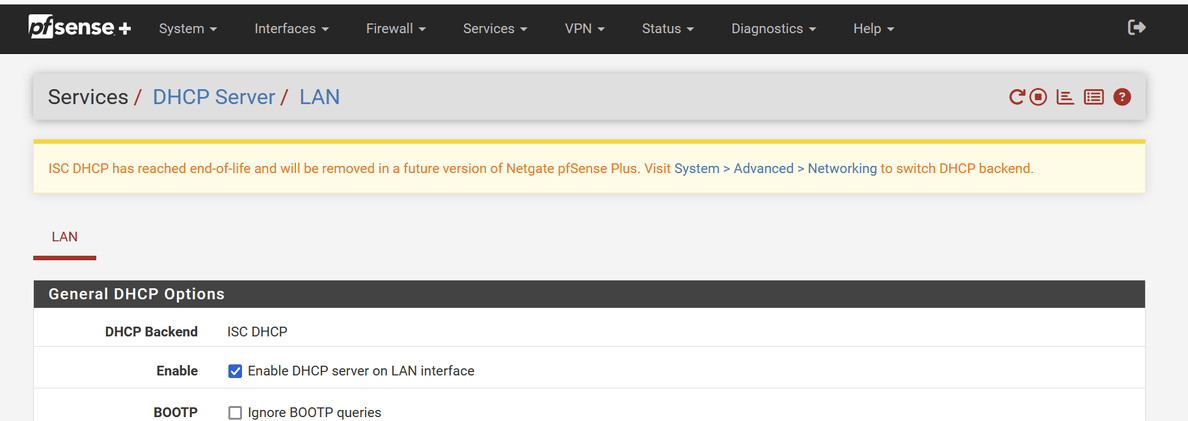
Maybe so, but the problem is that Netgate didn’t clearly notify users who received the update that KEA was a preview. Instead, we were shown a warning in red like this anytime the DHCP server page was opened, which happens when one wants to edit DHCP reservations :
Even clicking the “?” for help at the top leads to a page that does not mention anything about ISC or KEA.
Following the suggested link shows this :
Notice how there is not one word about how KEA is a preview.
And the “?” at the top of this page does not lead to a page mentioning ISC vs KEA either.
There were indeed 2 places I could have learned about it.
If I followed the Netgate blog, I would have found this :
I don’t follow the blog, though.
There were also release notes :
It’s quite possible I didn’t read them. But I may also well have them read at the time, and simply not recalled this information the next time I changed a DHCP reservation, and acted on the advice of the ISC deprecation warning without realizing I was turning on a server that wasn’t feature complete. Nothing bad happened with it, until I ran into this Plex issue.
I think Netgate needed to do better, and list have some sort of warning in the UI before turning on KEA. They didn’t do that.
Anyway, the issue has been publicized now. There is no telling when KEA will actually be ready. It would still be good if Plex mentioned it, in the meantime.