Thank you very much for your reply, I highly appreciate the time you took to look into the issue I am having.
You are correct. Logging into Plex app on the same phone, via Google works great. Logging into Plex Media Player on both AndroidTV, Windows and Linux PCs work great.
Logging into Plexamp on Windows and MacOS works great too. Only android is the troubling platform.
Right now I am checking logging into Plexamp on another device.
exactly the same behaviour on stock ROM on another Android device - freshly flashed. Going with “Continue with Google” redirects me to Google search page instead of oAuth screen (stock browser).
And this is via Google-linked account in a web browser? (Assume the first couldn’t be but the latter might be).
I just tried on my Pixel 3 and when I hit Continue with Google it spun for a bit and then gave me the “we found a Plex account for …” page so it looked like the linkage was working.
For sure, but the Plex app uses totally custom/native Google account sign-in, whereas we try to reuse the web component which already exists. Hence why I was trying to figure out if you could go to app.plex.tv and sign in with a Google account.
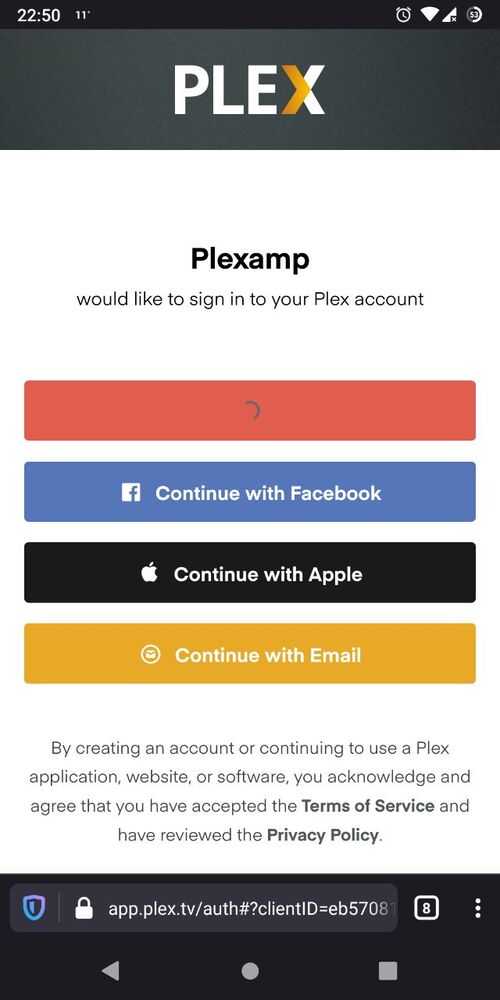
After choosing signing in with Google, I got redirected to Google page to choose which google account I want to authenticate with, and then it redirects me back to app.plex.tv with the same screen and “loading circle” on the Sing in with Google button.
This is the screen I am redirected back to, after choosing my google account when trying to login into app.plex.tv or PlexAmp or Plex Dash.
LOL, solved it. I downloaded Chrome on my Android phone and it worked. Now the curious thing is why the authentication doesn’t work with Firefox Preview?
This is due to new content-blocking features built into Firefox. The default values prevent the Google cookie from being used.
It does seem like the failure-case-handling is a little tatty, but ultimately this is a browser configuration issue explicitly blocking the desired resources. You can allow Cookies to be sent and sign-in should work again.
I too am having issues signing into Plex dash I hit sign in it takes me to the login page on chrome says it was successful but the app still says sign in even under my account it shows Plex dash is authorized