When i click on it it soon goes from green to red
Ok. Can you get me a screenshot of your router’s status page? I need to see what it’s Public/External IP address is, and its gateway. I wonder if you don’t have a second router somewhere in the house between you and the internet that we’re all just missing out on.
Knowing your internal house IP addresses isn’t sensitive information, in case you are concerned.
Which page is that? Im not familiar with the title
The page where you verified that your router’s IP does NOT match the IP of that on whatismyip.com.
It should look something like this?

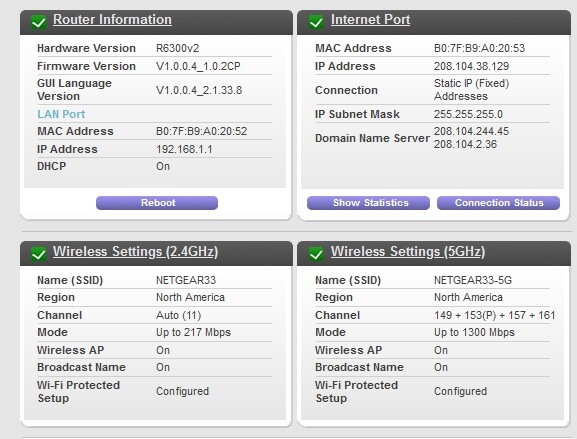
Looking at that, it looks like you are still behind a CGNAT. You got a static IP, but they didn’t give you a public IP. Contact them again, inform them that you are hosting a server (you don’t have to say what kind) and need the ability to do port forwarding. See if they will set up a port forward rule for you (use port 32400), or get you a public IP address.
CGNATs are a pain to deal with if you are hosting any kind of setup yourself (like Plex). In the end, there might not be an option available to you if the ISP won’t help.
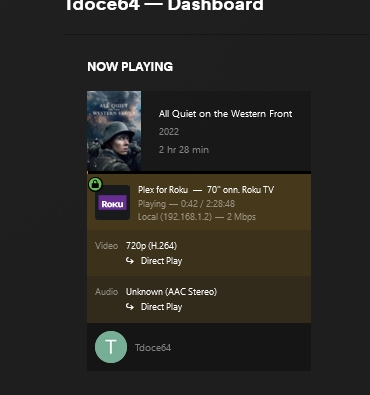
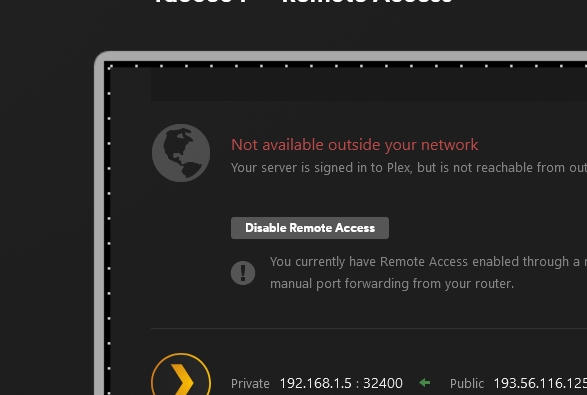
Ok this is interesting, I contacted my Provider who confirmed i was no longer behind the cgnat. I tried my system again and it worked, i was on Direct Play, i stayed green. I tried a second test with my VPN on. My system was Red and yet it still showed me as getting direct play…

I’ll be happy once i see a friend or family member on and it working. Hopefully this is it however. I want to thank everyone for all your time and effort, this was important to me and has bothered me for about a year now. Ty again so much! 
Glad it’s all working now and we all could help.
It doesn’t look like your server is accessible from the outside.
The public IP of your server which is registered with plex.tv is not the same as the one on your last screenshot. (although it differs only in the last octet)
Did you put anything into
Settings - Server - Network - ‘Show Advanced’ - “Custom server access URLs” ?
If so, verify that this is reflecting your current public IP address.
When debugging remote access issues, it is also helpful to
- shut down the server for a few seconds and then
- restarting it.
- then let it simply sit for a while
the 2nd test the one with the VPN it was Red and says i wasnt accessible and yet when i monitored the viewing, it was green and on direct play… weird
I assume that’s because the VPN makes it appear as if the client is located in your local network. In which case the missing remote access doesn’t matter.
Look at the Now Playing section in your last screenshot.
It says "Local (192.1689.1.2)2 and the IP is also from a private IP range.
As long as i get Direct Play im happy, thats been the goal for a year now. But here is the thing…everywhere online it will tell you that the human eye cannot tell the difference between 720p/1080p or 1080p/4k if your back a few feet/ Ive tried various tests, on my PC with my face up against the Monitor i can usually tell, on my big screen TV sitting back a ways i cant tell the difference between 720p and 4k pretty much. What if ive been going through all this effort and my friends cant tell the difference between transcoding (480? less?) and 720p (which im posting in) lol??? My friends and family typically say that my vids are “ok”.
Ok i see one of my friends on and its working properly finally (TY everyone!!!), im waiting to hear if there is a noticeable difference after all my efforts lol
This topic was automatically closed 90 days after the last reply. New replies are no longer allowed.
