Hello all,
I’m having trouble matching a particular album.
I’ve got Bing Crosby/Frank Sinatra/Nat King Cole’s CD “It’s Christmas Time” released in 1992. I have found it in MusicBrainz:
| MBID: |
9ecfa186-9272-4bf9-9587-397e66d294d6 |
|
|
|
|
|
|
|
|
|
|
|
|
|
|
|
|
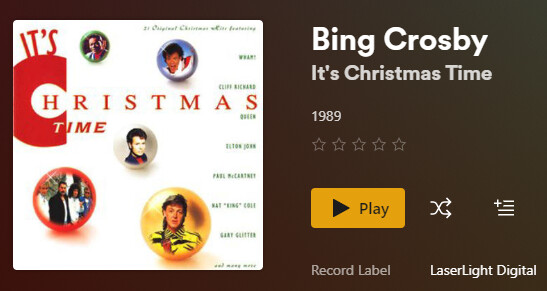
When I try to match from Plex, it keeps connecting me to a 1989 release by Bing Crosby.

image547×291 39.7 KB
When I unmatch the album, I assume it pulls from my metadata (which I’ve updated from MusicBrainz). I’m getting the correct album info, but it’s not showing Crosby listed as the artist on any of his tracks.
I’m running the app on a desktop using Windows 10 (yes, still). I tried refreshing metadata and fixing the match. I unmatched and rematched. I have done an advance search with the MBID and it’s still finding the 1989 version. I deleted my files, re-ripped the CD with a match to MusicBrainz, and did all this again. What am I missing? Is it me or the database?
Note: there are multiple versions of the 1992 album entered. Track #4 is different on different versions. My track #4 is Hark the Herald Angels Sing.
Thanks for any help you have for me!
Server Version#:
Player Version#:
<If providing server logs please do NOT turn on verbose logging, only debug logging should be enabled>
Plex cannot handle collaboration albums.
i.e. releases, which have more than one artist name as their Album Artist.
You will need to decide on which of those three you want this album to appear.
Or maybe move it into Various Artists and have it appear as a compilation album.
In any case, use embedded meta tags.
All tracks of an album need to have identical content in the Album Artist tag.
They can have different content in the regular [Track] Artist tag. (Which is where you want to put the artist name of that particular track)
Important: once you have decided on the Album Artist, move the whole album folder over into the corresponding folder for that artist name. (I am talking about folders in your media file storage, not about anything inside of Plex.)
See https://support.plex.tv/articles/200265296-adding-music-media-from-folders/ for the folder structure I am referring here. Be sure to use it always.
The regular Windows file manager is not able to show or manipulate the Album Artist meta tag. Use a dedicated meta tag app, like e.g. Mp3tag - der universelle Tag Editor (ID3v2, MP4, OGG, FLAC, ...)
After doing all of the above, perform the Plex dance with the album.
Plex Web will not show the [Track] Artist of a track, if it’s identical with the Album Artist.
Thanks for the input. I’ll just leave it pulling from my local metadata in this case. I’ve got it in a Various Artists folder, and have embedded tags with MusicBrainz Picard, so my data is good.