I switched to a new computer and can’t get Plex running at all. I have gone through all the forums and support topics many times and tried them with no success. I wish you had a chat with support feature. i am not keen on having to go through a forum.
I log in online - click on launch, the settings - no place to add my external library. Then I downloaded the app - this is a new windows 10 computer. I launch the app and it says use the navigation to add a library but there is no place to add one. Under libraries it shows local photos and local videos. How do I add my cloud and external drive libraries?
Go to settings (wrench looking icon), “manage” then Library on the left side menu bar towards the bottom. Add Library icon and follow the prompts should allow you to add your media.
Also if you have a 2nd instance (or haven’t removed your first plex server), you might have to switch to that server interface. Right under the home icon there should be the name of your first server, you might have to click the drop down triangle to get to your other server.
Make sure you are not using the Plex app from the Microsoft app store.
This is a pure playback app with no administrative features.
If the above is all you have installed so far, you need to download and install the Plex Server software (download below).
After that, give this a read:
https://support.plex.tv/articles/200264746-quick-start-step-by-step-guides/
Thanks for the responses. I have downloaded the plex server from the plex website many times. I have uninstalled it, installed it. I go to the wrench looking thing and there is no “manage” or “settings” when I open it. I am pretty sick of this software after months of trying to get it going with no success, and no help desk to call.
Please post a screenshot.
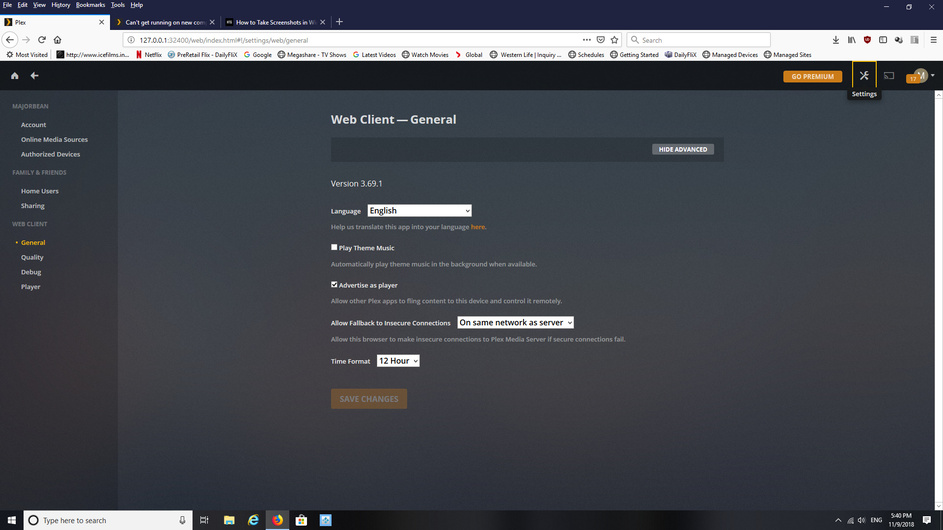
I am pretty sure yours is a different issue.
You probably have 2 plex.tv accounts.
Your server is using one and your web browser is using the other.
You need to bring both the server and the browser into the same plex.tv account.
See https://support.plex.tv/articles/204281528-why-am-i-locked-out-of-server-settings-and-how-do-i-get-in/

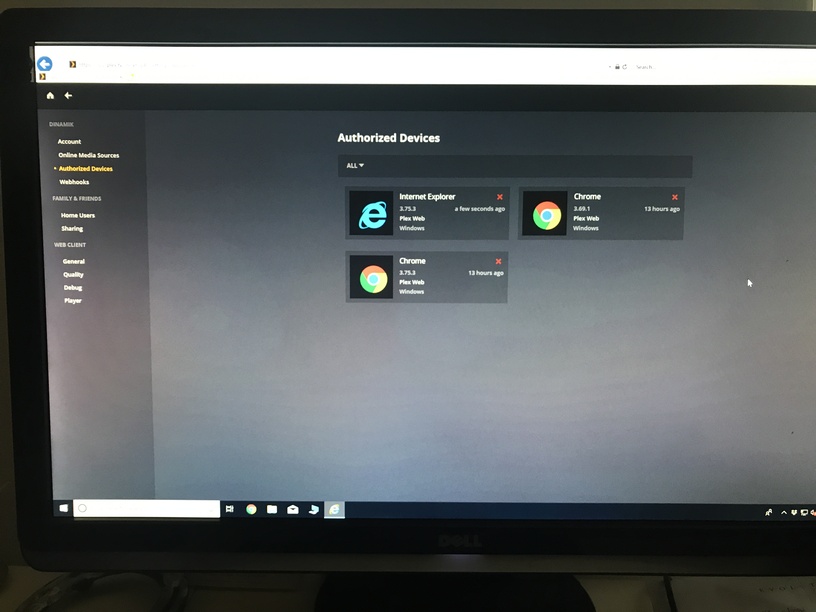

Yes. As you can see under ‘Authorized Devices’, there is no Plex server signed into this plex account.
If you have indeed a Plex Server set up and running, you need to bring this server over into this plex account by performing this procedure:
https://support.plex.tv/articles/204281528-why-am-i-locked-out-of-server-settings-and-how-do-i-get-in/
Do you know why “devices” or " libraries" doesn’t show under tools?
‘Libraries’ is not there because there is no server. Libraries live on a server. No server - no libraries.
‘Devices’ is there. It’s just now called ‘Authorized Devices’.
I went on my macbook, logged into plex, downloaded the server and it immediately went to a server set up page, which I never get on my windows desktop. So now my windows desktop is seeing my backbook as the server and but the library is in an external hard disk connected to my desktop. Will I be able to add it or can I now only add libraries from my macbook - which I can’t connec the external drive to.
I also don’t understand why when I downloaded and set up the server many many times on my windows desktop, when it never gave me the screen to set up my library
Please follow the link I set above for you.
Thanks Otto. I did the registry change. Do I delete the server on my MAC or can I have more than one? I don’t seem to be able to add outside of my MacBook - options are limited to where I can search.
You can have as many servers as you want.
I went into settings on the desktop and it popped up to claim an unclaimed server. You were right in the registry the username was typed slightly wrong. The desktop is now setting that server back up but the laptop server disappeared. At least I have a server and library now. Thank you…
You might have to repeat the prodedure on the laptop as well, to bring all Plex clients and servers into the same account.
