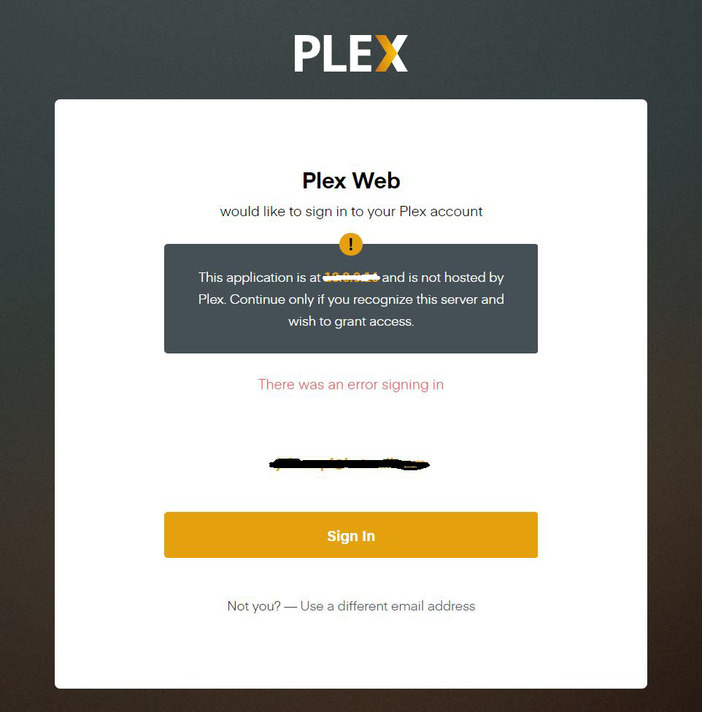
Server Version#: 1.19.5.3035
Player Version#: 4.37.2
I get this now: “This application is at 10.0.0.16 and is not hosted by Plex. Continue only if you recognize this server and wish to grant access”. Cant ever log in, the serve is not hosted by Plex its hosed by me, I should be able to log in as I did for years,
Automatically Sign In doesn’t stay checked, doesn’t work anymore.
This only means it is the local web app. not the one at app.plex.tv. If that is your servers IP address then it is fine. If you see your account email/username there then should just need to hit continue or sign in. As long as you don’t have your browser set to delete cookies/cache after every restart for that URL or something similar it should not ask you again on that computer.
Automatic sign in has nothing to do with that screen. Auto sign in only skips the user selector if you have other users or an account PIN.
It is like that because unsuspecting people get given links by unscrupulous people saying to sign in to their server and those unscrupulous people can more easily hack the users account.
Yes I know, I am an IT guy of 30 years. Cant sign in to local anymore. I sign in and it goes round and round and round, can never sign in that’s why I have posted this issue.
I guess I don’t understand how you can see that the option to auto sign in is unchecked if you cannot sign in to see it. Does sign in work from an incognito/private window?
because I can sign in if I go via https://app.plex.tv,
but I I have never had to do that before, I have always done, used the direct link to my server, https://xx.x.x.xx:32400
app.plex.tv and ip:32400/web won’t necessarily match web app settings. each are their own instance. (there is a settings sync option but I can’t remember if that is on or off by default)
so at ip:32400/web after it gives you the screen with the “this application…” and you attempt to sign in where exactly does it take you. It just reloads the sign in page?
just keeps going back to this:
I know these things might be sorta obvious but I’m gonna ask anyway.
Have you tried a different browser and/or incognito window? Different computer or browser on a smart phone for example or a different network
Do you have any extensions that might blocking javascript or anything like that?
have you cleared cookies/cache/site data for that URL?
If you look at the console logs of the browser as you try to sign in are you seeing any errors?
So it works ok with Chrome. So I guess its a new Firefox issue.