I have QNAP and installed Plex media server and managed everything with my library but but after I moved my NAS to my brother house so he can use it seems can’t see library on browser
the library doesn’t show
but the using the Apple TV it shows the library list and everything
any idea ? I don’t want to delete the Plex server from NAS and re install
it will mean I have to do the work again
You say you moved it to a different house, but looks like you are trying to access it via IP address. When you go to app.plex.tv what shows up?
yes I tried to open Plex server from the NAS on browser but no list
tried Plex.tv website also same !
but the Apple TV was already logged in with same username
it starts to show the list library
Most people in general assign a static IP address to their NAS.
Would you verify that the IP address, Netmask, and DNS are valid for the new house?
If they are valid, you should be able to sit down at another Mac in the new house and open Terminal and see if you can SSH into that address, e.g.
ssh admin@192.168.0.177
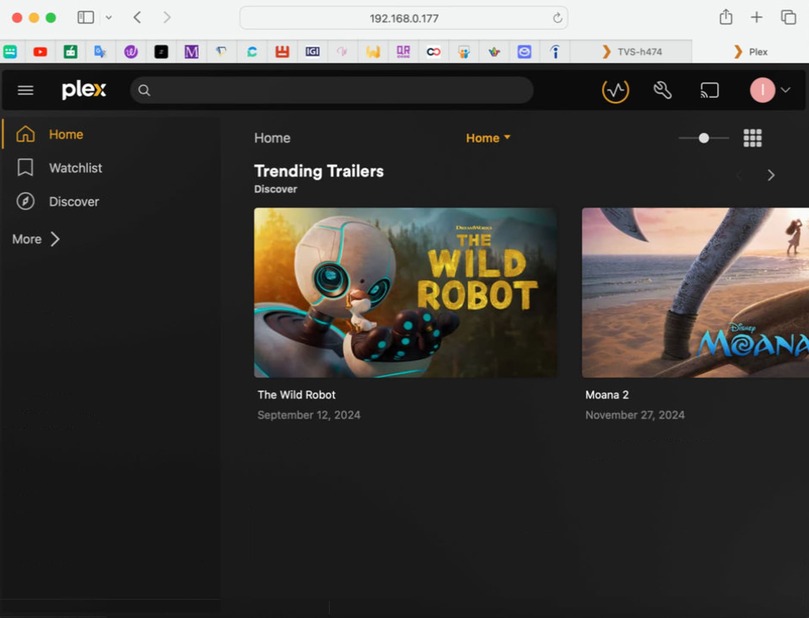
now it shows the library but not in first login page
as showing here :
I have to clicl more to see the list of my library
how can I pin the server to be first page.
this issue only when I login via my NAS Server
now I can see my library via Plex app and Apple TV
I logged to Plex.tv and it shows the library normal in first page
Oh nice all you have to do is pin a few things.
Click More > and mouse over a library, then click on the three vertical dots︙you’ll see the option to Pin.