Have been working on this for weeks now and not a blink. When trying to access from TV Box android I get a message from the “more” tab the network is not secure. Digging deeper I found the slots for certificates and there are none. Reading help articles on Plex I see where you provide certificates automatically. No such luck in my experience. Can you provide me with certificate by email or, a work around?
Don’t auto-renew subscription. If Plex doesn’t work for me will go back to plugging the drive into the Android box. Of interest, WDTV’s last upgrade included a handshake with WDTV on initialization. When they blocked the handshake on their end all the WDTV became useless.
The option/setting you found is to provide an own certificate (e.g. if you have your own server with its own domain name).
For what it’s worth you should not need that in a regular setup.
Can you double-check the settings of Plex on your Android TV box as well as those of your Plex Media Server?
Android Client:
Settings > Advanced > Allow Insecure Connections
Server:
Settings > [Server Name] > Network > Secure Connections
If you disabled secure connections on the server but require it for the client, that’ll result in errors when you try to access the library from your Android box.
I’m using the 64 bit version on windows 10.
This is the only server mentioned that I can find and it is in advanced as you indicated. Shall I look somewhere else? I have unplugged my drive will plug it back in for the meantime.
Back to my original configuration all the directories are showing up in plex on my desktop. Have troubles trying to get a Plex app on that dam android POS i bought.
.
Not quite sure what you mean with your last post.
As for the screenshot… if you scroll down a little further in the settings menu on the left, you’ll see a “Network” section. That’s what I was referring.
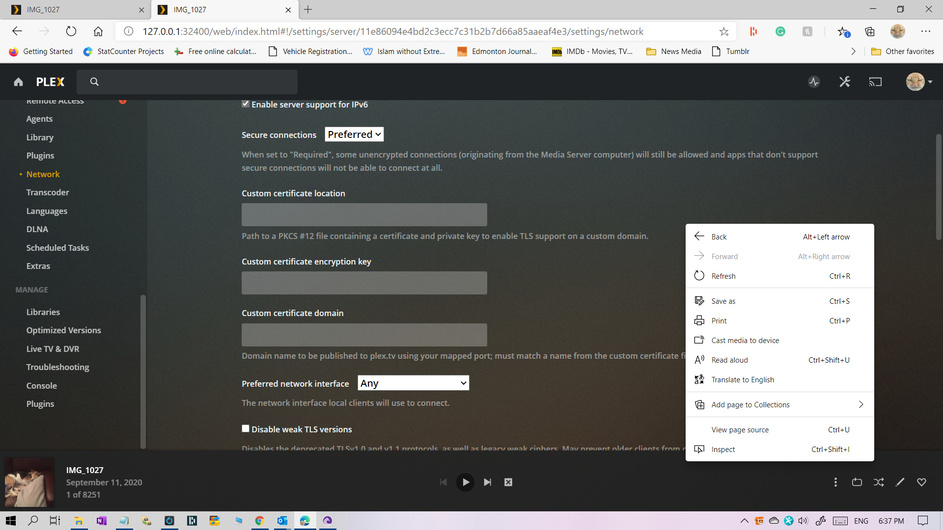


Network settings look ok.
It appears there had been some issue last year with older versions of Plex for Android / PMS where the client misinterpreted the actual settings. What versions of Plex Media Server and Plex for Android (TV) are you running in that setup of yours?
Is the Plex app on your Android TV signed in to your account or did you configure this a pure local connection (specifying the PMS’ local IP)?
DLNA
Why the DLNA settings… I thought you’re using the Plex for Android app?
If you’re trying to use Plex via DLNA, that Android Box parameter in the DLNA client preferences might cause some trouble… there used to be a pretty technical string, e.g.
IP=<PMS_IP_address>,DirectPlay=true,DirectStream=true,LocalResolution=1920x1080,RemoteResolution=1280x720,OnlineResolution=1280x720,LocalVideoQuality=74,RemoteVideoQuality=49,OnlineVideoQuality=49,SubtitleSize=100,AudioBoost=100,MusicBitrate=192
This string is usually automatically generated and should not be meddled with unless you’re familiar with DLNA parameters 
Warning! : Even more so than with most other “Advanced” settings, you should be very careful about altering settings here. You should do so only if instructed to do so or if you know specifically why you’re making a change and exactly what the appropriate value for the setting is.
Plex server 4.34.4 Nothing on my andoid box yet have a keyboard coming in a couple days for it. Let’s call it a night and t hanks again for your ongoing efforts.
John
I’m getting error on plex when I try to access my drive from my TV It shows me Plex site stuff which I can access okay. When I try the “downstairs” (my desktop and movie drive) I get an error about not a secure server. When I use the option to switch to insecure I get a warning I pay attention to as don’t know if it is just talking Plex or my whole net process.
Question" how do I get a secure server onto PLex from what I can read secure refers to SSL connection.
that’s still the same settings from our discussion ~1 week ago.
This topic was automatically closed 90 days after the last reply. New replies are no longer allowed.
