Cant transcode video - ERROR Occured

Server Version#: 1.112.0.359-0d79a49f
Player Version#: Android TV up to date

Plex Media Server Logs_2025-12-02_20-01-42.zip (796.2 KB)

Hello,

So… I’ve already posted that on reddit and also asked for help on unRAID Discord channel (they farwarded me to ask here).

Here’s reddit post:

Error occurs when i want to transcode 4K (and 4K HDR, ie: MPEG-H Part2/HEVC (H.265) (hevc)) video to play it on 1080p Sony Android TV with Plex app.

Got Plex Pass Unlimited.

Plex Media Server - docker from official Plex Github placed on unRAID Unleashed server based on i9-13900k with 128GB DDR5. I have replaced mosted of movies from 1080p to 4K HDR - and non of them works now. Those files work as direct stream (audio/video to ie. Windowes 11 PC and (video direct/ audio transcode to android phone).

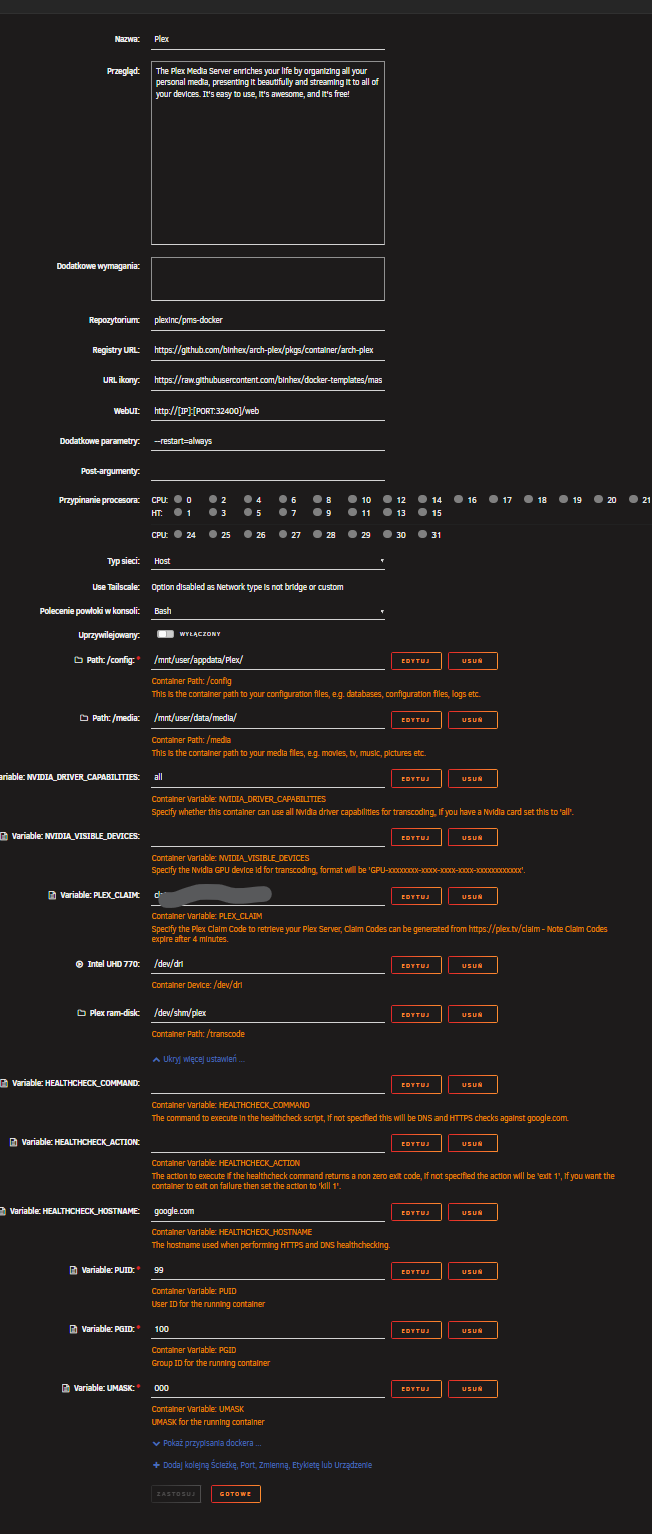
Heres it’s setting:

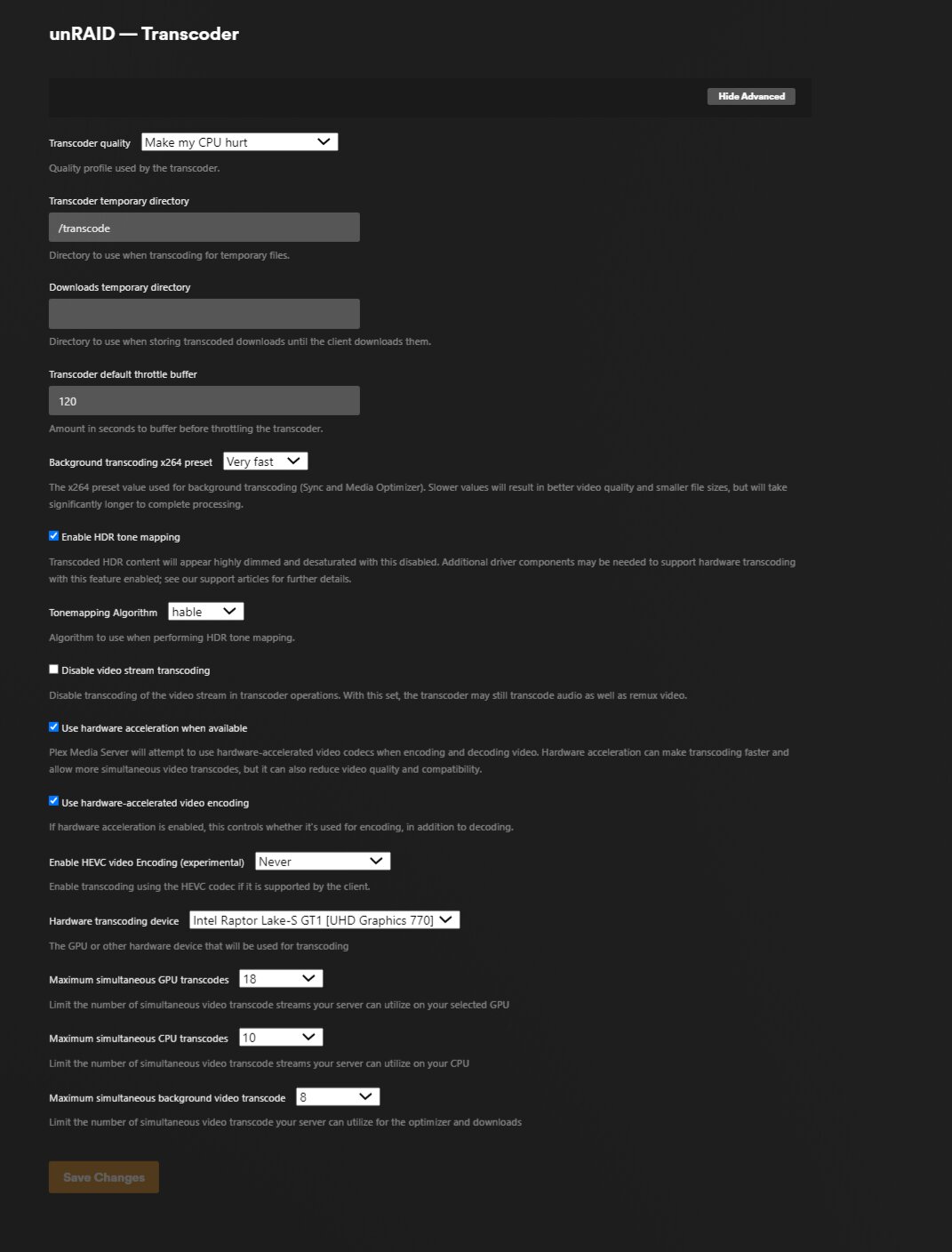
and heres transcoder settings (inside Plex):

Already tried:

Option #1

TRANS_DIR set to /transcode

added /dev/shm (also tried /tmp/plex and /tmp) to /transcode

Option #2

Disable Enable HEVC optimization

Disable Enable HDR-Tone Mapping

Option #3

Removed “codecs” folder from Plex Media Server

May I ask for help here?

Your transcoding hardware (/dev/dri) is not coming through correctly.

Dec 02, 2025 19:30:09.196 [23279090715448] DEBUG - [Req#89/Transcode/aba31faabd8f394-com-plexapp-android] TPU: hardware transcoding: enabled, but no hardware decode accelerator found
Dec 02, 2025 19:30:09.196 [23279090715448] DEBUG - [Req#89/Transcode/aba31faabd8f394-com-plexapp-android] [Universal] Using local file path instead of URL: /media/movies/TRON Ares (2025)/TRON Ares (2025) {tmdb-533533} - [WEBDL-2160p][EAC3 2.0][h265]-Alusia.mkv
Dec 02, 2025 19:30:09.196 [23279090715448] DEBUG - [Req#89/Transcode/aba31faabd8f394-com-plexapp-android] TPU: hardware transcoding: final decoder: , final encoder: 
  1. /dev/dri - should be of type Device (Please confirm this)
  2. As a test, run it privileged to see if a UID/GID mapping problem.
    ( I run privileged and then use container defaults for UID/GID)

Thank you for quick respond.

So yes. As you can see above.

dev/dri is set as container device.

UHD is not used by any VM or any else docker.

I have set Plex container as Privilaged, but got same error. whould you like me to provide any other debug ?? (with enabled debugging or verbosed)

you’ve created directory /dev/shm/plex on the host ?

(Most pass /dev/shm = /transcode and then set transcoder temp to /transcode – which is the default)

i did changed transcode place to that what you said but still got same error.

Also removed those two arguments related to nvidia also no changes - still error.

Dec 02, 2025 19:30:27.406 [23279090715448] DEBUG - Versions: skipping generator 263 because it's suspended: diskUnwritable
Dec 02, 2025 19:30:27.406 [23279090715448] ERROR - Versions: failed to get status for generator 263
Dec 02, 2025 19:30:27.407 [23279090715448] DEBUG - BPQ: generated 0 item(s) for queue

You need to track down why the host directories cannot be written.
You might need to get into the shell and chown -R the whole Plex-Media-Server tree

May I ask to elaborate ?? chown -R “Plex Media Server” to what onwer it sohuld be unraid root or like almost rest of dockers nobody ??

Im sorry but my linux knowledge level doesn’t let me track why it can’t be written thats why im here… If it is needed we can wipe Plex to start it again if there is no chance to recover this

Heres how it looks like:

The container config UID = 99 (nobody)
The container config GID = 100 (users)
The container runs Privileged = yes to access the HW transcoding (required)

If you have these setting , I would start removing any customized paths you have in your PMS transcoder settings.

The goal is to get PMS to start to transcode at least one time.

For what it’s worth, My unraid container just failed. Docker erased it.

I am starting over

Here is the config I will be using (except for the duplicate directory at the bottom… OOOPS :slight_smile: )

May i ask for procedure to clean full wipe of Plex ? To start over ?

So for now there is no sense vin changing chow ?

To completely start over.

  1. Stop the server
  2. Go to Plex.tv https://app.plex.tv/desktop/#!/settings/devices/pms
  3. REMOVE the server ( :x: )
  4. Now, like any other Docker container – Delete the container.

Should I also remove some images ?? Or in app data folder also ?

You can delete it if you want. It will pull fresh image if needed (not the current one)

Removed completely including appdata folder. After fresh install, waited for library sync to completed then checked settings in transcoder and tried to run on TV … still same error not transcode.

Here’s new log:

Plex Media Server Logs_2025-12-04_22-47-20.zip (3.2 MB)

Here’s transcoder settings:

Here’s container settings:

To be honest I have no clue wtf is wrong with it. One of main reason of building server buying unRAID licence was Plex to have unlimited capabilities and now it is not working…

I see it’s still not finding the GPU.

Would you please:

  1. Restart PMS
  2. Wait idle for 2 minutes (Do nothing)3.
  3. Download the server logs
  4. Attach here please

It must be failing somewhere early in the initialization

Please also go into the container shell.

  1. ls -la /sys/module/i915
  2. ls -la /sys/module/i915/drivers/4.
  3. ls -la /sys/module/i915/drivers/pci:i915/

It should look like this:

[chuck@lizum DBRepair.1998]$ ls -la /sys/module/i915
total 0
drwxr-xr-x   7 root root    0 Nov 25 23:19 ./
drwxr-xr-x 342 root root    0 Nov 25 23:19 ../
-r--r--r--   1 root root 4096 Nov 25 23:19 coresize
drwxr-xr-x   2 root root    0 Dec  4 18:17 drivers/
drwxr-xr-x   2 root root    0 Nov 25 23:19 holders/
-r--r--r--   1 root root 4096 Dec  4 18:17 initsize
-r--r--r--   1 root root 4096 Dec  4 18:17 initstate
drwxr-xr-x   2 root root    0 Dec  4 18:17 notes/
drwxr-xr-x   2 root root    0 Dec  4 18:17 parameters/
-r--r--r--   1 root root 4096 Nov 25 23:19 refcnt
drwxr-xr-x   2 root root    0 Dec  4 18:17 sections/
-r--r--r--   1 root root 4096 Dec  4 18:17 srcversion
-r--r--r--   1 root root 4096 Dec  4 18:17 taint
--w-------   1 root root 4096 Dec  4 18:17 uevent
[chuck@lizum DBRepair.1999]$ ls -la /sys/module/i915/drivers/
total 0
drwxr-xr-x 2 root root 0 Dec  4 18:17 ./
drwxr-xr-x 7 root root 0 Nov 25 23:19 ../
lrwxrwxrwx 1 root root 0 Dec  4 18:17 pci:i915 -> ../../../bus/pci/drivers/i915/
[chuck@lizum DBRepair.2000]$ ls -la /sys/module/i915/drivers/pci\:i915/
total 0
drwxr-xr-x  2 root root    0 Nov 25 23:19 ./
drwxr-xr-x 40 root root    0 Nov 25 23:19 ../
lrwxrwxrwx  1 root root    0 Dec  4 18:18 0000:00:02.0 -> ../../../../devices/pci0000:00/0000:00:02.0/
--w-------  1 root root 4096 Dec  4 18:18 bind
lrwxrwxrwx  1 root root    0 Nov 25 23:19 module -> ../../../../module/i915/
--w-------  1 root root 4096 Dec  4 18:18 new_id
--w-------  1 root root 4096 Dec  4 18:18 remove_id
--w-------  1 root root 4096 Dec  4 18:18 uevent
--w-------  1 root root 4096 Dec  4 18:18 unbind
[chuck@lizum DBRepair.2001]$

Ok here it is,

turn off time 6:45

start time 6:53

(idle)

log download: 6:56

conainer shell enter 6:57

Plex Media Server Logs_2025-12-05_06-56-18.zip (2.4 MB)

as an output in plex conainer shell:

  1. ls -la /sys/module/i915
# ls -la /sys/module/i915
total 0
drwxr-xr-x   7 root root    0 Dec  5 06:57 .
drwxr-xr-x 267 root root    0 Nov 28 10:22 ..
-r--r--r--   1 root root 4096 Dec  5 06:57 coresize
drwxr-xr-x   2 root root    0 Dec  5 06:57 drivers
drwxr-xr-x   2 root root    0 Dec  5 06:57 holders
-r--r--r--   1 root root 4096 Dec  5 06:57 initsize
-r--r--r--   1 root root 4096 Dec  5 06:57 initstate
drwxr-xr-x   2 root root    0 Dec  5 06:57 notes
drwxr-xr-x   2 root root    0 Dec  5 06:57 parameters
-r--r--r--   1 root root 4096 Dec  5 06:57 refcnt
drwxr-xr-x   2 root root    0 Dec  5 06:57 sections
-r--r--r--   1 root root 4096 Dec  5 06:57 taint
--w-------   1 root root 4096 Dec  5 06:57 uevent

ls -la /sys/module/i915/drivers/ (I presume 4 on the end was an error - ls -la /sys/module/i915/drivers/4)

# ls -la /sys/module/i915/drivers/ 
total 0
drwxr-xr-x 2 root root 0 Dec  5 06:57 .
drwxr-xr-x 7 root root 0 Dec  5 06:57 ..
lrwxrwxrwx 1 root root 0 Dec  5 06:58 pci:i915 -> ../../../bus/pci/drivers/i915
  1. ls -la /sys/module/i915/drivers/pci:i915/
# ls -la /sys/module/i915/drivers/pci:i915/
total 0
drwxr-xr-x  2 root root    0 Dec  5 06:59 .
drwxr-xr-x 29 root root    0 Dec  3 11:07 ..
lrwxrwxrwx  1 root root    0 Dec  5 06:59 0000:00:02.0 -> ../../../../devices/pci0000:00/0000:00:02.0
--w-------  1 root root 4096 Dec  5 06:59 bind
lrwxrwxrwx  1 root root    0 Dec  5 06:59 module -> ../../../../module/i915
--w-------  1 root root 4096 Dec  5 06:59 new_id
--w-------  1 root root 4096 Dec  5 06:59 remove_id
--w-------  1 root root 4096 Dec  5 06:59 uevent
--w-------  1 root root 4096 Dec  5 06:59 unbind

it looks simillar for me

Thank you. That matches my machine.

I have an i3-7100U CPU but am also using Unraid 6.12.4 (7.2 did not work for me)

Can you please look and confirm your Transcoder settings expressly call out the GPU ?

Hardware transcoding device: Intel HD Graphics 620

I am forwarding this info to Chris so he can double check for me.

May I ask how can I check this ? Where should I see that.

I think I should underline also that there’s another GPU NVIDIA Quadro P200 (bonded to some vm, but still in this machine)

Got also apps: GPU Statistics, NVIDIA Driver and Intel GPU TOP

If you mean transcoder settings in plex settings it says: Intel Raptor Lake-S GT1 [UHD Graphics 770] theres only

Ane news here? Can you explain me where can I check that ?

If you don’t have a Nvidia GPU, you can remove the Nvidia apps

The Raptor Lake CPU (-13900) is already supported by PMS.
( I have an AlderLake CPU (-12900) and it works fine with the native app )

Dec 02, 2025 19:28:27.492 [23279137942328] INFO - Preemptively preparing driver imd for GPU Intel Raptor Lake-S GT1 [UHD Graphics 770]
Dec 02, 2025 19:28:27.492 [23279137942328] DEBUG - [DriverDL/imd] Skipping download; already exists
Dec 02, 2025 19:28:27.493 [23279137942328] INFO - Preemptively preparing driver icr for GPU Intel Raptor Lake-S GT1 [UHD Graphics 770]
Dec 02, 2025 19:28:27.493 [23279137942328] DEBUG - [DriverDL/icr] Skipping download; already exists

Given you can select the GPU in the Plex settings tells us that PMS is properly seeing everything it needs.

The puzzle is why it doesn’t see it when you attempt a transcode.

Dec 02, 2025 19:30:09.195 [23279090715448] DEBUG - [Req#89/Transcode/aba31faabd8f394-com-plexapp-android] Starting a transcode session aba31faabd8f394-com-plexapp-android at offset -1.0 (state=3)
Dec 02, 2025 19:30:09.196 [23279090715448] DEBUG - [Req#89/Transcode/aba31faabd8f394-com-plexapp-android] TPU: hardware transcoding: enabled, but no hardware decode accelerator found
Dec 02, 2025 19:30:09.196 [23279090715448] DEBUG - [Req#89/Transcode/aba31faabd8f394-com-plexapp-android] [Universal] Using local file path instead of URL: /media/movies/xxxxxxxxxxxxxxxxxxxxxxx
Dec 02, 2025 19:30:09.196 [23279090715448] DEBUG - [Req#89/Transcode/aba31faabd8f394-com-plexapp-android] TPU: hardware transcoding: final decoder: , final encoder: 

Do you get the same results if you use Plex/web for playback?
I have to kindly ask you to elaborate….

I DO have Nvidia GPU P400 on unRAID machine and soon aother NVIDIA for AI purposes…

As per 13900 cpu its igpu is there only for plex purpose.

Where can i check those logs ?? which file ??

about removing app what you mean by that ??

Intel GPU TOP ?