Hi, I was wondering if I’m encountering a bug or if its not a current feature. My problem is trying to cast from the android Plex app to the Plex for Windows desktop application. What it does is show me suggestions to cast to Plexamp, even if its not open. It shows my phones Plexamp app as an option to cast to as well, which seems odd. Can cast to Plex on an android TV with it.
I’m specifically trying to cast music using the android app as a remote, bc I’m not a fan of the Plexamp UI compared to the normal one. Trying to cast other mediums doesn’t work either though
In the Windows player:
Settings - Plex for Windows - ‘Show Advanced’ - General - “Advertise as player”
This needs to be active.
After opening both the Windows and the Android App, it may take a few seonds until the player can be found.
You may have to use the ↻ icon to refresh the list of available players once or twice.
Are you sure about that? Your own Plex server hasn’t been “seen” by plex.tv for a few weeks now.
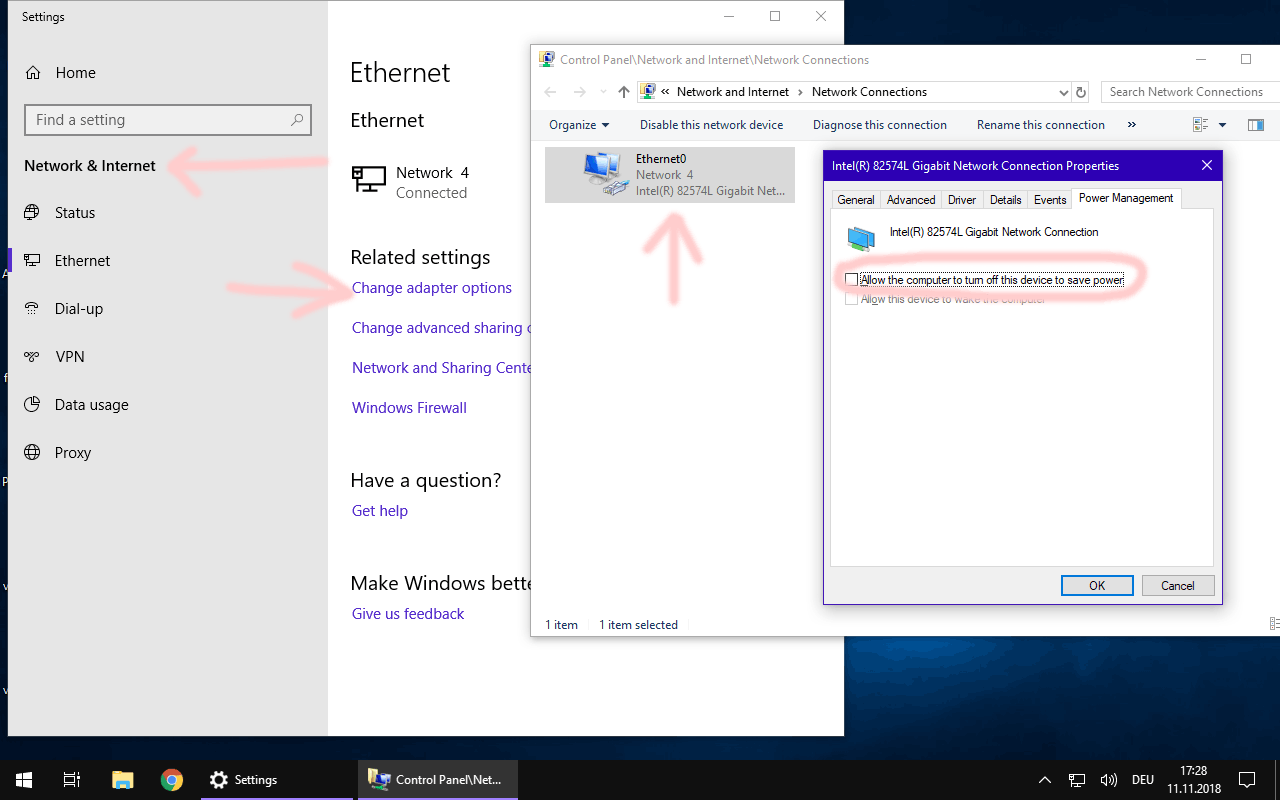
Additionally, in my experience casting can get unreliable if the Windows machine is allowed to send its network adapters into “power saving” mode.
You better disable that. (on both the server machine and the player)
Yep, I’m pretty sure my server is running on my local network, it’s not under my account, as I joined my partners family server when I moved in with her, and then bought a lifetime pass on her account because that was where we’d been hosting our shared non music library. I gave up on my personal music server when I saw only the family owner has certain features(sonic analysis) which were the main reason I bought the lifetime pass, so I’ve just mounted my hard disk drives to her PC’s server. Not an ideal solution, but I’m not aware of a way to transfer ownership, so.
Thanks for the tip about the adaptor power saving, I turned that off. From your advice can I assume I should be able to cast from the Plex android app to the windows desktop app, not just Plexamp on android to Plexamp on windows? That was really all I wanted to know, if its a bug or not, If I should be able to or not.
I know it works like this. I just tested it a second time.
However, you using a different login name may introduce a wrinkle in the fabric.
I’d try to “Switch User” to your own user account on the Windows player first. Then try to connect to it from the Android app. Just as a test.
All involved Windows computers should show “private” in the properties of their network connections. If it says “public” in there, all ports are closed by the firewall and remote control will fail.
Thanks for the tips! I do believe both our pc’s are on the private setting, and I am able to cast to the tv, to our computers to Plexamp, just not the windows desktop application. I’ll double check the other PC soon to make certain. Hmm yeah, I can see how perhaps casting is being messed with because I’m trying to cast from a different user than the one hosting.
Ok I just tried that, and casting from the admin/family owner profile does work fine in the way I’d expect it to work, no problems there. So should I chalk this up as working as intended, or should family users be able to cast in that same way? Would the issue maybe be that my account is an account? Not a family profile created by the family owner, as I’d had this account and separate plex server before moving in together.
Yeah ok, I think the reason it might have been playing up was because I was logged in (not at the profile screen but account) on different accounts in the two devices, and didn’t remember/realise. I’ve logged in using the family owner account on both phone and that desktop app and can cast fine using this profile. Thanks, I appreciate your help, it fixed my mistake