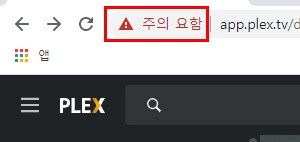
Hi, http://app.plex.tv should redirect you to https://app.plex.tv which would be a secure connection. Would you mind trying https://app.plex.tv instead and see if you still get the same error? I wonder if, for some strange reason, you are not being redirected.
If that fails, can you paste here the full url you get? Thanks.
Your personal Plex Media Server has the Secure connections server preference set to “Required”.
The server that’s shared with you has their corresponding preference set to “Disabled”.
Those things are basically not compatible with each other. I would recommend that you:
Tell the friend/family member sharing with you to change their server’s Secure connections preference to the default value of “Preferred”.
Change your own server’s setting to the same value. You should be able to access it using your local web app (e.g. http://localhost:32400/web on the computer running the server). Otherwise, you could manually change the value in your server’s advanced, hidden settings.
After both those are fixed, you can try forcing the hosted web app to load securely by going to the https://app.plex.tv/desktop?secure=1 address.