Server Version#: 4.43.1
Unraid, Hotio/Plex container
He guys,
i have been seeing this issue for a while now. Also in the previous version of PMS.
Basically what happens is when i change the library agent and use Upgrade Matching it switches back to the Plex Agent instantly.
At first it happened to all my 3 libraries. But the TVDB agent is working now in my Tv Shows Library.
Issues are:
Movies library, switching from Plex Movie agent to the TMVDB.
Music library, switching from Plex Music agent to Last.FM agent.
Ill attach logs for the music library.
Last.FM log
System log where you can see the last.FM changing back to Plex Music
I am not sure what other logs can be useful, but i can recreate the issue and grab new logs..
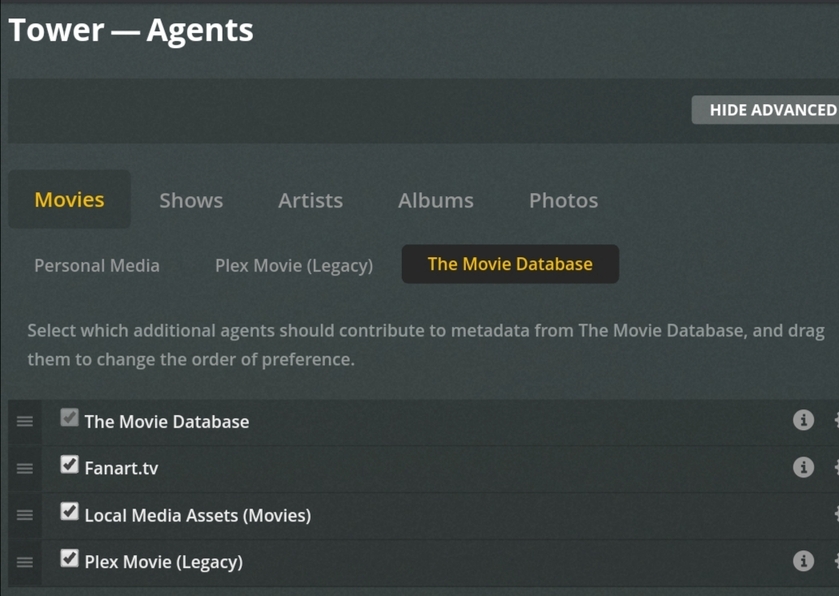
Also here some screenshots of how i have setup the agents.
Thank you all in advanced for the help.!
I’m a little unclear on your issue. Are you saying that if you select a movie library, then choose “Upgrade matching”, then edit the library to look at the agent, it shows “Plex Movie (legacy)” again?
If so, try refreshing the page before going back to check the agent. I’ve seen an issue with a recent version of Plex Web where old data keeps showing up.
There is no “Upgrade matching” for music libraries so I’m extra confused what your issue there is.
thank you for the reply!
When i change the agent, save, and refresh it shows correctly. When i select ‘upgrade matching’ it starts and instantly stops again and the agent goes back “Plex Movie”, not (legacy). it stays like that when i refresh or restart the server/container.
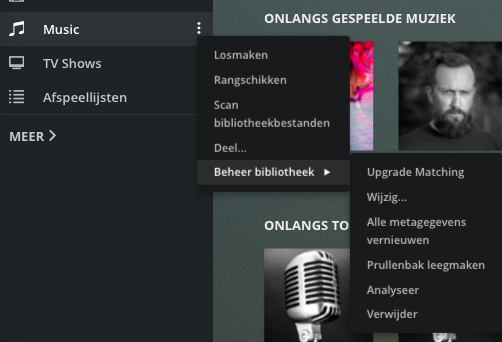
Also, i see ‘upgrade matching’ for my music library
That is correct. Plex Movie is the new agent and when you choose to Upgrade Matching, this is the new agent that is used. Please note that this does not actually update the metadata, it only changes the agent being used as well as some other backend updates. You still need to manually Refresh All Metadata for the library for the new matching to actually get updated.
Ok, I found it. You have a music library using the Last.fm agent and not the Plex Music agent. I’m not sure what that option is suppose to do, I’m checking. It’s either to upgrade the agent from last.fm to Plex Music or it’s a bug and shouldn’t be shown there.
Ok. Found out about the music library. There is an option to upgrade if you are using an older agent besides the latest Plex Music agent. These would be libraries using last.fm or the old Premium Music Library if you still have those around and never upgraded them when they should have automatically upgraded.
Thank you for the replies.
To put it in a nutshell, I was doing it wrong. I was trying to use tvdb, tmdb and last.fm as my agents. I should just use the new plex agent.
Changing Agents doesn’t “stick” for me either. I’ve repeatedly tried to set my Movies library to the following:
If I navigate back to the library and tell it to refresh all metadata (in the hopes of building collections from TMDB); when I go back to Agents, it has reverted back to the “Personal Media”:
What am I doing wrong? Similar problem with Shows, but I assume that once I’m doing it right for Movies, I can fix it for Shows.
That is not where you change the agent. Those are the global settings for all agents. To specify the agent used for a particular library, you edit the library and change it there. Note that this only affects new content. This does not change existing content in your library.
Okay. Thanks. I did this before, but it was years ago when I first setup the server. I had to rebuild everything, and then a few months later (this month) rebuild again as I moved it all from my desktop to a NAS.
So you’re saying that in order to gather all collection info from the movie database, I’ll have to remove and re-add all of my movies? Will refreshing all metadata do it?
Yes, refreshing the metadata will gather the collection info from TheMovieDB, if you have that setting enabled. But as I said before, changing the agent does not change already existing content in your library, so if you previously used the Plex Movie (Legacy) agent and change the library setting, refreshing will not help. It would be best in this case to create a new library and start over.
It seems I didn’t have to recreate the library. the refresh metadata did it. Thanks.