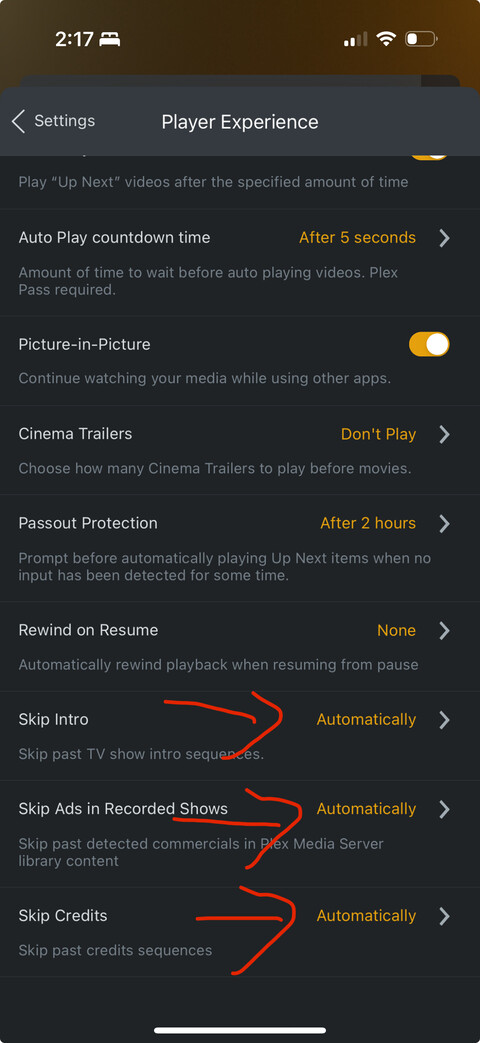
I have a plex pass for my server and have added my wife’s plex account (no plex pass) to my plex home. Theoretically, she should have nearly all the plex pass features that I have but she is unable to change the settings for the skip intro, skip ads, and skip credits to be skipped automatically. Additionally, the autoplay countdown is unable to be changed and she is prompted to purchase a plex pass to access these features. The skip does offer her a button to skip but we really like the auto skip feature.
The apps of newly invited users into a Plex Home sometimes need a little push, to notice the change in status of the account.
Use “Switch User” on the phone to switch to a different user within your Plex Home. Then switch back to hers.
Just tried that again but no luck, she has all other plex pass features that should be shared otherwise. I even logged into my plex account on my phone, changed those settings to automatic, logged out, logged into her account, see the settings changed to automatic (the features don’t work though) and I am unable to change them back with her account (back to the default).
Update: Tried her account on the Apple TV. The auto skip feature only works when I’m logged into the Apple TV Plex app and navigate to her account. If I log into the tv as her and navigate to any account (even my own with plex pass) the auto skip feature doesn’t work
Update2: Tried the Mac HTPC app and her account’s auto skip does work but any other device tried so far, (Apple TV, iOS) doesn’t work.
I am almost certain there is a bug in the AppleTV and iOS Apps.