Server Version#: 1.109.0.329-ea562b95
Player Version#:
<If providing server logs please do NOT turn on verbose logging, only debug logging should be enabled>I’ve got an unusual one…
Clue was theatrically released with 4 versions of different endings. I got the 4K version of the film, and all 4 of the movies versions are on the disc.
How do I name these alternate ending versions so I have them all available to view?
I read the page on it…but it says for different cuts (like Theatrical Release, director’s cut, etc.)…
Does this mean if I follow the Blade Runner example and list out the files with alternate endings they will all show up in the library?
I have the 4K version of Clue and those endings are all, each, in the movie itself. No real need to have different cuts. I know it says 4 cuts, but that’s kind of misleading. It’s 3 surprise endings that is included when viewed. In other words…it shows one ending, then it clearly states “That’s how it could have happened.” and then shows how each character was the possible murderer, until the final one, which is the true ending “But here’s what really happened.”
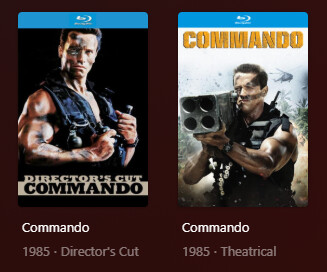
Now if you truly want to name each cut (like other movies do and need), you just do this naming scheme: Clue (1985) {Theatrical} and add them 1 by 1 in plex before uploading the others. Once loaded into Plex, you must name the “cut” in the Edition section and hit save. After that upload the second cut and name that in the Edition section and save as well. If you upload them all at once…they will only show up as 1 movie in Plex and it won’t allow you to select which cut you want to watch, it will select at random.
That’s an odd way to package Clue - typically they just put all 4 at the end when they released on VHS\DVD. Having different Editions just for the last 5-10 minutes of film seems like a lot of disk space to use up.
You do want Editions as the others mentioned - you can use the GUI or you can use file naming. I recommend the file naming way to make it easier to identify the different editions at the file level.
You can name the Edition whatever you like but whatever you name it will also come up in the Filters options for editions - just an FYI if you don’t want that filter list getting cluttered.
The Plex GUI will show you other Editions in the details page of each Title but you might think about putting them into a Collection. That can sometimes keep your Library view a little cleaner if you have more than one or two editions of the same movie.
One thing that Editions doesn’t support is the Cast Discover feature - if you click on an actor to see other titles on your server they are in, anything with an Edition tag won’t show up. It looks like that’s fixed in the New Experience version of Plex that’s rolling out though (at least it is on the Roku Experience Preview).
Plex will list them separately. No need to modify Edition section via Plex web. No need to add separately.
With your naming, Plex ignores {Theatrical}, which is why you have to add them separately, then edit the movie and add the tag. It works, but takes extra steps.
so should my names be this way for example:
Clue (1985) {edition-Theatrical}.mkv
Clue (1985) {edition-Director’s Cut}.mkv
With those above it will find both versions at the same time and mark them in editions? or do i still have to name Director’s cut or whatever after they both are in Plex? Just looking for clarity.