Sorry for the trouble, that is definitely not expected. The favorites are shared across the new apps, so I am curious if those libraries are also missing when you open the mobile apps. Before diving into that, maybe we can clarify a few things about when you say you have to favorite them again to get them back on the Home screen:
When you go to the Libraries tab in this state, does the drop-down show only All Libraries?
When you select All Libraries, are all the libraries on that screen already unfavorited (all hearts are empty), or are you unfavoriting and re-favoriting them to make them appear again?
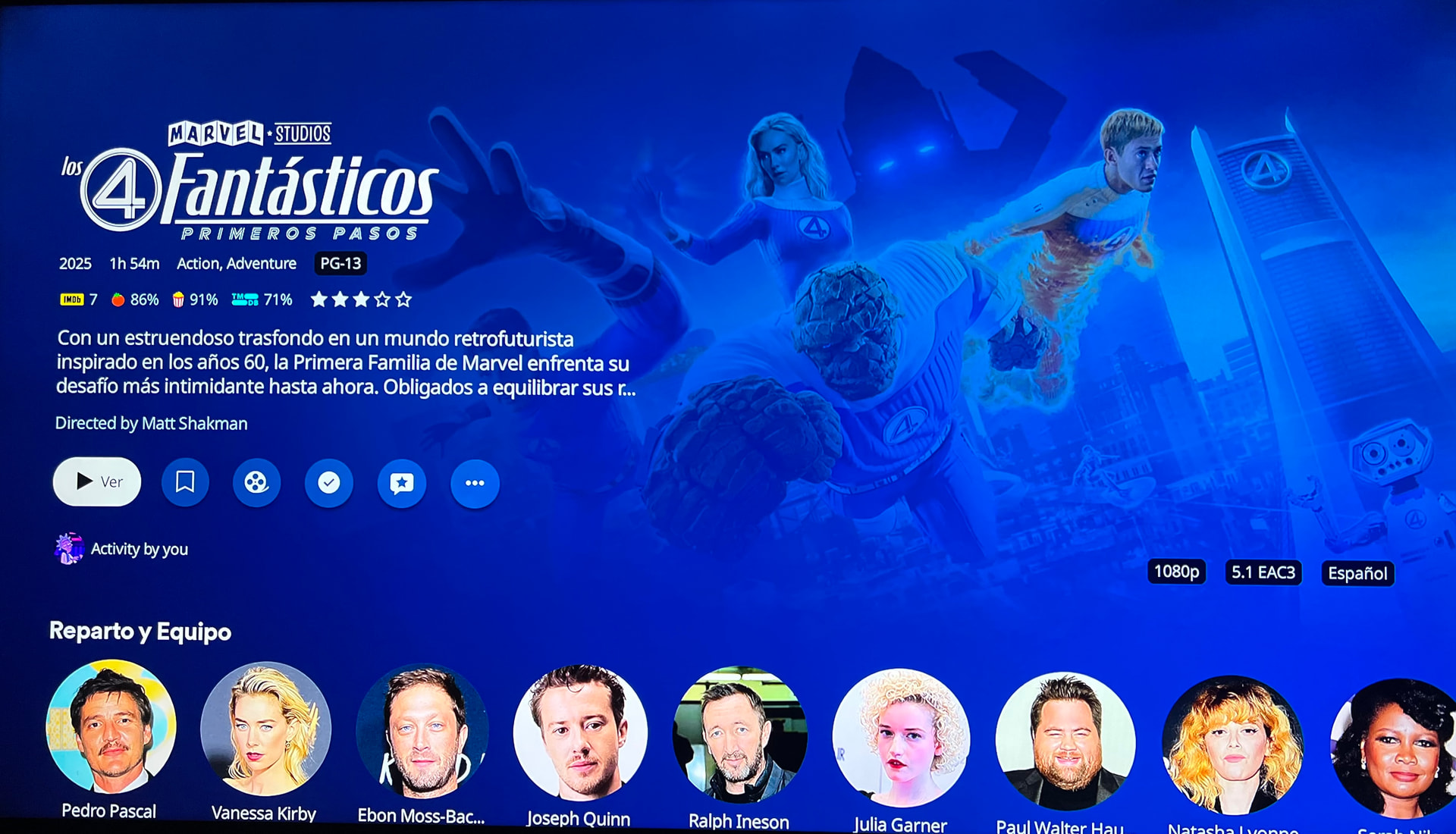
I was also going to mention this bug. When you click on the backgrounds of movies/shows, they become blurry/opaque. Here are some screenshots: the first shows the normal view, and the second shows when the background is no longer visible. It looks awful.
He’s saying, “stop zooming the background in and then washing ultrablur over it”. Just leave it in the corner and relatively unobstructed, like it was before we clicked into the pre-play screen.
This is another example of “change for the sake of change”, as it’s exactly how the legacy app handles the transition.
Edit: Also, please add the audio language back to the pre-play screen.
At first launch after the update, the libraries nested in the menus showed what I had previously favorited as expected. The Home Screen did not build out factoring those in and only showed one Plex provided show I’ve been watching as in progress. Nothing else.
When I unfavorited everything, I saw every library in the menu. I don’t recall what the Home Screen displayed after that as my fingers were flying in a mad dash to refavorite everything.
Thanks. That indicates the favorites were still favorited, but for some reason, the home screen failed to include the hubs from those libraries. It would really help to see the logs if this happens again. Happy to provide the steps for that if you ever run into it again. Just let me know.
When you unfavorite everything, the drop-down will just include all libraries, which is definitely a confusing state to be in, and one we will be addressing. While all libraries in that state will show in the drop-down, they are not favorited and will not contribute to the Home screen.
yes and I think nx6 maybe said it best because I can tell when the background starts to zoom in is when it ‘breaks’. I should probably add that I run on Synology and I’ve usually just installed/upgraded from package mgr instead of manual install….which of course means I’m never on latest server build and I understand this might be my issue not matching up with the preview app. But I guess I was just trying to vote I like the ‘non-zoomed’ home view best anyway. and noted on screenshots for my posts going forward.
Thank you for these screenshots! Super helpful. And thank you @nx6 for the layman’s terms. Got something logged for further investigation. Thank you @tech603 for also mentioning that you’re running on Synology!.
I preferred it before the fix. Personal preference. Actually thought it was one of the nice touches done well in the new interface.
I was actually trying to remember where the post was that someone had pointed it out as a bad thing and meant to comment post fix. Didn’t think this was going to be among the first things addressed given the other stuff people have been vocal about.
AmazingRando is definitely right that it is a personal preference…and if the zoom-and-fade option is what the production builds stick with, I’ll certainly live with it. I did want to note that the 9.0.29 preview build is now working great for me…the zoom action is not occuring and the background is displaying perfectly just as on the homepage. Thanks!
I wonder if the “zoom” effect had a bigger impact on some clients than others. I never saw the zoom causing usability issues on the Roku here when I played around with it, but maybe older/less-powerful devices had an issue. Kinda like how the FireOS app used to zoom the highlighted card on browsing (not a lot, like maybe 10-15% larger than the others), and I believe that got removed because of the performance impact. It’s just a plain white outline now.
I have a user on Roku 3 and have an older Roku TV … the Zoom didn’t seem laggy. In fact, overall, the new app works snappier than the older one on older hardware. Anecdotally.
Navigational oddity: Browsing the full library of shows tonight. Navigated into a show. Clicked into Season 1. Decided I wanted to try another season instead and when I click back, it put me all the way back to the library. I would expect to go back to the show level. Reproduced a few times on other shows to be sure.
OK, I’ve given it some time to adjust to the new UI. I didn’t want to be that person that just hates things that change, because of change. Verdict: this UI sucks. I want the left pane navigation back. It’s faster, less laggy, more customizable, and it just works. Give us an option to use the old UI or the new one. My shared users keep complaining, and after some adjustment time, now I’m complaining. Bring back the simpler UI.
I really don’t see the “big issue” of the navigation being on the left or up top. Been using the my Roku and then back to my Fire TV to really look at the differences. I like the new Roku interface better. Bring on the New Experience to Fire TV. Lots of empty threats of people moving to another media server. There are too many things that Plex does that make it the #1 choice. If you really want to switch, you would move on and stop looking back here.
This is absolutely correct. But, it feels like a slow crawl to less reasons this is true. So, while I probably won’t be going anywhere anytime soon… I am ready to audition other options.
I LOVE Plex. I want them to succeed and be awesome. I also want them to remember who they are, and how they got to the top. They supported us. Now, it seems like they may have other interests.
I don’t pretend to be all knowledgeable about their vision. In my mind, I see that revenue has to come in. We all bought lifetime plex passes one time. That money is gone. Also, Plex at its core is a pirate ship. Fire TV for example is cracking down on illegal apps. What makes Plex legit? Again, I don’t claim to be all knowledgeable, but the combination of services could be the key. So when the money doesn’t come in, “it (Plex) goes away.” So in my opinion, I can navigate through the “fluff” (which you can turn off as an option) to keep enjoying my Plex.
So, I bought my Lifetime near 10 years ago. I have well gotten my money’s worth out of it. I also get that the company needs to make money, and that there’s a revenue stream sitting right in front of them that looks really attractive.
I am likely in a minority, but I would happily pay a monthly subscription if they pulled back the reigns and went back down the path of the end user being forefront.
I truly do want them to succeed, and I’d do my part to make that happen. If they keep chasing down funding from elsewhere, the further and further they will get from having their current audience. They’ll become Tubi, or Pluto… then likely purchased by a bigger company to become the “free face” of their operations. Pure speculation, but I feel like they’re looking down paths that aren’t in line with the path that brought them here.