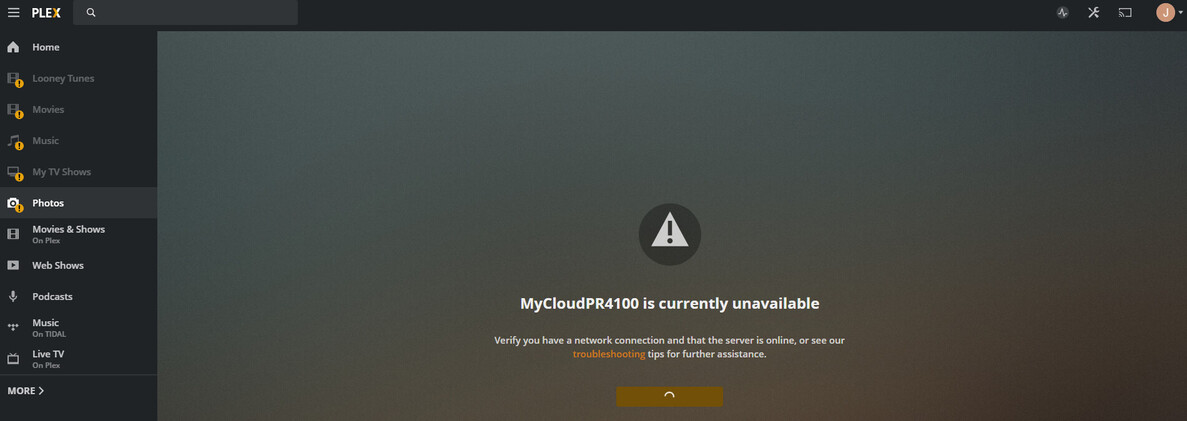
Posting here for the record, and in case anybody (e.g. chrisallen) has some guidance.
Problem: Can’t upgrade PMS due to OS5 issues. Now getting new recording setup failure after not updating PMS for almost a year.
Symptom: Updates of PMS from Plex after OS5 upgrade continue to time out (WD logs out after WD WebUI timeout value elapses).
Status: PR4100s (have 2) both upgraded to OS5, then Plex updated via Plex bin file. Then, couldn’t update further due to WD WebUI timeout (I set it to max). Was able to update Plex from WD 3rd party apps., Now stuck in worsening dowrev PMS status.
PMS= 1.21.4.4079
OS5=5.13.115
Path Fwd.: Clean install or move PMS to Windows machines 
I will try the uninstall and manual cleanout of Plex directories/files via SSH (puTTY, I guess). Basic Bash experience here. Anybody care to comment?
Can’t come soon enough. Wish I had though to make sure Plex was available before installing this new OS. 
Its been working a while for me at this point. The big thing that I had to do was install the Plex PR4100 OS 5 version. I had to download its file and do a manual install from the WD apps screen.
Every update since I see the little notice in my Plex web client and then download the bin. Go to the WD admin apps page and do a manual install. I say yes to the its already installed and things have been working well. I didn’t really have to do anything from the command line (I did poke around there at first though).
It has been a struggle with this OS 5 install. From the info posted thus far I have been able to install the latest Plex version for OS 5 no problem. However, now that I’m in Plex it will not access my files. “MyCloudPr4100 is currently unavailable” - retry connection is all I get. A big yellow exclamation next to each directory. The other confusing thing is how it appears to have the drive in twice with one nearby and one unavailable. Any suggestions would be appreciated.
Same happened with mine, basically your server had not migrated successfully. You can either try as I did unsuccessfully to get support from Plex, or you can rebuild your libraries on the new server, which I had to do in the end after weeks of waiting for a response.
Support from Plex would be nice. Just not sure how you could contact them outside of this forum. Would I need to figure out SSH and delete the data base from within there? Putting everything back together, fix tags, etc. would probably take me 8 hours. Yikes!
Hi,
Wondering if you can point me in the right direction. It has been a couple of weeks now since I regret installing the WD OS5 and ruining my Plex. I have looked at your posts and believe that I now have the correct version installed. The problem is that my data seems corrupt. It appears to have the WD PR4100 in there twice and I can’t connect to the folders. See screen shots. Any advice to fix this would be appreciated. Thanks, Jeff.
@jhamjohnston please DM me and I can setup a TeamViewer session to investigate. There might be some new information required to add to my posts on what to do if the OS3 > OS5 OS migration does not go 100% without issue.
I’m helping out chrisallen here.
If there is anything I can do (I live on the other side of the world from him so I may have better availability), Please let me know.
Plex have been working closely with Western Digital on this issue and they will be including some changes in an upcoming OS 5 firmware release to make the OS3 > OS5 migration more robust in specific cases to avoid Plex Media Server starting over as a new server.
It is advisable at this time to hold off on upgrading to OS5 until this update is available (Please check https://os5releasenotes.mycloud.com/ over the next month or so)
I will update this thread with more details and to confirm the firmware version that resolves this issue.
Is there anything that can be done manually while we’re waiting for a firmware fix? Any indication on whether that fix will actually fixed messed up installations or just impact new OS upgrades? Of course I only found all of these posts after an OS5 upgrade botched my Plex installation (Install process seemed fine, from the built in app store, and I don’t think I was left with an incomplete installation; even upgrade to a newer Plex server version worked fine) - same symptoms, the server shows up twice in the sever selection drop down (one unavailable), and all my original libraries are inaccessible (showing the ‘server is unavailable’ error). The one ‘good’ server doesn’t have any active libraries as if it doesn’t contain anything. The previous metadata/database still seems to be intact at ‘/mnt/HD/HD_a2/Nas_Prog/plex_conf/Plex Media Server’ (this is on a WD PR4100; the backup mentioned in some posts at ‘/mnt/HD/HD_a2/.systemfile/OS3_Apps_Backup/Nas_Prog/’ is no longer there.). Thanks!
Sadly no, Once you upgrade to OS5 you lose the /mnt/HD/HD_a2/.systemfile/OS3_Apps_Backup/Nas_Prog/ folder (This was failing to be created in firmware 5.11 and never and is not yet resolved, it should be in the version after 5.14)
Thank you for your reply. So are you saying that even with a firmware update it’s unlikely I’ll get my previous setup back? Does this also apply to the server showing up twice but one having no knowledge about the previous library setup? That wasn’t entirely clear. I’d like to know whether there’s hope this specific problem will be resolved automatically and I should just hold on to the box as is right now, or if I should bury all hopes of getting my previous server setup back? Again, it does appear that the configuration is still there. Thanks.
Hi
Is there any chance you could fix the issues with my cloud home plex server and why any video files won’t play on any android device?
Could you teamviewer or something on mine?
Hi guys,
I have the same problem after upgrading my PR2100 to the latest OS5 version 5.15.106 (server shows up twice in the sever selection drop down (one unavailable) and no data).
DW staff just told me that:
“Looks like Plex created a new Server for some reason.
The Data that Plex indexes reside on the HDD and not inside of Plex so the quick solution is to create a new Plex Library on the new server.”
Reference: Two MyCloud servers in Plex and no data in Plex after upgrading from OS3 to OS5 - #2 by SBrown - My Cloud Pro Series - WD Community
Оutrageous i would say!
I can’t use plex for a couple of days now because of that issue. I am not sure what to do. Just want my data back.
So please @chrisallen tell us when this problem will be fixed and should we just patiently wait for the solution?
Thank you
After more than a week the second, inoperable server “just disappeared” and I was left with the new instance of the same name but no libraries, although the data was in the supposedly right location. So I just proceeded to create new libraries coz I didn’t want to wait for an answer - most annoying since all my custom splits, play history etc was lost due to having to set them up from scratch. This can’t just be a WD OS upgrade issue. Unless the version of the Plex server has completely changed the format and location of metadata (which is unlikely, just speculating), why would it not find and pick up the leftover metadata from the old version?!
I have reached out to WD to find out when the fix is to not remove the App Data from OS3 when upgrading to OS5.
The unfortunate news is that if you have upgraded from OS3 → OS5 in the last few months the /mnt/HD/HD_a2/.systemfile/OS3_Apps_Backup/Nas_Prog/ folder won’t exist, so when you installed the OS5 version of Plex Media Server, there is no plex_conf folder for us to restore, so you ended up with a new server.
WD is working to ensure this OS3_Apps_Backup folder is present after OS5 upgrades and this fix should be in an upcoming OS5 firmware for future users who upgrade from OS3
Unfortunately this means that for those users who have already upgraded, the solution is to remove the old offline server from your account and setup new libraries 
Thank you very much for your reply and for the precise description of the problem and solution. It is much appreciate it!
Having that information now make it a lot easier for me to accept the solution (rebuilding my library)  as i will no longer wait in the dark for a fix but having my library up and running.
Once again, thank you @chrisallen for your precious support!
I’ve found this discussion very useful, thank you Wingman. I do have a slightly different question. I just added My Cloud hardware (and I’m on OS5) and have a totally empty disk. What would you recommend I do in terms of download? Which source (Plex or WD?) and which version from that source should I use? I do have an extensive video library, but I’ve been keeping it on a USB hard drive, and I’m anxious to upgrade! Thanks, in advance for your help!