Thank you for the screenshots, this helped guide me through my Xfinity Bridge Mode Enabling with was logged into by going to “10.0.0.1” and putting in Username (admin) and Password (password) and going to advanced settings and enabling bridge mode, thus giving me further instructions on how to add the correct port with side by side screen shots you provided (thumbs up) Happy Streaming!
1 Like
The latest: I installed a Netgear Nighthawk AC1900 (Model C7100V), backed down my subscription to a 400 Mbps plan, and was then able to configure port forwarding. It gave me another complication with another device which I won’t bother this community with, as it is not relevant to Plex. The port forwarding works as intended–at least I have indications of full remote access to all three servers.
I would have gotten a full-gigabit-compatible router, but the only one Comcast approves, with an appropriate form factor, is temporarily out-of-stock. Until it gets back in stock, I had to work with what I could get. The flip side is that now I have good practice under my belt with port forwarding, because finally I had a setup that let me do it and make it work.
A Comcast technician admitted to me that the only way to get port forwarding on a modem available and rentable directly from Comcast, is to pay the heavy freight for a business account. I now know that any subscriber who wants to do more than the basics, and many more who just want better performance and believe they can save the rental fee, will buy a third-party gateway device. “Xfinity Xfi” is a bust, and at least some people in the company know it.
1 Like
Glad to hear you got everything working with the 3 servers @Temlakos
Temlakos, I have the same router and can’t seem to get mine to work. Could you point me to a site that shows me how to forward my ports please? Or if you don’t mind please tell me how you did it? I have 2 Plex servers (plus one on my laptop makes 3). I can’t seem to get any of them to work remote access. My daughter is missing getting to us my Plex at her house. The router supports UPnP but I can’t seem to get it to work. I did toggle it off and on with no help. And trying to add ports through the advanced tab isn’t as straight forward as with the old D-Link that the Netgear replaced. Netgear support want help me with this problem. Thanks
To forward ports on the Nighthawk AC1900, you have to sign into it.
Typically it defines a default user named “admin” and a default password
that literally reads “password.” You should change that at your earliest
opportunity.
Understand this: the subnetwork this gateway (a “gateway” is router and
cable modem all in one) defines is 192.168.1.0/0.0.0/255. So all your
device IP addresses begin with 192.168.0. and then a number between 1
and 254. It reserves 192.168.0.1 for itself.
So first look at your connected-devices display. Identify each of your
servers. You might have to shut down every device, then bring up your
devices one at a time. Every time you do, you know that the new device
is a server.
From the connected-devices display, write down the MAC Address of each
server.
And just one thing: you must /reserve/ the IP address of every device
you will use as a server. I ended up doing it by specifying a DHCP
reservation. That’s the simplest and easiest way to handle it. You just
want to make sure that the address is the same every time. (Most DHCP
routines assign an address at random to a new MAC address and then
assign the same one every time that MAC address signs in. But to make
/sure/ of that, /reserve/ it. Look for a routine labeled “DHCP
Reservations.”)
Port forwarding (/not/ to be confused with port /mapping/) is on a
separate screen. To find it, look for it under an option like “Security.”
If it asks you to specify a range, specify the same port for the
beginning and the end.
Specify forwarding to a /different port/ for every IP address. (The MAC
address is something you specified when reserving the IP address to it.)
The /internal/ port must always be 32400.
The /external/ port is the port /you choose/. You can let /one/ device
also use Port 32400. Every /other/ device /must use a different port/.
Select TCP /only/. If you try to forward the port for both services (TCP
and UDP), it won’t connect.
Having said that: since then, I got a modem-only device, also from
Netgear, and a Linksys router. The reason: nobody except Cisco makes a
gateway capable of supporting 1-gigabit service. (That requires DOCSIS
3.1. The model you are using goes to DOCSIS 3.0.) And Cisco’s DOCSIS 3.1
gateway will cost you better than $1K US. Better to get a DOCSIS 3.1
modem /only/, and then add a router. /The router handles device
connection, DHCP assignment, and port forwarding./
Mine is a special case. I wanted gigabit service. If you don’t need
that, then your combo should work just fine.
Terry A. Hurlbut
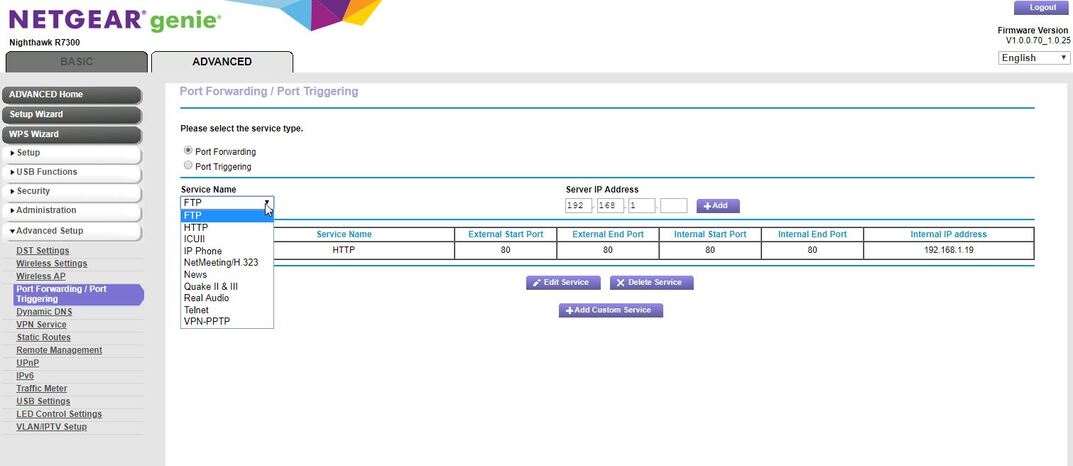
Thank you for your quick response. I will try and work on it this afternoon after church and my wife’s birthday celebration. On my router’s port forward screen it says port forward/port trigger. I also need to choose from a list FTP, HTTP and many others. My old D-link didn’t have that. I am including a screenshot from my router. Thanks again for your help.
With your help I was able to gain Remote Access. I still need to change my computer to a static IP address so when I reboot I don’t have to go change my port forward. Thanks for your help.
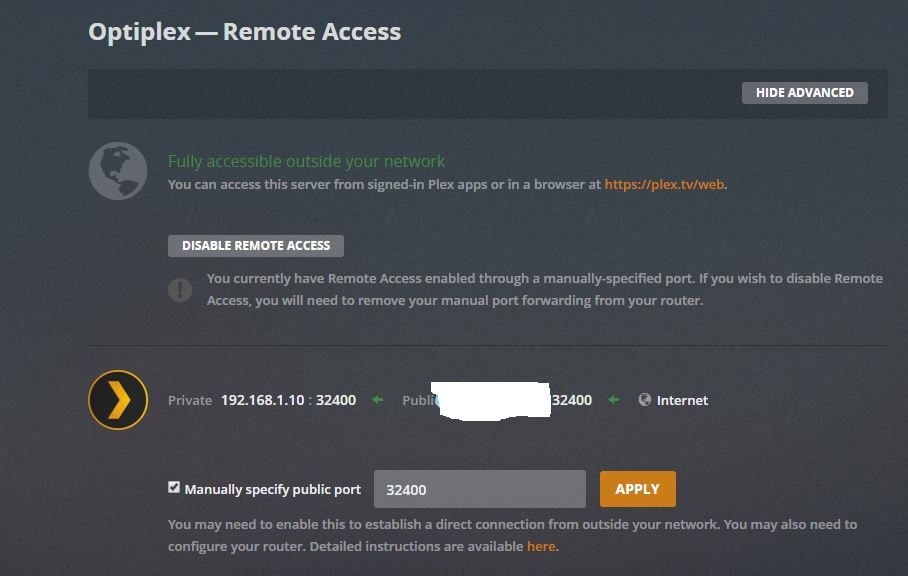

Thank you for this screenshot; it’s very valuable.
For Service Name, make that a name of /your choice/. I chose Plex. It
literally doesn’t matter, except that service names must be different
for each IP address. Those service names are for /your convenience only!/
/
/
The service you want is port /forwarding/, not port /triggering/.
Specify internal start port and end port with the same number, which
must always be: 32400.
Specify /external/ start port and end port, again with the same number,
but make this /your choice/. I recommend starting with 32400 and adding
1 to it until you have worked through all your servers. And remember: no
two servers can have the same external port. This is the external or
“public port” you enter on Plex’s Settings page for remote access.
For internal IP address, specify the IP address of the server (or your
laptop). /Make sure you reserve it first!/ DHCP reservation is
/essential/ so that the router forwards the desired port for each device.
If you have any further questions, please don’t hesitate to post or
write back.
Terry A. Hurlbut
Right you are. Either specify a static IP address or tell your DHCP
server to /reserve/ an address for each machine. DHCP reservation will
serve the purpose just as well.
Terry A. Hurlbut
Terry,
Are you saying I can tell my Router (DHCP server?) to reserve an address for my Plex servers?
Thanks,
Mike
You should be able to. Try the DHCP settings. Look for anything that
says “reservations.”
If no joy, specify a static IP address. I know the router has a routine
for that.
Terry
Terry,
You are such a wealth of information. I found that on my router and set it up. I do have another Plex question that I have been unable to find an answer to. Since you and I both have more than one Plex server I see the need to synchronize my watch history between servers. I keep hoping Plex would address this issue but I haven’t notice it. Do you know of a way to accomplish this? I saw a Plugin called Plex Watched Sync that used Trakt to do this but Plex has removed Plugins from their software it seems.
Thanks again for all your help,
Mike
My wealth of knowledge comes from my experience. Recent experience,
too–only this year did I finally experiment with owning my own modem
and router–or earlier my own gateway. It saves me equipment rental from
my ISP and allows me to do port forwarding–which Comcast’s Arris
gateways for DOCSIS 3.1 /cannot/ handle. “Port forwarding” in which the
internal and external port are the same and /must/ be the same, is /not/
“port forwarding” by my definition. With that, I could put up only /one/
server for remote connections.
Now about those plugins: Plex’ developers are always trying a new
wrinkle. Did you notice, for instance, that they push updates to their
server software at least once a month, and often twice? Three times?
They can’t afford any longer to maintain a plugin API and to keep up
with all the “non-canonical development,” with all the issues this
creates. That’s my guess–because I can just imagine how difficult a
proposition this can be. But maybe Plex should take a few lessons from
the authors of the popular Content Management Systems, like Wordpress.
Every now and again, Wordpress’ core development team pushes an upgrade
that breaks plugins all over the place and even breaks third-party
themes. (That’s rare, but it happened with Wordpress version 5.1. I had
to yell for help to my theme developers, who managed to solve the
problem within twenty-four hours.) But for the most part, Wordpress’
core developers manage not to break plugins–or maybe the plugin
developers know that they must move smartly when it comes to responding
to an update or upgrade, and the need to test and upgrade on their side.
Bottom line: why Plex’ development team decided to eliminate their
plugin API, I don’t know. Maybe they never had a good relationship with
plugin developers. Or maybe someone, having “NIH” (Not Invented Here)
syndrome, took over as captain of the team.
What I do is to use my servers for different eras of movies and
different kinds of TV shows–and in two cases, different categories of
music (or what I call “lectures”: non-music files holding literal
lectures, demos, or the occasional radio play). That way, I might have
different shows “On Deck” on different servers, so I have to browse them
all to keep up with it. Still, I find I can keep up with my watch
history well enough by organizing my video content this way.
Have you noticed, though, that the Plex developers /finally/ developed
/client software that can search across all servers?/ That has been a
real boon to me. First they offered this on Plex for Android. Now they
offer it on Plex for Roku as well.
The only thing Plex still can’t do, is create lists of movies, spanning
all servers, selected for a given actor, director, genre, or release
date. I mitigate this by maintaining a slightly loose demarcation in my
movie types. Because I have three servers, generally I group any movies
released in 1959 or earlier as “Classic,” movies released to theaters
later as “Modern,” and movies released (at least at first) to the old TV
networks and now to home video on yet another server. While some actors
span two categories, not many actors successfully transitioned from
“Made for TV” to “A List.” (And remember: “Made for TV” became “the new
B List.”) So when I want to search for all movies in which, say, Sean
Connery appears, I have to browse separately on two servers by “Actor =
Sean Connery.” Because /Marnie/ appears on my Classic server, while /The
Hunt for Red October/ and all my James Bond movies appear on my Modern
server.
Still–just to be able to search on any title and have my particular
client find it, wherever I have stored it, makes things much easier when
I want to find something to watch.
But I know what you mean. What I would like to see, frankly, is what I
would call Plex Media /Cluster/ software. Get a population of
fast-enough servers, and I would think a good developer could develop a
server system that would permit them to operate as a pair or a cluster.
This would present one totally seamless library to any client, the same
as what you get from any streaming channel on a streaming device, or a
modern smart TV. Sadly, the Plex core development team seem to have /no
plans/ for this.
Neither do they seem to want to talk about another suggestion I had:
making use of certain MP3 tags like “Composer,” “Conductor,” “Movement,”
and “Movement Name” for use in albums having music by more than one
composer, with the same artist(s) performing them. Sadly, Plex’
developers seem stuck in a world where a CD (or, once again, a vinyl LP)
has several tracks by /one/ artist. Plex does so well with metadata
management for movies and TV. But for music? Not so much. Maybe they’re
waiting for someone to create a Music Database that’s as good as The
Movie and Television Databases. Today Plex uses whatever metatags the
music files carry. Plex recognizes the Artist, Album (album title),
Title (track title), Track (track number), Discnumber, Genre, Year,
AlbumArtist, and Cover Art tags. Plex infers /nothing/ from the
filename, as they do with movies and TV. /Some/ metadata is available
from third-party databases, all right, but not nearly enough.
Which is why, especially as I have begun to record my extensive vinyl
collection with Audacity, I tag my music with the MP3tag program
(https://www.mp3tag.de/en/). I started doing that after getting tired of
re-saving a file every time I discovered I had made a mistake in tagging
in Audacity. (Audacity uses the Title, Artist, Album, Track, Year,
Genre, and Comment fields only.) When you record from vinyl, you /have/
to tag. MP3tag makes available every tag that is part of the IDv3
standard for sound file tags. Trouble is, Plex Media Server recognizes
only the ones I mentioned above–and when I have a classical album (or
worse yet, a boxed set!), I have a problem composing suitable track
titles that have information that I should be able to tag /separately/.
That’s a lot more information than you asked for, and I’ll understand if
much of it (especially the music part) is out-of-scope here. I’ve
mentioned some of this in other Forum categories, though, so you might
want to search on my username for my other posts.
Terry
Thanks for all your input Terry. I mainly use my Plex servers for Movies and TV. I do have my music on there but I guess I am not as into music as video. I do like my audiobooks but don’t use plex for them. I’ll just keep hoping that Plex comes up with a solution for syncing my viewing history.
For me, media is media. Besides, I’ve got some real treasures in my collection–on vinyl, yet.
This topic was automatically closed 90 days after the last reply. New replies are no longer allowed.
