Constant re-recording of episodes already in library

Server Version#: 1.40.2.8395
Player Version#: Not important
Tuner Make/Model: HdHomeRun Extend, HDHomeRun Connect 4K, HDHomeRun Prime
Guide/Lineup name: Various
Using XMLTV?: Using EPG

So there is the continuing confusion on ‘New and Repeating airings’ continually re-recording content, and I’m running into it, and it’s utterly not obvious ‘why’.

we’ll start with the library, TV library, setup, it’s pointing to the right place. All good, lets use Wild Kratts as an example since I’m actively recording that, if I look in the library at Wild Kratts I see the following:

Which shows 3 copies of Season 2 Episode 13, which is weird to begin with. Looking into that I see:

Which again is odd, but not a big deal. Regardless there’s 3 copies of the episode and the metadata lines up so it should be in the library fine:
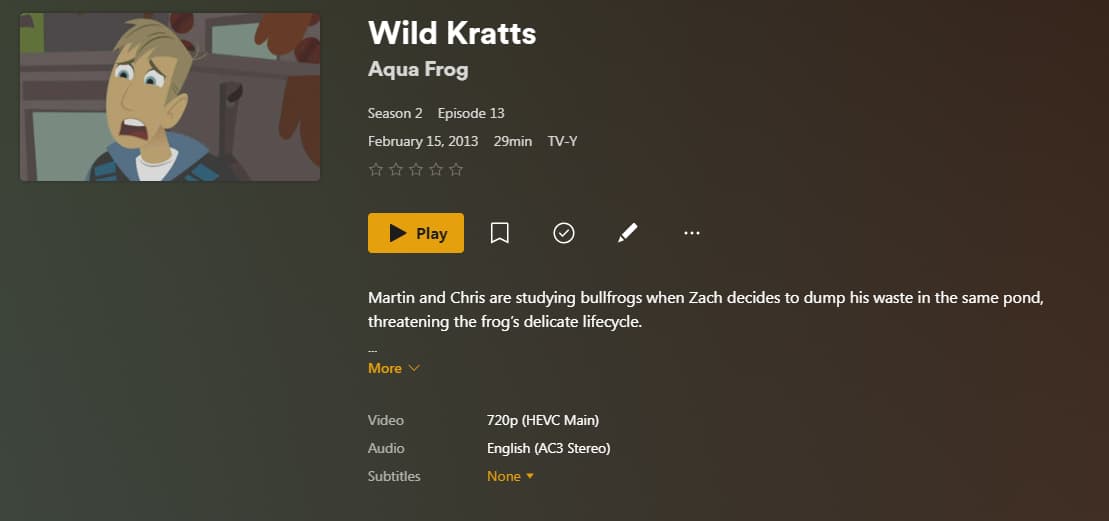
So far so good. So library looks to be more or less as I’d expect, though there’s extra copies, I’ll go clean that mess up later.

Looking at the recording I have:


and


That looks like to me that if it can find a better copy it will record that, otherwise it’s content and should ignore any new episodes. This is where it gets frustrating and it’s not obvious ‘why’, if I look at the DVR schedule it shows a pile of Wild Kratts episodes to be recorded, ok weird.
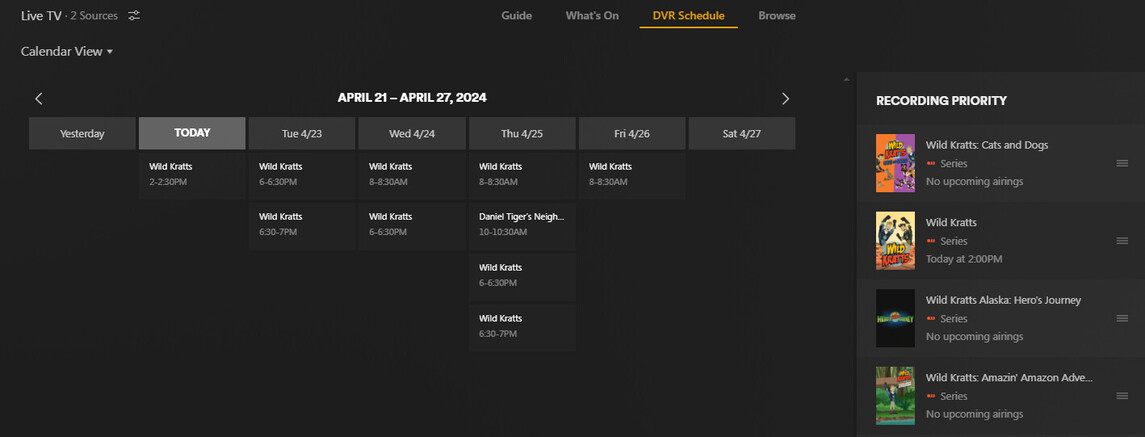
however specifically it shows that it’s intending to record Season 2 Episode 13 in SD today, which looks ENTIRELY nonsensical

So is this actually intending to record? I’m going to double check it if it does, but if memory serves I’ve caught it doing this before.

Is this just showing me that an episode is coming up, but it’s not actually going to record it? If so that’s probably a bug from a UI/UX perspective that there’s no good indication of if it intends to record or not. Bonus points that my library has a clearly higher quality version of it already as 720p is definitely higher resolution than “SD”.

So what’s up here, and I just completely confusing what’s going on, or is there something actually messed up here?

Where are those NFO files coming from? They suggest some sort of post-processing outside PMS.

Also, your screenshots show different file sizes for the recordings. While file sizes don’t necessarily mean a quality difference, they can certainly imply it. Is it possible that the copies are actually a better quality?

I know that my local PBS stations air the same episodes for some shows in different qualities (I’m looking at you, This Old House) so it’s important (for me) to limit recordings to particular channels (the HD channel only, not SD sub-channels).

The nfo files were added externally, they literally have nothing to do with anything here as Plex itself doesn’t read them or use them. The implication that external post processing of the files has happened is inaccurate, it has not been done.

File sizes all being nearly identical, but not the same, is probably more indicative of the different openings/pre-roll/etc on the respective videos so they don’t come out the same.

File sizes: If you’ll note 3rd screenshot explicitly shows that Season 2 Episode 13 that’s already present on the system has a video resolution of 720p (HEVC Main), so Plex is already well aware of what quality it has, and the recording schedule is explicitly noting it’s going to record in ‘SD’ (my last screenshot) (and yes there’s various SD vs. HD PBS stations around here too, but Plex has noted it wants to record from ‘SD’, as it knows the lineup and the stations resolution from the HDHomeRun)

No my concern here lies dramatically more with the fact that the Plex library knows I have Season 2 Episode 13 in 720p and it seems to want to re-record it in 480<something, probably i>, unless I’m miss-understanding the interface entirely

What channel are you recording from provides HEVC video with AC3 audio? As far as I’m aware, all ATSC 3.0 channels are HEVC with AC4, at this time. Are those coming from the Prime tuner?

It’s possible PMS is becoming confused with quality vs. bitrate (which would place HEVC at a disadvantage).

Please describe your setup in more detail, including what is producing the NFO files.

I think you are focusing in on the nfo files and missing the broader point here, but if you insist the nfo files were created using tinyMediaManager so I could make use of the same libraries in Emby and/or Jellyfin as I look at the alternatives to Plex since Plex continues to make certain types of uses / interactions (why can only the ‘admin’ account set up TV recordings? Why can there only be one ‘admin’ account? for example) needlessly complicated.

For the record:
image

Plex has actually decided to re-record the show since it’s crossed the timing to start.

As for it being confused, I would think it would only do it at the roughest levels, I.E. resolution. After that the determination would be nearly subjective levels, and regardless recording something in SD vs. 720p at all wouldn’t make any sense (which it’s currently recording in SD) as there’s no way an SD recording would be “higher quality” than a higher resolution copy.

Nope, I’m note focusing on anything in particular. Just curious what might be causing behavior most are not seeing, but you are.

But, again, what tuner is providing HEVC video with AC3 audio in your environment? (See your third screenshot from your original post.). That’s extremely uncommon in an HDHomeRun environment, though definitely not unheard of. I’m curious if PMS is confusing bitrate with quality (a low bitrate HEVC stream could be much higher quality than a MPEG2 stream).

To forestall the question about quality, that literally makes no difference:

Unsetting the replace lower quality still shows it wanting to re-record shows

An additional debugging point:

Plex Media Server.log:Apr 22, 2024 18:57:17.946 [139938729306936] DEBUG - Subscription: No match in the library for ‘Wild Kratts - E13 - Rainforest Stew’, grabbing.

Again for whatever reason it doesn’t think it’s in the library when it obviously is

Screenshot #4 instructs Plex to record “New and repeat airings”.

That is in fact part of the problem here, “repeat airings” is not actually explained properly anywhere.
New obviously only records if the guide data indicates it’s ‘new’, fair enough - but that’s not what everyone wants/needs, so the only other option is “New and repeat airings”. So you select that, but at least in my case it’s then repeatedly re-recording things that are already in the broader library, as well as things it’s already recorded and doing so at a lower quality. I.E. it already knows it has a 720p version, why is it snagging an ‘SD’ version at all?

Even searching this forum there’s a lot of folks who say that if you have ‘repeat airings’ enabled it won’t re-record, and a fair number of folks reporting findings similar to mine that that doesn’t seem to be the case - case in point: Does "New and Repeat Airings" record duplicate episodes or simply allow "previous" episodes as well?

So this boils down to:

  • Have I miss-understood what the ‘New and repeat airings’ does? Empirically: sorta, it does what it says on the tin, just not what I’m expecting (I.E. don’t re-record things it already has)
  • Are the folks claiming that it doesn’t re-record somehow doing something different and/or do I just have it set wrong? From everything I can find no, but the Plex docs don’t seem to cover this super well.
  • If Plex doesn’t actually support this (which I believe is what @OttoKerner is saying here) then is there a way to get something like what’s in Jellyfin and Emby added to plex for:
    image
    to make it super obvious what’s going on for folks?

Plex records in .ts not .mkv and will keep track of anything successfully recorded. It will replace lower resolution recordings if that option is selected and the file has been analyzed.

It is possible that this is a new problem introduced with the 1.40 branch of the server which I am not running. How are the files being converted to mkv or is it possible that they were recorded with one of your other programs. I would definitely recommend a separate library dedicated to the DVR vs mixing them.

Only started testing recordings in other places, and have explicitly chosen different content that’s recording there to not overlap. Those are all acting exactly the way I’d expect, so that’s good as a “well something is working how I’d expect it”.

Conversion: possibly, though I’ve seen this particular issue for a while with or without the conversion so I don’t think that’s the issue, and going back to the thread linked folks were claiming the conversion they were doing worked as expected (assuming it was actually working as expected in those threads).

In theory mixing the branches shouldn’t matter, and in fact SHOULD (hypothetically anyway) offer the ability to fill in gaps in content you may have from other sources. Say you snag a DVD or Bluray of something, children’s focused content specifically has a tendency to be utterly obnoxious in what’s on the disks bundling things not so much in “seasons” but random assortments from all over the place with random duplicates splattered everywhere (frankly it’s astoundingly frustrating), recording should in theory allow you to fill in the gaps and/or if you snag a DVD but you can get it at a higher quality replace things.

I’m not convinced that having a fully separate library for the recordings would actually resolve anything, and I’m almost at the point of pulling out a debugger and trying to trace through what’s going on as I can’t seem to get any additional debugging output out of what’s there.

This topic was automatically closed 90 days after the last reply. New replies are no longer allowed.
