Out of no where I get a lot of “Conversion failed. A required codec could not be found or failed to install” on my 1080p Remux or 4k files. Is there a fix? I’m up to date with Plex update, and running Win 10 Pro x64.

Anyone?
In your Plex Media Server data directory is a sub-directory named Codecs. Try stopping PMS, renaming this (e.g. to Codecs.old), and restarting PMS. Then play a problematic item. This will force PMS to re-download the required codecs. If this doesn’t work, check to see if a new Codecs directory has been created and populated; if not, it could mean that PMS is having trouble reaching Plex’s servers to download the required files.
Thank you, I will give this a shot tonight
Nope, still same issue
Did PMS create the new Codecs directory and populate it? If not, perhaps it’s not able to reach the download site (I’m not sure what the actual link is); if so, perhaps there’s an issue with the codec libraries being downloaded.
Your server logs may contain more information.

I’m not sure what else to suggest, though I did see in another thread where a user performed an uninstall/reinstall of PMS and it helped. All your metadata should be preserved as long as you use Windows’ uninstall and not a third-party utility.
If you’re interested in attaching your server logs I don’t mind having a look (reproduce the issue right before grabbing them):
Settings -> Troubleshooting -> Download Logs
In other topics where this has been an issue they logs sometimes show an error downloading a required library or XML document.
Just tried un-install and re-install. Same error. I downloaded the zip of the logs. Where/how to upload? 154 files - any specific one you are looking for?
@SecurityPlus Follow the instructions here and then post those logs here and I can take a closer look.
I will get the zip posted as soon as I can. Do I have to worry about any personal information in any of these logs?
*Zip attached.
*Running WIndows 10 Pro and Plex Version 1.18.2.2058
*Only seems to happen with my 4K and 1080 Remux files hosted from cloud (But not all, some do play, but most dont)
*Can load the files up via Windows Explorer from the cloud (outside of plex) and they play fine
*Never starts, just says that error after about 3 seconds of hitting play
Tried: Disabling firewall, removing and re-installing Plex, removing the directory and re-adding the directory
Do you have a custom transcoder temporary directory set?
Settings -> Transcoder -> Transcoder temporary directory
The logs show that it’s having some issues writing to the transcode directory:
Dec 04, 2019 07:11:40.936 [8276] INFO - CodecManager: starting EAE at "\\?\D:Transcode\Sessions\EasyAudioEncoder"
Dec 04, 2019 07:11:40.936 [8276] ERROR - CodecManager: could not create EAE watch folder
Dec 04, 2019 07:11:40.937 [8276] DEBUG - Streaming Resource: Terminated session 0xde3f2c0:k3rld3to9scfj6hqwbrojfoq with reason Conversion failed. A required codec could not be found or failed to install.
It’s possibly a red herring, but you may want to ensure that that path is fully accessible/writeable/has space available. Or try setting it to a different location to see if the problem persists. Also, are you running PMS as your user, or as a Windows service?
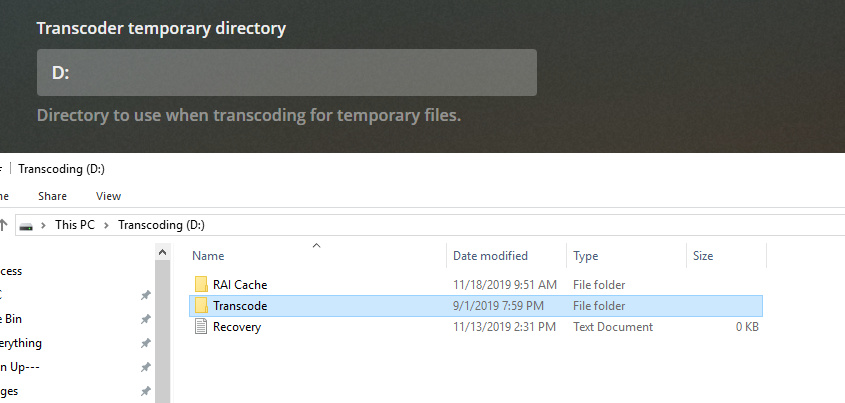
Can you try clearing that setting to see if it changes the behavior? It would at least rule out that particular location as being the cause of the issue.
So turn off the “D” for transcoding and leave it on the OS drive? I have 64 gigs of DDR4 PC3600 memory and the system typically is only using about 20. Maybe I should use a RAM drive for transcoding, or does that ruin memory like it does SSDs?
The drive does say unhealthy actually now that I look at Stablebit, but also says still within manufacturer specs

Yes, for a test just let it use the default location on the OS drive. The SSD may not be the issue at all, this would just be a test to help rule it out.
A RAM disk would be a good choice if you can carve out enough. Using it in this manner would have no deleterious effects on its longevity.
You are the man! Turned off D: directory and restarted Plex. All 4K and 1080 Remux files are playing now. Thanks so much man! What log files would I focus on if I’m ever trying to figure this out myself, or keywords are you searching for? If it’s too hard to explain, just say so.
Going to look into setting up the Ram Drive since transcoding just really ruins SSDs anyways, especially if it has no affect long term on the memory and I have about 65% un-used. I have a brand new, very powerful system (New Ryzen 9 3900 12 Core CPU, 64 gigs DDR4 PC3600 memory, P2000 graphics card, Platinum PS, 100TB storage) so I doubt it should be an issue. I’ll have to do some googling to read up on the right way to do it
No problem, I’m glad it worked. The log I found the above referenced error was “Plex Media Server.log.” Most (all?) of the server-related stuff gets written there. There are other logs for the various metadata agents and other services, but for most issues the server log is the place to start.
