Server Version#: 1.43.2.10687-563d026ea
I’m reopening this topic because I’m experiencing the same issue with Plex Media Server version 1.43.2.10687-563d026ea on Windows 11 with the latest updates installed.
After downgrading and reinstalling version 1.43.0.10492-121068a07, the issue disappeared.
Logs from 1.43.2.10687-563d026ea:
- The
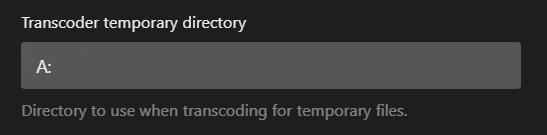
A:Transcode\Sessionsis succesfully created.
Jul 10, 2026 16:06:25.004 [30220] INFO - [Req#86c/Transcode] CodecManager: starting EAE at "\?\A:Transcode\Sessions\EasyAudioEncoder"
Jul 10, 2026 16:06:25.004 [30220] ERROR - [Req#86c/Transcode] Error creating directory "\?\A:Transcode\Sessions\EasyAudioEncoder\Convert to WAV (to 2ch or less)": The system cannot find the file specified
Jul 10, 2026 16:06:25.004 [30220] ERROR - [Req#86c/Transcode] CodecManager: could not create EAE watch folder
Jul 10, 2026 16:06:25.004 [30220] ERROR - [Req#86c/Transcode] Error configuring transcoder: Decoder install failed: eac3_eae
Jul 10, 2026 16:06:25.004 [30220] DEBUG - [Req#86c/Transcode] Streaming Resource: Terminating session 0000024461359090:jf74uuxg7qj2jerpq5njofkp which is using transcoder slot. Used slots of 8086:7d55:1043:88c8 is now 0
Jul 10, 2026 16:06:25.004 [30220] DEBUG - [Req#86c/Transcode] Streaming Resource: Terminated session 0000024461359090:jf74uuxg7qj2jerpq5njofkp with reason Conversion failed. A required codec could not be found or failed to install.