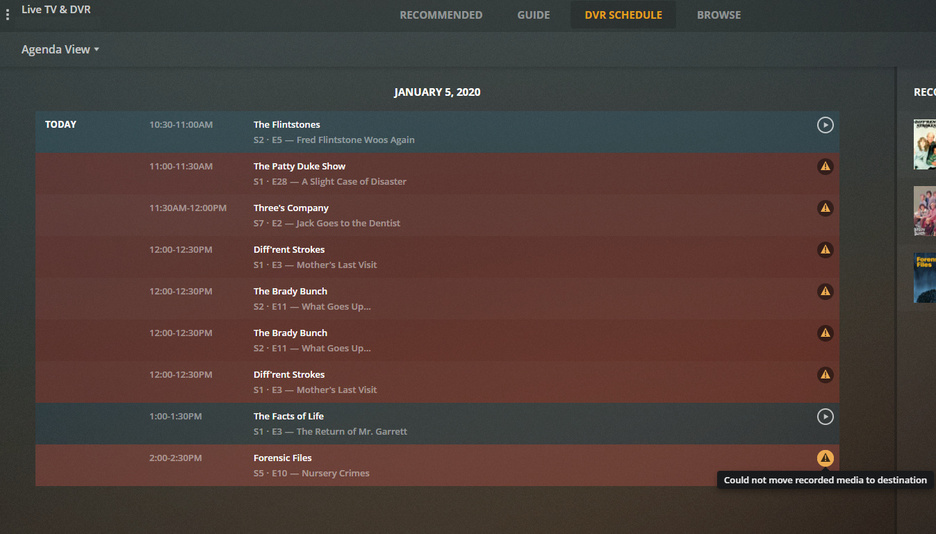
Thanks for this and I was considering such a solution as well, but I noticed that when I move recorded TV from a local drive to a server drive later, the TV shows do not show up in the folders even after manually running a “Scan Library Files.” The weird thing is that movies are fine. It’s just TV shows that break. I can see the TV files in the show folders on the server drive, alongside existing show files that were recorded in the past when the DVR didn’t have the “Could not move recorded media to destination” problem in PMS version 1.16.x, the old TV files show up, but the new files moved from the local drive do not.
It’s VERY frustrating how broken PMS is at this point. I didn’t pay what I thought was an exorbitant sum for the lifetime plex pass to end up with the mess that we have now. It’s ridiculous that Plex can’t fix this problem because it used to work beautifully for years, and seems to not really care, and is MIA.
Having this same issue. New Plex Media Server 1.17.0.1709 Running on Intel NUC running Unbuntu 18.04.3. Recording destination is CIFS share on UnRAID NAS 6.7.2. Some recordings work some do not. Haven’t found a correlation yet.
Note: I am not running the latest PMS version due to corrupt HW transcoding issue with more recent releases
Edit: I upgraded to a second PMS server running in a VM to 1.18.3.2156. The issue exists on that version as well.
Edit: Also using btrfs on the unRAID NAS
Edit: still can’t find any correlation. Some work some don’t. See attached where two test recordings worked today and most others failed. When it fails to move it sometimes it creates the destination directory sometimes the destination directory is not created. All of these test recordings (both successful and not) were new to the library. Not all failures were back to back recordings.
Having the same issue running the PMS on a RPi4 (v1.18.4.2171) and using a Synology NAS as my Storage.
If I click on a show to record, it seems to have no issue creating a folder and adding that show, but if it’s an existing show, I get the error.
Same issue for me on Debian 9 current version 1.18.4.2171 had same issues on older version too. Recording works when you select a one off. If you choose a series and the second episode finishes recording it fails to move it to the right directory. Sometimes it’s in the .grab folder not always, other times it deletes the file. Really unreliable, and I just don’t use Plex DVR for fear of it failing. I use TVheadend and EyeTV on the Mac with my SAT>IP and tvhProxy for Plex well for just for watching TV.
In another topic thread I read recently it was stated that if Plex starts indexing a recording before it is finished that would cause issues although this one was not specifically mentioned. That got me thinking. In my testing of different OS to move from my current Plex server to I have more than one server monitoring the library for changes and they are pointing at the same folders on the NAS. Last night I disabled all of the library scan options on the servers that were not doing the recording. All recordings completed last night without errors. Testing more today. Does anyone else with this issue have multi servers scanning the same folders on their NAS?
Yes. I still run Plex natively on my ReadyNAS to actually serve all the media but I’m using Plex for Windows to do all the DVR work to reduce the workload on my aging NAS.
I believe they were referring to Plex Media Server automatically scanning the library folder
Click settings in upper right of screen , select the other Plex Media Server on the left pane that is not recording live TV. On the left pane go to Settings > Library
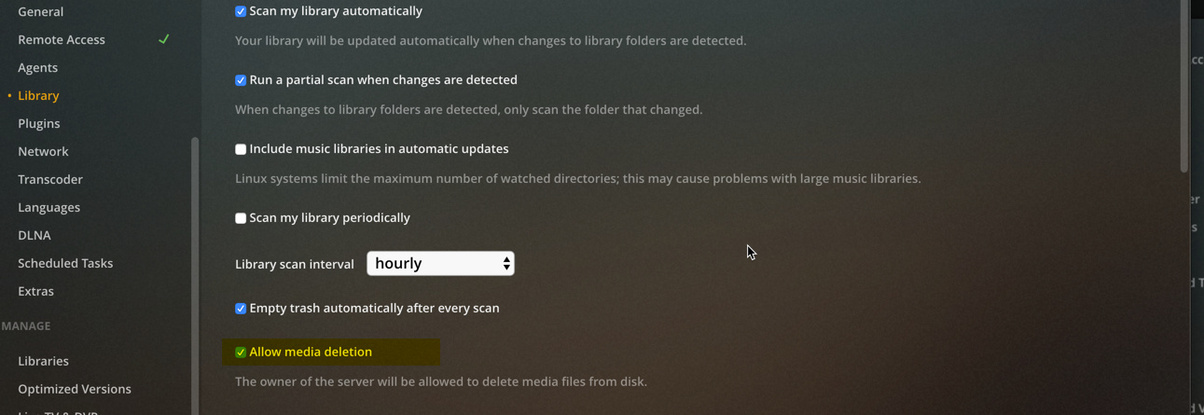
I disabled all the following settings below in my case on my other Plex Media Server that was not recording live TV. Since then 8 live TV recordings have successfully completed. I think it was probably the top setting and possibly the second setting in the list below that was the issue with multiple Plex Media Servers
Scan my library automatically
Run a partial scan when changes are detected
Include music libraries in automatic updates
Scan my library periodically
I am also running multiple Plex instances, on a Mac mini and a Synology diskstation. Both point to the same set of folders on the NAS. For now, I have removed the Synology version of Plex completely and will monitor.
too.
Just my synology Server has the settings still active. On that server (synology) tv mode is configured.
Since that time, all records work flawlessly.
But im wondering what causes this problem.
I guess indexing is starting. But why the hell does it scan the .grab folder?
I think plex should just add an exclusion to the scan options of Plex to the .grab folder. Problem should be solved, right?
I disabled hourly library scanning on all my servers (1 synology where DVR happens and 2 NVIDIA Shield devices that mount the NAS through SMB). I only had one recording last night, but it worked. Every single one of my previous recordings since the summer has failed until last night. I’ll keep an eye on it to see if they continue to work.
I agree that it is weird that library scanning could cause this sort of issue.
I guess the .grab folder is in the TV Shows directory where an external server would attempt to index but the server doing the DVR would know to exclude the .grab folder for scanning.
Wow I can’t believe this may have been solved. Kudos for figuring it out it was the scan option. I disabled it and so far it’s working again! Amazing and sad that its been an issue for me for over a year and such a simple thing. This should be a very easy fix for Plex to figure out now that we’re close to figuring out the root cause. I can use plex again! At least if this continues to be the solution, but 5 recordings have worked in a row so its definitely looking good.
I am starting to think that may be another Plex Media Server is purging the directory because it thinks it is obsolete
So question to everyone, is the media path shared with more than one plex media server ?
It is just a thought - at the moment, I need to follow up on this to establish what the criteria is for purging what we believe to be dead .grab directories
Further to my earlier post, another Plex Media Server can easily purge a .Grab directory used by another Plex Media Server, if the media path is used in library paths on more than one Plex Media Server. Plex Media Server thinks it is the owner of any .grab directories created in its library paths
So I know now this may be one cause of the issue.
The question is now, how many of the users reporting this on this forum thread, share the NAS Network Shares for the media paths and have libraries for these paths on more than one active Plex Media Server.
I too have this problem and also share a NAS path with two PMS’ and since disabling library scan no longer have the problem but obviously i would like to turn this feature back on once this issue is resolved,