Happy to test Linux (Ubuntu) alpha build for the port release 
I’m still running the bash script to check if it’s listening or not and restarting the tuner service atm
Happy to test Linux (Ubuntu) alpha build for the port release
I’m still running the bash script to check if it’s listening or not and restarting the tuner service atm
As soon as you have a build for Nvidia Shield I’ll be happy to try it.
@sa2000 do you know if this issue is being looked into as well?
Thanks. Added you to the Private Message thread for 1.25.8 alpha release
Am I right in saying that beta 1.25.8.5621 has this fix which is now readily available?
Yes - the alpha build I sent out is now available as beta - same build
For this issue - it fixes the tcp port release issue - so the Plex Tuner Service crashes will have less of an impact as the service will get restarted and operational soon after. The crash itself is still to be resolved
@sa2000 any indication when the crash will be resolved?
We have now updated PMS from version 1.25.7.5604 to 1.25.8.5621, but the TV and DVR function remains disrupted. Individual channels appear briefly, but immediately the error message mentioned in the thread title appears again and something seems to crash.
logs for tuner that will see channels but fail to tune.
Uploading: Plex Media Server Logs_2022-03-20_23-13-43.zip…
The logs update in your forum post appears to have failed to complete
Please try to upload the logs zip file again
Thanks
So far the development team have not been able to reproduce the crash and start debugging it
Changes are being made to crash reporting for the Plex Tuner Service so this may help
I think we need more examples of dump files and debug server logs - (easiest would be for desktop machines running Plex Media Server)
@Resowo Thanks for the logs
The Plex Transcoder is logging the same error for all channel tunes
ERROR - [Transcoder] Option scan_all_pmts not found.
This was for transcoding stream from http://192.168.100.171:34400/stream/8d92086efbaf47359b2c0b44b4f0bfe0
I am discussing with our development team
@Resowo - further to my earlier response, could you get me a channel stream capture for one of these channels using curl
e.g. for channel 1010
curl -o chan1010cap.ts http://192.168.100.171:34400/stream/8d92086efbaf47359b2c0b44b4f0bfe0
break-in on the capture after 2 minutes and then zip the output file chan1010cap.ts and let me have it
Have you tested channel tuning using the DVR directly and not through the service that you have on 192.168.100.171:34400 ? I presume it is xTeVe or some other third party setup
Hi sa2000,
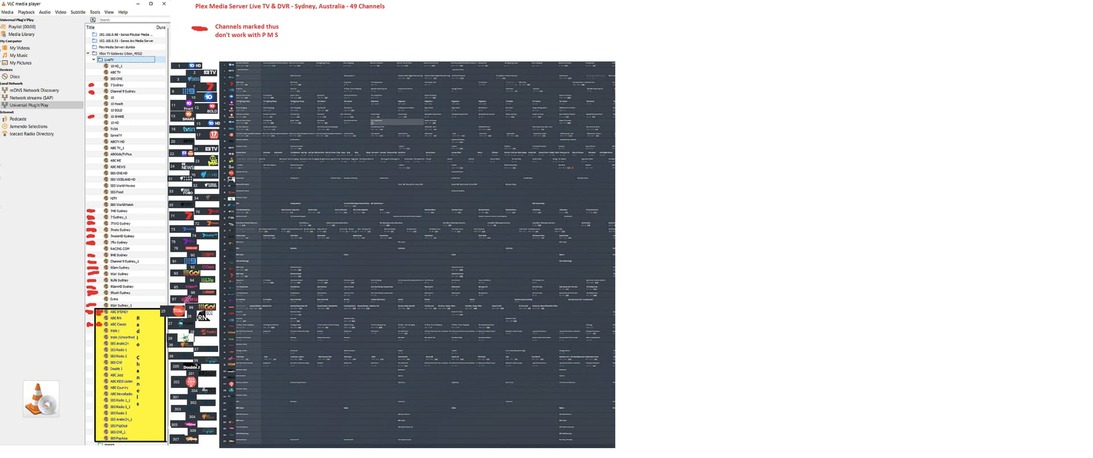
I’m still unable to get my VBox TV Gateway device to work fully with PLEX (be it the hosted web app https://app.plex.tv/desktop or Plex Media Server). My VBox device (XTi-3442 (dvb-t) is definitely correctly tuning to all 49 Sydney, Australia, local channels; they all play correctly through the current version of VLC Media Player (v3.0.17.4 Vetinari); and Plex is correctly downloading the xmltv program guide from the http: source: “//xmltv.net/xml_files/Sydney.xml”
I have had no succcess, whatever, connecting to, or playing, any of the channels with the Plex web app(v4.76.1). However, using PMS, I can connect to, and record from, all of the low numbered channels. Channels that DO NOT WORK with PMS (marked in Red
I have same issue with same channels
Lets get some debug server logs and a text file with contents of the xmltv response
The specific problem with character encoding for channels with spaces and extended characters was fixed in Plex Web 4.75.0
So suggest ensuring debug logging is enabled
Then go through DVR EPG refresh
Then go through tune of a channel that works and stopping that and then a tune for a channel that does not work
and providing the the debug server logs plus a copy of the xmltv response saved into a text file
Thanks sa2000 for your reply.
Could you try these url’s and save the output into a text file
http://192.168.0.146:55555/devices/vbox-4952

http://192.168.0.146:55555/devices/vbox-4952/scanners
There may be some more vbox urls - but i do not know what they are - may need to go through delete dvr and recreate to see the urls in the logs and then I can give you the url’s to capture responses for
Also after you go through setup and you get the issue with channel 7 - please download the database and send me the zip by private messahe