Could not tune channel. Please check your tuner or antenna

I’m having the same issue, but it seems specific to Android TV devices.

I did get the Hauppaug WinTV-dualHD | model 1595 Working on Windows PMS Version 1.21.1.3876

LiveTV plays on my mobile (iPhone XR), RokuTV devices, as well as casting to any device from my mobile.

I would note that when i installed WinTV v10, it updated the driver and the device stopped working with Plex. WinTV v10 seems to have broken everything i had to completely remove the driver and software I was trying to make it pick up the cable channels but it broke more than anything.

I installed only the driver from here:
wintv-solo_dual_quadhd_5_2020_0406_38125

I saw someone else switched to USB2 instead of 3 but that also made it stop working for me.

After that I can scan channels, on the Antenna and it picks them up, it wouldn’t pick any up from cable (possibly another issue?). i was able to set up DVR and all that but it still refuses to play on any AndroidTV Devices natively. I’ve turned the experimental player on and off. Tried quality on Max and Low.

This is the attempted play on my androidTV – Failing

"Jan 11, 2021 22:09:56.308 [11096] Debug — DVR:NewSchedule: Partitioning, step one, let's compute an absolute ordering.
Jan 11, 2021 22:09:56.308 [11096] Debug — DVR:NewSchedule: Initial partitioning completed with 0 partitions.
Jan 11, 2021 22:09:56.308 [11096] Debug — DVR:NewSchedule: Partitioning completed with 0 partitions.
Jan 11, 2021 22:09:56.308 [11096] Debug — DVR:NewSchedule: We computed 1 alternative realities in 0 ms.
Jan 11, 2021 22:09:56.308 [11096] Debug — DVR:NewSchedule: The winning schedule had score: 0 and 0 conflicts.
Jan 11, 2021 22:09:56.310 [1056] Debug — [Grabber/17.1-aa1c81dfce8d2d98-com-plexapp-android] DVR:NewSchedule: Partitioning, step one, let's compute an absolute ordering.
Jan 11, 2021 22:09:56.310 [1056] Debug — [Grabber/17.1-aa1c81dfce8d2d98-com-plexapp-android] DVR:NewSchedule: Initial partitioning completed with 0 partitions.
Jan 11, 2021 22:09:56.310 [1056] Debug — [Grabber/17.1-aa1c81dfce8d2d98-com-plexapp-android] DVR:NewSchedule: Partitioning completed with 0 partitions.
Jan 11, 2021 22:09:56.310 [1056] Debug — [Grabber/17.1-aa1c81dfce8d2d98-com-plexapp-android] DVR:NewSchedule: We computed 1 alternative realities in 0 ms.
Jan 11, 2021 22:09:56.310 [1056] Debug — [Grabber/17.1-aa1c81dfce8d2d98-com-plexapp-android] DVR:NewSchedule: The winning schedule had score: 0 and 0 conflicts.
Jan 11, 2021 22:09:56.554 [11868] Debug — DVR:Segmenter: Stopping idle session: http://127.0.0.1:32600/devices/compound_device041dvb%23bda%23usb%23vid_2040%26pid_826d%230014147620%23/media/triplet%3A%2F%2F0%3A919%3A3?param=%3C%3Fxml%20version%3D%221%2E0%22%20encoding%3D%22UTF-8%22%3F%3E%0A%3Ctunedata%3E%3Ctt%3E8%3C%2Ftt%3E%3Cdq%3E0%3C%2Fdq%3E%3Cdr%2F%3E%3Cfr%3E16%3C%2Ffr%3E%3Cmd%3E0%3C%2Fmd%3E%3Csr%3E0%3C%2Fsr%3E%3Cpl%3E0%3C%2Fpl%3E%3Clf%3E0%3C%2Flf%3E%3Cl1%3E0%3C%2Fl1%3E%3Cl2%3E0%3C%2Fl2%3E%3Cls%3E0%3C%2Fls%3E%3Cpp%3E0%3C%2Fpp%3E%3Chz%3E0%3C%2Fhz%3E%3Cin%3E0%3C%2Fin%3E%3Cfc%3E0%3C%2Ffc%3E%3Ct%3E919%3C%2Ft%3E%3Cn%3E0%3C%2Fn%3E%3Cs%3E3%3C%2Fs%3E%3Cen%3E0%3C%2Fen%3E%3C%2Ftunedata%3E%0A.
Jan 11, 2021 22:10:08.669 [1520] Debug — Request: [IPREPLACE.53:59734 (Subnet)] POST /livetv/dvrs/6/channels/17.2/tune (60 live) TLS GZIP Signed-in Token (USER)
Jan 11, 2021 22:10:08.704 [1520] Debug — DVR:NewSchedule: Partitioning, step one, let's compute an absolute ordering.
Jan 11, 2021 22:10:08.704 [1520] Debug —  DVR:NewSchedule: Between 2021-01-11 22:10:08 and 2021-01-11 22:15:08 on channel 17.2: 'Live TV - Session'
Jan 11, 2021 22:10:08.704 [1520] Debug — DVR:NewSchedule: Initial partitioning completed with 1 partitions.
Jan 11, 2021 22:10:08.704 [1520] Debug — DVR:NewSchedule: Partitioning completed with 1 partitions.
Jan 11, 2021 22:10:08.704 [1520] Debug — DVR:NewSchedule: PARTITION of size 1.
Jan 11, 2021 22:10:08.704 [1520] Debug —  DVR:NewSchedule:    Between 2021-01-11 22:10:08 and 2021-01-11 22:15:08 on channel 17.2: 'Live TV - Session'
Jan 11, 2021 22:10:08.704 [1520] Debug — DVR:NewSchedule: After processing the partition, we have 2 alternate realities.
Jan 11, 2021 22:10:08.704 [1520] Debug — DVR:NewSchedule: We computed 2 alternative realities in 0 ms.
Jan 11, 2021 22:10:08.704 [1520] Debug — DVR:NewSchedule: The winning schedule had score: 10 and 0 conflicts.
Jan 11, 2021 22:10:08.704 [1520] Debug —  DVR:NewSchedule: device 0 tuner 1 airing 0 between 2021-01-11 22:10:08 and 2021-01-11 22:15:08 on channel 17.2: 'Live TV - Session'
Jan 11, 2021 22:10:08.706 [9056] Debug — [Grabber/17.2-aa1c81dfce8d2d98-com-plexapp-android] DVR:Segmenter: Creating a new recorder for http://127.0.0.1:32600/devices/compound_device041dvb%23bda%23usb%23vid_2040%26pid_826d%230014147620%23/media/triplet%3A%2F%2F0%3A919%3A4?param=%3C%3Fxml%20version%3D%221%2E0%22%20encoding%3D%22UTF-8%22%3F%3E%0A%3Ctunedata%3E%3Ctt%3E8%3C%2Ftt%3E%3Cdq%3E0%3C%2Fdq%3E%3Cdr%2F%3E%3Cfr%3E16%3C%2Ffr%3E%3Cmd%3E0%3C%2Fmd%3E%3Csr%3E0%3C%2Fsr%3E%3Cpl%3E0%3C%2Fpl%3E%3Clf%3E0%3C%2Flf%3E%3Cl1%3E0%3C%2Fl1%3E%3Cl2%3E0%3C%2Fl2%3E%3Cls%3E0%3C%2Fls%3E%3Cpp%3E0%3C%2Fpp%3E%3Chz%3E0%3C%2Fhz%3E%3Cin%3E0%3C%2Fin%3E%3Cfc%3E0%3C%2Ffc%3E%3Ct%3E919%3C%2Ft%3E%3Cn%3E0%3C%2Fn%3E%3Cs%3E4%3C%2Fs%3E%3Cen%3E0%3C%2Fen%3E%3C%2Ftunedata%3E%0A.
Jan 11, 2021 22:10:12.399 [0600] Debug — Completed: [IPREPLACE.53:59734] 200 POST /livetv/dvrs/6/channels/17.2/tune (60 live) TLS GZIP 3730ms 8525 bytes (pipelined: 34)
Jan 11, 2021 22:10:29.620 [7092] Debug — DVR:NewSchedule: Scheduled an operation 'Live TV - Session aa1c81dfce8d2d98-com-plexapp-android' on channel 17.2 on device 0 tuner 1 between 2021-01-11 22:10:08 and 2021-01-11 22:15:29
Jan 11, 2021 22:10:29.620 [7092] Debug — DVR:NewSchedule: Partitioning, step one, let's compute an absolute ordering.
Jan 11, 2021 22:10:29.620 [7092] Debug — DVR:NewSchedule: Initial partitioning completed with 0 partitions.
Jan 11, 2021 22:10:29.620 [7092] Debug — DVR:NewSchedule: Partitioning completed with 0 partitions.
Jan 11, 2021 22:10:29.620 [7092] Debug — DVR:NewSchedule: We computed 1 alternative realities in 0 ms.
Jan 11, 2021 22:10:29.620 [7092] Debug — DVR:NewSchedule: The winning schedule had score: 0 and 0 conflicts."
http://127.0.0.1:32400/web/index.html

And then here it is working from my Mobile Phone:

Jan 11, 2021 22:15:10.112 [11436] Debug — Request: [IPREPLACE.95:55655 (Subnet)] POST /livetv/dvrs/6/channels/17.2/tune (67 live) TLS GZIP Signed-in Token (USER)
Jan 11, 2021 22:15:10.153 [11436] Debug — DVR:NewSchedule: Partitioning, step one, let's compute an absolute ordering.
Jan 11, 2021 22:15:10.153 [11436] Debug —  DVR:NewSchedule: Between 2021-01-11 22:15:10 and 2021-01-11 22:20:10 on channel 17.2: 'Live TV - Session'
Jan 11, 2021 22:15:10.153 [11436] Debug — DVR:NewSchedule: Initial partitioning completed with 1 partitions.
Jan 11, 2021 22:15:10.153 [11436] Debug — DVR:NewSchedule: Partitioning completed with 1 partitions.
Jan 11, 2021 22:15:10.153 [11436] Debug — DVR:NewSchedule: PARTITION of size 1.
Jan 11, 2021 22:15:10.153 [11436] Debug —  DVR:NewSchedule:    Between 2021-01-11 22:15:10 and 2021-01-11 22:20:10 on channel 17.2: 'Live TV - Session'
Jan 11, 2021 22:15:10.153 [11436] Debug — DVR:NewSchedule: After processing the partition, we have 2 alternate realities.
Jan 11, 2021 22:15:10.153 [11436] Debug — DVR:NewSchedule: We computed 2 alternative realities in 0 ms.
Jan 11, 2021 22:15:10.153 [11436] Debug — DVR:NewSchedule: The winning schedule had score: 10 and 0 conflicts.
Jan 11, 2021 22:15:10.153 [11436] Debug —  DVR:NewSchedule: device 0 tuner 1 airing 0 between 2021-01-11 22:15:10 and 2021-01-11 22:20:10 on channel 17.2: 'Live TV - Session'
Jan 11, 2021 22:15:10.156 [7092] Debug — [Grabber/17.2-9236D754-706F-4363-9E86-53AFB95AC479] DVR:Segmenter: Creating a new recorder for http://127.0.0.1:32600/devices/compound_device041dvb%23bda%23usb%23vid_2040%26pid_826d%230014147620%23/media/triplet%3A%2F%2F0%3A919%3A4?param=%3C%3Fxml%20version%3D%221%2E0%22%20encoding%3D%22UTF-8%22%3F%3E%0A%3Ctunedata%3E%3Ctt%3E8%3C%2Ftt%3E%3Cdq%3E0%3C%2Fdq%3E%3Cdr%2F%3E%3Cfr%3E16%3C%2Ffr%3E%3Cmd%3E0%3C%2Fmd%3E%3Csr%3E0%3C%2Fsr%3E%3Cpl%3E0%3C%2Fpl%3E%3Clf%3E0%3C%2Flf%3E%3Cl1%3E0%3C%2Fl1%3E%3Cl2%3E0%3C%2Fl2%3E%3Cls%3E0%3C%2Fls%3E%3Cpp%3E0%3C%2Fpp%3E%3Chz%3E0%3C%2Fhz%3E%3Cin%3E0%3C%2Fin%3E%3Cfc%3E0%3C%2Ffc%3E%3Ct%3E919%3C%2Ft%3E%3Cn%3E0%3C%2Fn%3E%3Cs%3E4%3C%2Fs%3E%3Cen%3E0%3C%2Fen%3E%3C%2Ftunedata%3E%0A.
Jan 11, 2021 22:15:15.276 [11808] Debug — Completed: [IPREPLACE.95:55655] 200 POST /livetv/dvrs/6/channels/17.2/tune (66 live) TLS GZIP 5163ms 8527 bytes (pipelined: 8)
Jan 11, 2021 22:15:15.371 [11436] Debug — Request: [IPREPLACE.95:55655 (Subnet)] POST /livetv/dvrs/6/channels/17.2/tune (63 live) TLS GZIP Signed-in Token (USER)
Jan 11, 2021 22:15:15.442 [0600] Debug — Completed: [IPREPLACE.95:55655] 200 POST /livetv/dvrs/6/channels/17.2/tune (64 live) TLS GZIP 71ms 8527 bytes (pipelined: 9)
Jan 11, 2021 22:15:23.080 [1288] Debug — DVR:NewSchedule: Partitioning, step one, let's compute an absolute ordering.
Jan 11, 2021 22:15:23.080 [1288] Debug — DVR:NewSchedule: Initial partitioning completed with 0 partitions.
Jan 11, 2021 22:15:23.080 [1288] Debug — DVR:NewSchedule: Partitioning completed with 0 partitions.
Jan 11, 2021 22:15:23.080 [1288] Debug — DVR:NewSchedule: We computed 1 alternative realities in 0 ms.
Jan 11, 2021 22:15:23.080 [1288] Debug — DVR:NewSchedule: The winning schedule had score: 0 and 0 conflicts.
Jan 11, 2021 22:15:23.158 [6924] Debug — DVR:Segmenter: Stopping idle session: http://127.0.0.1:32600/devices/compound_device041dvb%23bda%23usb%23vid_2040%26pid_826d%230014147620%23/media/triplet%3A%2F%2F0%3A919%3A4?param=%3C%3Fxml%20version%3D%221%2E0%22%20encoding%3D%22UTF-8%22%3F%3E%0A%3Ctunedata%3E%3Ctt%3E8%3C%2Ftt%3E%3Cdq%3E0%3C%2Fdq%3E%3Cdr%2F%3E%3Cfr%3E16%3C%2Ffr%3E%3Cmd%3E0%3C%2Fmd%3E%3Csr%3E0%3C%2Fsr%3E%3Cpl%3E0%3C%2Fpl%3E%3Clf%3E0%3C%2Flf%3E%3Cl1%3E0%3C%2Fl1%3E%3Cl2%3E0%3C%2Fl2%3E%3Cls%3E0%3C%2Fls%3E%3Cpp%3E0%3C%2Fpp%3E%3Chz%3E0%3C%2Fhz%3E%3Cin%3E0%3C%2Fin%3E%3Cfc%3E0%3C%2Ffc%3E%3Ct%3E919%3C%2Ft%3E%3Cn%3E0%3C%2Fn%3E%3Cs%3E4%3C%2Fs%3E%3Cen%3E0%3C%2Fen%3E%3C%2Ftunedata%3E%0A.
Jan 11, 2021 22:15:23.160 [9228] Debug — [Grabber/17.2-9236D754-706F-4363-9E86-53AFB95AC479] DVR:NewSchedule: Partitioning, step one, let's compute an absolute ordering.
Jan 11, 2021 22:15:23.160 [9228] Debug — [Grabber/17.2-9236D754-706F-4363-9E86-53AFB95AC479] DVR:NewSchedule: Initial partitioning completed with 0 partitions.
Jan 11, 2021 22:15:23.160 [9228] Debug — [Grabber/17.2-9236D754-706F-4363-9E86-53AFB95AC479] DVR:NewSchedule: Partitioning completed with 0 partitions.
Jan 11, 2021 22:15:23.160 [9228] Debug — [Grabber/17.2-9236D754-706F-4363-9E86-53AFB95AC479] DVR:NewSchedule: We computed 1 alternative realities in 0 ms.
Jan 11, 2021 22:15:23.160 [9228] Debug — [Grabber/17.2-9236D754-706F-4363-9E86-53AFB95AC479] DVR:NewSchedule: The winning schedule had score: 0 and 0 conflicts.

Well - debug logging is enabled by default - if user disabled it then it would need re-enabling.

The logs are removed due to the security issue mentioned in the article showing in the banner Unexpected user token exposure in (Windows) Plex Media Server v1.20.5 through v1.21.1.3830

Please repeat the test - please restart the server with debug logging already enabled and then repeat the test and gather logs using the current version of Plex Media Server https://plex.tv/downloads

There is evidence in the logs that the Plex Tuner Service is trying DVB-C and DVB-T. There is also an error logged during tuning

Jan 09, 2021 22:42:15.293 [9220] INFO - [I] transponder_streamer::start_channel. Start request for channel triplet://9018:4166:4287
Jan 09, 2021 22:42:15.293 [9220] INFO - [I] transponder_streamer::stop_idle_timer

Jan 09, 2021 22:42:15.367 [14140] INFO - [I] DeviceGetListEx_impl: Filter [7231 BDA DVBT Tuner]
Jan 09, 2021 22:42:15.367 [14140] INFO - [I] DeviceGetListEx_impl: device instance path pci#ven_1131&dev_7231&subsys_362014c7&rev_aa#4&1e6cde06&0&0019#
Jan 09, 2021 22:42:15.368 [14140] INFO - [I] DeviceGetListEx_impl: Filter [7231 BDA DVBC Tuner (MCE)]
Jan 09, 2021 22:42:15.368 [14140] INFO - [I] DeviceGetListEx_impl: device instance path pci#ven_1131&dev_7231&subsys_362014c7&rev_aa#4&1e6cde06&0&0019#
Jan 09, 2021 22:42:15.368 [14140] INFO - [I] DeviceGetListEx_impl: Filter [7231 BDA DVBC Tuner]
Jan 09, 2021 22:42:15.368 [14140] INFO - [I] DeviceGetListEx_impl: device instance path pci#ven_1131&dev_7231&subsys_362014c7&rev_aa#4&1e6cde06&0&0019#
Jan 09, 2021 22:42:15.369 [14140] INFO - [I] DeviceGetListEx_impl: Filter [7231 BDA DVBT Tuner]
Jan 09, 2021 22:42:15.369 [14140] INFO - [I] DeviceGetListEx_impl: device instance path pci#ven_1131&dev_7231&subsys_362014c7&rev_aa#4&1e6cde06&0&0019#
Jan 09, 2021 22:42:15.369 [14140] INFO - [I] DeviceGetListEx_impl: Filter [7231 BDA DVBC Tuner (MCE)]
Jan 09, 2021 22:42:15.369 [14140] INFO - [I] DeviceGetListEx_impl: device instance path pci#ven_1131&dev_7231&subsys_362014c7&rev_aa#4&1e6cde06&0&0019#
Jan 09, 2021 22:42:15.369 [14140] INFO - [I] DeviceGetListEx_impl: Filter [7231 BDA DVBC Tuner]
Jan 09, 2021 22:42:15.370 [14140] INFO - [I] DeviceGetListEx_impl: device instance path pci#ven_1131&dev_7231&subsys_362014c7&rev_aa#4&1e6cde06&0&0019#
Jan 09, 2021 22:42:15.370 [14140] INFO - [I] DeviceGetListEx_impl: pDL->Count:6
Jan 09, 2021 22:42:15.641 [14140] INFO - [I] GetTunerInterfaces:    Interfaces on NodeType 1   (2 interfaces):
Jan 09, 2021 22:42:15.641 [14140] INFO - [I] GetTunerInterfaces:       {EF30F379-985B-4D10-B640-A79D5E04E1E0} IID_IBDA_DigitalDemodulator

Jan 09, 2021 22:42:15.641 [14140] INFO - [I] GetTunerInterfaces: {DDF15B12-BD25-11D2-9CA0-00C04F7971E0} IID_IBDA_AutoDemodulate     - QueryInterface FAILED ! - hr = 0x80004002

Jan 09, 2021 22:42:15.642 [14140] INFO - [I] GetTunerInterfaces:    Interfaces on NodeType 2   (0 interfaces):
Jan 09, 2021 22:42:15.642 [14140] INFO - [I] Looking for preferred capture for tuner @device:pnp:\\?\pci#ven_1131&dev_7231&subsys_362014c7&rev_aa#4&1e6cde06&0&0019#{71985f48-1ca1-11d3-9cc8-00c04f7971e0}\{3ff44ee5-8547-402a-94f3-d4fe00020001}

Jan 09, 2021 22:42:15.647 [14140] INFO - [I] Found preferred capture: @device:pnp:\\?\pci#ven_1131&dev_7231&subsys_362014c7&rev_aa#4&1e6cde06&0&0019#{fd0a5af4-b41d-11d2-9c95-00c04f7971e0}\{5bb3dbd0-9e1e-424c-9281-6b0000020000}

Jan 09, 2021 22:42:15.649 [14140] INFO - [I] add_filter (7231 BDA Digital Capture DVBT)
Jan 09, 2021 22:42:15.855 [14140] INFO - [I] add_filter (7231 BDA Digital Capture DVBT)
Jan 09, 2021 22:42:15.979 [14140] INFO - [I] add_filter (7231 BDA Digital Capture DVBT)
Jan 09, 2021 22:42:16.105 [14140] INFO - [I] add_filter (7231 BDA Digital Capture DVBC)
Jan 09, 2021 22:42:16.231 [14140] INFO - [I] add_filter (7231 BDA Digital Capture DVBT)
Jan 09, 2021 22:42:16.245 [14140] INFO - [I] add_filter (Sample grabber)
Jan 09, 2021 22:42:16.252 [14140] INFO - [I] add_filter (MPEG-2 Demultiplexer)
Jan 09, 2021 22:42:16.274 [14140] INFO - [I] add_filter (BDA MPEG2 Transport Information Filter)
Jan 09, 2021 22:42:16.312 [14140] INFO - [I] start_graph: hr=0, state=2
Jan 09, 2021 22:42:16.312 [14140] INFO - [I] StartDevice()    OK
Jan 09, 2021 22:42:16.312 [14140] INFO - [I] ----------------------------------------------------------------------------

No data came back and Plex Media Server aborted the tune at 22:42:42

Jan 09, 2021 22:42:16.312 [14140] INFO - [I] CTVSStreamSource::TuneTransponder. Transponder tuning request: diseqc 0, freq 562000, modulation 0, polarization 0, symbol rate 0, LOF 8, LNB selection signal 0, FEC 0
Jan 09, 2021 22:42:16.313 [14140] INFO - [I] SetTuner() 562000, H, 0  Mod:0 LOF:8  22Khz:0

Jan 09, 2021 22:42:18.116 [15204] INFO - [I] web_service_t::process_device_status
Jan 09, 2021 22:42:36.136 [12016] INFO - [I] web_service_t::process_device_status


Jan 09, 2021 22:42:42.199 [9220] INFO - [I] transponder_streamer::tune_transponder_impl. Signal stats: 0, 0, 0

I would suggest you try with just DVB-T tuner - the support article here Frequently Asked Questions - DVR & Live TV | Plex Support does say that all DVRs must be the same type - this is what we support currently

Can I add more than one DVR tuner?

Multiple tuners can be added to your server from within the Plex Web App. Tuners should be of the same type; all OTA or all cable, on the same Plex Media Server

Suggest raising a separate forum topic with full Plex Media Server logs zip together with enabling and capturing the android app logs for the failed attempt to tune the channel

see
https://support.plex.tv/articles/201643703-reporting-issues-with-plex-media-server/

https://support.plex.tv/articles/200250417-plex-media-server-log-files/

Android, Android TV, Fire TV Logs | Plex Support

I have no control over which tuner it tries to use or what tuner(s) are made available to it. It’s a single PCI-E card and it used to work fine with Plex but something has clearly changed. I can’t even disable the individual “tuners” in device manager as it just shows up as a single device.

In other DVR software, like MediaPortal, NextPVR, DVBViewer etc. I have the option of which tuners the software uses but in Plex it just shows up as 1 device with 6 tuners with no way to configure it.

It manages to scan for channels just fine. Judging by the logs it’s using the correct DVB-T tuner for scanning but then switches to the DVB-C tuner for playback - I can’t seem to find a config file or db or reg entry to control this behavior.

Is this BGT-3620 card ? (by this manufacturer BlackGold Innovations | Support) ?

Are you able to provide logs of it working ok in previous version of Plex Media Server ? Do you know when it stopped working?

macOS 10.13.6
PMS 1.21.2.3883-702fd07e3
same problem with PMS 1.21.1*
HDHomeRun Prime/cable card

DVR tuning works briefly after a wipe and fresh install, then fails.

Also, I can not connect through localhost, after it worked for most of the first day of running the beta.

Plex Media Server Logs_2021-01-15_11-10-34.zip (3.6 MB)

Is there going to be a fix for this issue? I was able to get it working again by exiting the Plex Server and start it up again. But the problem eventually return and I have to repeat the process. This is very annoying.

Same issue here. Tried to apply the latest version the other day when resetting the DVR for the guide change - hoping that after several months with so many users experiencing the issue it would be resolved. Unfortunately channel scan still did not work for either my Hauppauge or HD Homerun tuners. Uninstalled and reinstalled 1.19. All is good on 1.19. Considering moving back to SageTV or taking a look at Emby or Jellyfin.

Just got my plex pass and set up Live TV and DVR last week, and it worked exactly as I’d expected for a couple of days. After a few days of not using it, I tried to use it yesterday and today, and got the same error. I checked and the tuner works on the HDHomerun App, it works on another computer with Windows Media Center. This will be a huge disappointment if it’s not a stable feature.

It WAS a stable feature up through server version 1.19.5.3112, then some change was made in an update that broke the tuner function. Many of us are sticking with version 1.19.5.3112
until they find the bug and fix it. Scan through this thread for where to find that version.

I reinstalled Windows 10 20H2 today on my box. Previously 32-bit, I installed x64 instead. Allowed it to download all available Windows Updates. Used the Hauppauge driver from Windows Update and installed latest HD Homerun drivers from Silicon Dust.

Installed latest version of Plex (1.21.1.3876)

Channel Scan showed the blinking 12:00 / waiting, but when I clicked the scan button it completed successfully. Initial tests are good - I rebooted a few times to be sure. I am able to use Live TV & DVR functionality using both tuners.

Fingers crossed but it’s looking good. :nerd_face:

Hi - A couple of changes are being made to address these Plex Tuner Service issues. One has already been released in Plex Media Server 1.21.1.3876 - did you try this release ?

Release Notice: Plex Media Server - #389 by StSimm1

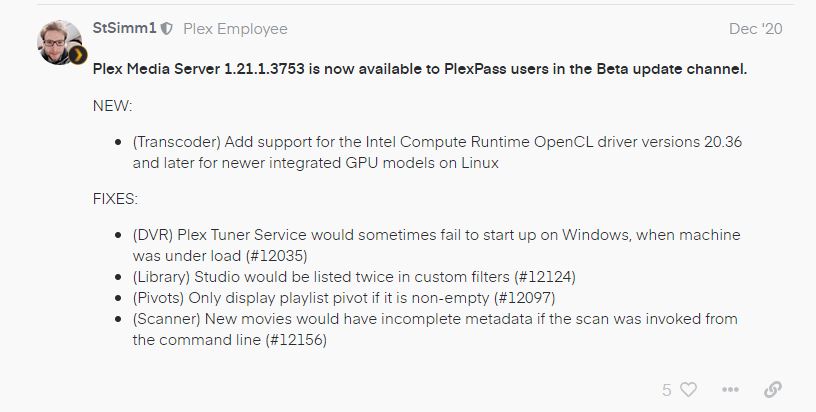
  • (DVR) Plex Tuner Service would sometimes fail to start up on Windows, when machine was under load (#12035)

Please let me know what happens when using 1.21.1.3876 - and fresh logs please if issue persists

The issue relates to localhost. The Plex Media Server and Plex Transcoder processes communicate through localhost and no requests are coming into the server process from the transcoder process giving rise to this error

Jan 15, 2021 11:07:25.899 [0x7000018a8000] DEBUG - [Grabber/017-z7uf23vkur95cbebvddaoeea] TranscodeSession: timed out waiting to find duration for live session

Jan 15, 2021 11:07:25.899 [0x7000018a8000] ERROR - [Grabber/017-z7uf23vkur95cbebvddaoeea] Failed to start session.

Could you look into your IP configuration to see if you have setup issue with loopback

Could you get me the output from this command executed in terminal on the server

ifconfig -a

Update:
And does the issue arise on the standard release 1.21.1.3876?

Further to my earlier post, could you check if you have any proxy software installed that may be intercepting 127.0.0.1 Requests.

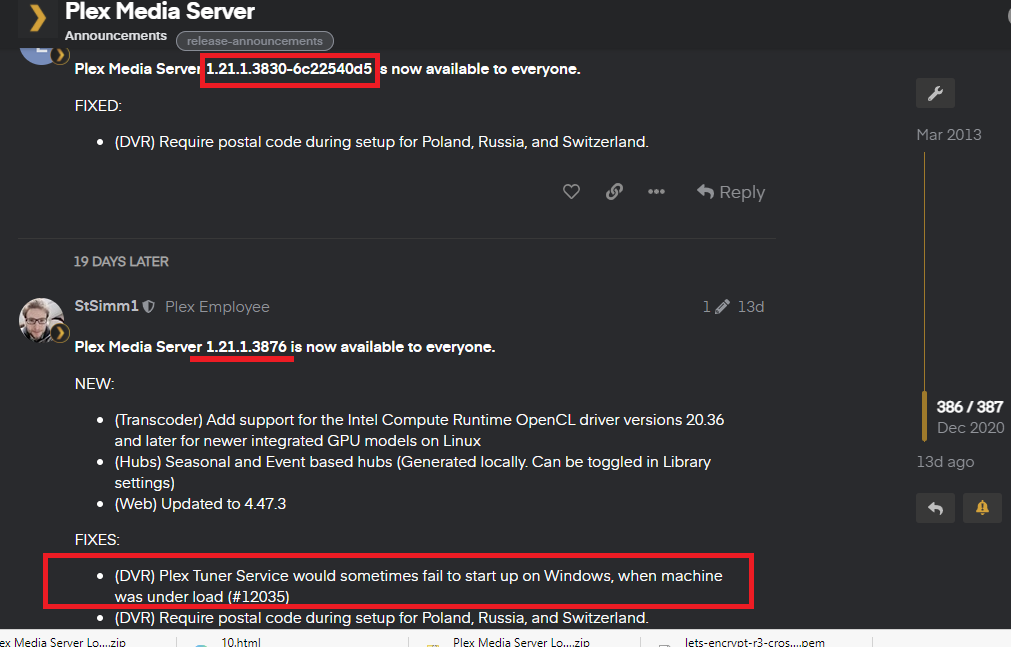
The last version I tested was 1.21.1.3830, which included the bug fix you listed according to the change log. That version had the same tuner issues. I have been checking the change logs of every version waiting for any other mentions of tuner fixes and have not seen any. Is there a reason to think the current version will work if 1.21.1.3830 didn’t?

I have not checked the actual code but the release notes show that the fix I mentioned came in after 1.21.1.3830

I’m using 1.21.1.3876 and it is still doing the same thing. Works for two days after upgrade and then goes back to the same behaviour. “Could not tune channel. Please check your tuner or antenna”.

Hi. I have not looked at any logs from your server for the failures you are getting and I have not said that your issue is resolved in 1.21.1.3876

I have mentioned before that this error message is a general and generic error and it could be caused by different underlying issues.

Does it work sometimes and sometimes does not?
Does it fail on specific channels?
Do the channels have multiple audio streams ?

server debug logs covering time from launch up to failure would start an investigation

please see

I see that fix as early as 1.21.1.3753 on Dec 20.