I did the install, rebooted, worked for two days and then back to the same crap. Cant tune channel
I have posted my logs a few times in the past and there is no response from dev team. As a SW engineer I don’t understand how you can not refer to this defect as a bug.
Nonetheless regardless of the semantics, when will I be able to watch Plex live TV again from my server?
(File removed)
Here is another log.(File removed)
Exactly. i have reverted back to the last stable build until they address this.
Version 1.21.1.3830, still doesn’t work. This time I uninstalled the old app first, restarted, installed 1.21.1.3830, restarted again, reinstalled the tuner, and it still gives the “Could not tune channel” error. Don’t think any old sessions survived the multiple reboots. Here’s the logs, look at the end for the tuner failures.
Edited by sa2000: Logs downloaded and removed
I have seen Windows re-instate previous active browser sessions after a reboot. So safest option is to close each browser Plex Web session
Not saying there is no bug. What I was saying is that the error text is generic and could be returned for many different reasons and each case needs to be investigated through debug server logs to identify the issue
I have looked at the server logs you attached here and you appear to have disabled debug logging for the server
Please see this support article for enabling debug logging
https://support.plex.tv/articles/201643703-reporting-issues-with-plex-media-server/
Please restart the server after enabling debug logging so that we have complete logs covering server launch as well
The logs do show that you have a corrupt database and you will need to address this first.
Dec 22, 2020 13:47:04.964 [0x7fa23f15c700] ERROR - SQLITE3:(nil), 11, database corruption at line 80439 of [bf8c1b2b7a]
Dec 22, 2020 13:47:04.964 [0x7fa23f15c700] ERROR - SQLITE3:(nil), 11, statement aborts at 5: [select media_subscriptions.id as 'media_subscriptions_id', media_subscriptions.'order' as 'media_subscriptions_order', media_subscriptions.metadata_type as 'media_subscriptions_metadata
Dec 22, 2020 13:47:04.964 [0x7fa23f15c700] ERROR - Thread: Uncaught exception running async task which was spawned by thread 0x7fa23cdde700: sqlite3_statement_backend::loadRS: database disk image is malformed
See
https://support.plex.tv/articles/201100678-repair-a-corrupt-database/
https://support.plex.tv/articles/202485658-restore-a-database-backed-up-via-scheduled-tasks/
Thanks - now have debug logging
The database corruption appears to be causing the DVR Live TV Tune failures e.g. tune for channel 2.3 here
Dec 22, 2020 13:55:56.398 [0x7faae6260700] DEBUG - Request: [10.0.0.89:56254 (Subnet)] POST /livetv/dvrs/9/channels/2.3/tune (9 live) TLS GZIP Signed-in Token (scott.hoyte@gmail.com)

Dec 22, 2020 13:55:56.460 [0x7faae6260700] ERROR - SQLITE3:(nil), 11, database corruption at line 80439 of [bf8c1b2b7a]
Dec 22, 2020 13:55:56.460 [0x7faae6260700] ERROR - SQLITE3:(nil), 11, statement aborts at 5: [select max(`order`) from media_subscriptions where target_library_section_id is null] database disk image is malformed
Dec 22, 2020 13:55:56.460 [0x7faae6260700] ERROR - Soci Exception handled: sqlite3_statement_backend::loadOne: database disk image is malformed

Dec 22, 2020 13:55:56.461 [0x7faaf4ec0700] DEBUG - Completed: [10.0.0.89:56254] 500 POST /livetv/dvrs/9/channels/2.3/tune (9 live) TLS GZIP 63ms 484 bytes (pipelined: 2)
The databases directory is
/share/CACHEDEV1_DATA/.qpkg/PlexMediaServer/Library/Plex Media Server/Plug-in Support/Databases/
See
https://support.plex.tv/articles/201100678-repair-a-corrupt-database/
https://support.plex.tv/articles/202485658-restore-a-database-backed-up-via-scheduled-tasks/
There is an issue with the Plex Tuner Service which manages USB and PCIe DVRs (and some old HD Homeruns)
It is exiting after launch leading to errors when tuning
Dec 24, 2020 16:19:17.257 [14296] DEBUG - [ChildProcessMonitor] Job running: "C:\Program Files (x86)\Plex\Plex Media Server\Plex Tuner Service.exe" "C:\Program Files (x86)\Plex\Plex Media Server\Resources\Tuner\Private" "C:\Program Files (x86)\Plex\Plex Media Server\Resources\Tuner\Shared" 1.21.1.3830-6c22540d5 32600 /waitmutex

Dec 24, 2020 16:19:17.295 [14296] DEBUG - [ChildProcessMonitor] Jobs: Starting child process with pid 14320

Dec 24, 2020 16:19:32.362 [6612] DEBUG - Jobs: 'C:\Program Files (x86)\Plex\Plex Media Server\Plex Tuner Service.exe' exit code for process 14320 is 0 (success)
Dec 24, 2020 16:19:32.362 [14296] DEBUG - [ChildProcessMonitor] Plex Tuner Service.exe exited.
Dec 24, 2020 16:19:32.362 [14296] DEBUG - [ChildProcessMonitor] attempting to relaunch Plex Tuner Service.exe; attempt number 1, 2 tries remaining
The development team have been working on this with diagnostics provided from another user. I will add your logs to that investigation
Thank you for the 1.19.5 and 1.21.x comparison
There is an issue with the Plex Tuner Service which is similar what I saw from a few other users. I have referred these logs to our development team. This issue is already under investigation.
So I just wanted to add my voice to the choir. I’ve been having the exact same issue with every release since 1.19.5.3112 and my tuner card is a Hauppauge WinTV-HVR-2255. After I install any of the updates after 1.19.5.3112 the Live TV/DRV work fine until the next day (assuming after a restart since my computer restarts nightly) then it just stops working.
I recently updated from 1.19.5.3112 to the latest release (1.21.1.3830) then deleted my tuner from Plex, rescanned the channels and update the EPG as per this post to get the new guide data provider. I tested everything and it was working fine after the update. Now a few days later and my first set of recordings failed and I can no longer tune any Live channels (again).
I hope this gets addressed soon as it’s kind of annoying but at least I can revert to a working release. In the mean time I would be happy to post any logs for any version to help out just let me know what you need.
I noticed there are 2 spots in the config that you have to click debug logging, missed that on the first.
I deleted that database, that fixed the issue for me. I had to point Plex back to all of the files that I have in my media.
Works now, and I can watch live TV, appreciate the help. Is there a corrupt DB handler that you can put in the code to notify users when this happens, would have saved me a few of months of frustration.
Blackgold BGT3620 PCI-E DVB-T2 tuner (previously working some months back)
Just installed latest version after uninstalling a few months back. Had to delete HKCU reg entries and uninstall/reinstall to get server wizard to appear but after that, it found the tuner card and scanned channels successfully. However, it won’t play any.
There’s two things i’ve noticed in the logs:
MDE: : no direct play video profile exists for http/mpegts/
So instead of sending the TS stream directly, it seems to try and transcode which then leads to:
Error — [Transcoder] http://127.0.0.1:32600/devices/dvb%23bda%230%23%40device%3apnp%3a%5c%5c%3f%5cpci%23ven_1131%26dev_7231%26subsys_362014c7%26rev_aa%234%261e6cde06%260%260019%23%7b71985f48-1ca1-11d3-9cc8-00c04f7971e0%7d%5c%7b353e20b5-4b13-4db0-b84e-1e0000040000%7d/media/triplet%3A%2F%2F9018%3A4166%3A4166?param=%3C%3Fxml%20version%3D%221%2E0%22%20encoding%3D%22UTF-8%22%3F%3E%0A%3Ctunedata%3E%3Ctt%3E4%3C%2Ftt%3E%3Cdq%3E0%3C%2Fdq%3E%3Cdr%2F%3E%3Cfr%3E562000%3C%2Ffr%3E%3Cmd%3E0%3C%2Fmd%3E%3Csr%3E0%3C%2Fsr%3E%3Cpl%3E0%3C%2Fpl%3E%3Clf%3E8%3C%2Flf%3E%3Cl1%3E0%3C%2Fl1%3E%3Cl2%3E0%3C%2Fl2%3E%3Cls%3E0%3C%2Fls%3E%3Cpp%3E0%3C%2Fpp%3E%3Chz%3E0%3C%2Fhz%3E%3Cin%3E0%3C%2Fin%3E%3Cfc%3E0%3C%2Ffc%3E%3Ct%3E4166%3C%2Ft%3E%3Cn%3E9018%3C%2Fn%3E%3Cs%3E4166%3C%2Fs%3E%3Cen%3E0%3C%2Fen%3E%3C%2Ftunedata%3E%0A: Server returned 404 Not Found
Which finally ends with:
Jobs: 'C:\Program Files (x86)\Plex\Plex Media Server\Plex Transcoder.exe' exit code for process 8204 is 1 (failure)
I tried moving the transcode folder to see if it made a difference, nope. I deleted it and it got recreated successfully. I’ve tried local browser streaming and android - neither work. Also tried with transcode off and on and the logs appear the same (error certainly is).
Logs attached.
Edited by @sa2000 to remove logs extract
I received “the device tuner does not tune the required channel” this morning. I thought it was odd since it had recorded something at 1:30am. WinTV (Haupenhauge) was not receiving a signal. TV itself was working fine. For me, the ethernet cable had apparently gone bad or was dislodged. I used a different ethernet cable & Plex started recording “Live TV & DVR”. Mine was a fairly obvious solution (no LAN light on the back of the PC used as a Plex server). I hope you can get your complex problems resolved!!
Thanks for the log snippets. Would need full server logs to investigate and see if the Plex Tuner Server process aborted earlier after launch
See this support article for getting all logs zip
https://support.plex.tv/articles/200250417-plex-media-server-log-files/
Not sure if it’s the same root cause as everyone else in this thread, but here’s an example of a tuning failure, starting at 08:42.
(File removed)
Debug logging is disabled so cannot see what was happening at 08:42
There is evidence of a crash of the Plex Tuner Service process but that was earlier at 08:25 and it would have got restarted then
see
Sorry I didn’t see mention of the need for debug logs. Here they are.
(File removed)
15:23: I get a successful tune (yay, but rare)
15:27: I try to tune, and the web UI just spins for several minutes (boo)
15:30: A scheduled recording starts. Scheduled recordings always work for me, but I can’t tune to recordings until they complete.
Ok, full logs attached. I wiped all first with server stopped then started server and tried to play straight away. Also uninstalled/re-installed the tuner and that has given me a different issue - before it would fail to play pretty instantly, now it takes a good 30 seconds. I also wonder if Plex is trying to access the correct tuner as there’s no way of telling it to use the DVB-T tuner and not to use the DVB-C and “DVB-T (MCE)” tuners.
Anyway, the BGT-3620 used to work (corroborating evidence at bottom of this page: https://support.plex.tv/articles/community-supported-tuners/?utm_source=Plex%20Apps&utm_medium=Plex%20Web&utm_campaign=Plex%20Apps), it doesn’t now, logs attached. Also, the logs still leak email addresses, be nice if there was a less public way of sending them.
Brand new to the Plex Live TV/DVR. I have a Happauge Digital TV Tuner for Xbox (connected to my Win10 PC).
Server Version: Version 1.21.1.3876
When setting up the Live TV/DVR, it sees the device and I can scan for channels, but I get the “No channels found” error that other are seeing.
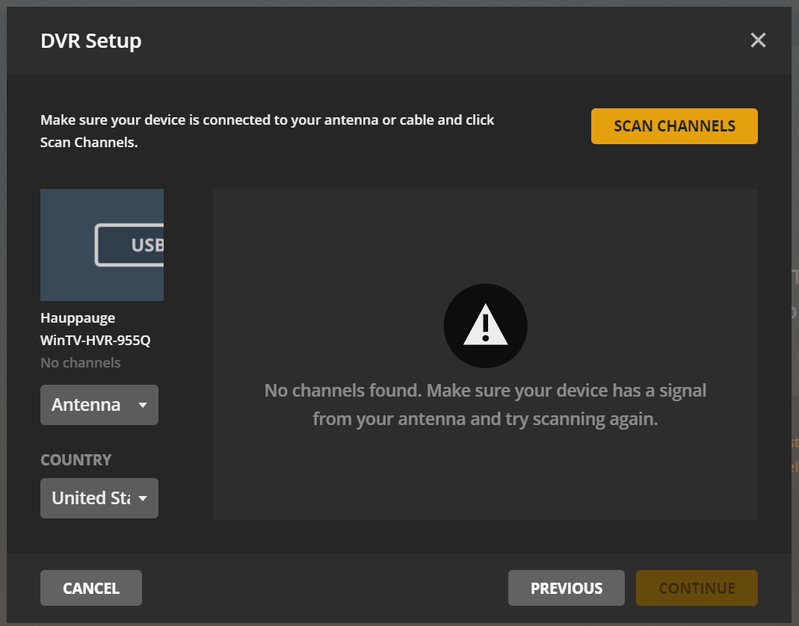
The antenna is just fine as I have strong signals on my TV without issue.
I will look into how to share the log file, but for now just wanted to follow this to see what the resolution may be. Thanks!
