I thought there might be a separate forum/section for Plexamp but couldn’t find one, so here goes. I’ve never used Plexamp - just been using my PMS NAS setup for my music in my house. But with the talk about possibly removing music from PMS in 2025 and having to rely on Plexamp instead I’ve started checking it out. Got a couple of initial questions though:
Can Plexamp (for IOS) manage and play music files that are on my iPhone, or only those that are in my PMS libraries (and does Plexamp have to communicate with my PMS in my house or can it operate independently/stand alone by blue-toothing to my car using the music already on my phone while I’m out driving around)?
Is there any way to make Plexamp remember and take you back to the place in a track where you left off listening (like PMS will do for movies and TV shows but apparently won’t do for music tracks for some reason, unless I’m missing something in PMS)?
If the answers above are “no”, are there any decent music player apps that will do both these things?
Plexamp can only connect to Plex music libraries. If it’s not able to communicate with your server, you’ll only be able play music you’ve already downloaded from your server in the Downloads tab.
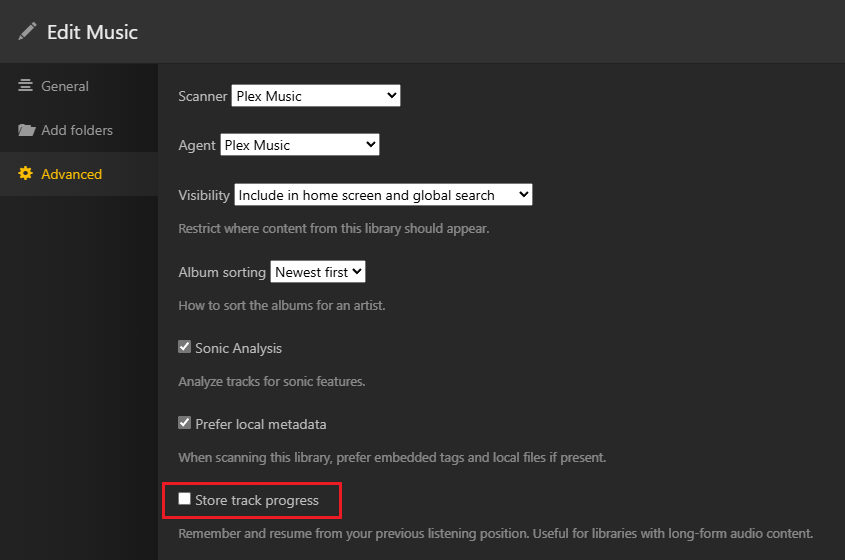
Yes, it’s a library setting that can be adjusted in the web/desktop app (Manage library > Edit > Advanced > Store track progress):
Removing music from Plex Media Server has never been discussed. What has been discussed and is happening is creating clients which focus on specific media types: Video, Music, and Photos. The Plex Media Server is the server. It will serve content to each of these new clients.
Plexamp is just another (music-specific) client. It still relies on PMS to provide the music.
Thanks for the clarification. I guess it’s not really PMS from which the music would be removed then, but from things like the Plex Roku TV player instead? For me, that’s basically the same thing, since the only thing I use my PMS for is to play my own content (including my music) through my Roku TVs in my house, but I can see the distinction.
I was pretty encouraged by the first response to my post above, since I had missed that setting to store track progress in my music libraries (thanks DTR!). However, even after I’ve ticked that setting I can’t seem to find any way for that to actually work - when I play the music on my Roku Plex player there does not seem to be any indication visible anywhere I can find that tells me I was listening to a particular track (nothing like “Continue Watching”), and when I just manually go back to the album and track I was listening to it simply starts the track over at the beginning - I can’t find any way to continue listening where I left off. What am I missing here?
It might require support from the client to do this. I believe Plexamp supports the feature to resume a song mid-play, but I fully expect that TV-based clients (the ones most likely to lose support for music sometime soon) probably don’t check for and use the “track progress” feature.
I only enable the “track progress” feature for my audiobooks library that I point Plex at. If I recall correctly, then if you have chapter-ized books, you must yourself remember which specific track you were on, and play that. I do want a “Continue Listening” feature in the library view, but I doubt Plex will implement that.
As for Plexamp on your car, yes! As long as your car stereo/speakers act as “speakers” for your device, you can connect, and use Plexamp to listen to music. I use a simple bluetooth speaker radio blaster, as my car is too old to have bluetooth built in. I have connected it to a newer bluetooth car, and had to find the “use car as slave” option in order to treat the car speakers as bluetooth speakers.
After doing a little more Googling regarding music player apps I ran across an app on the Apple store called Prologue (for Plex) - it cost me a one-time fee of $5 or $6 to activate the premium version so I could download my files from my Plex server, but it seems to integrate with my Plex server very nicely and lets me play my audiobooks (or any mp3 file apparently) offline on my iPhone without having to be connected to my Plex server, and it keeps track of (at least the last 3) files I have been listening to and lets me resume listening from wherever I stopped listening to them. I’ve only played around with it for a few minutes and haven’t tried it in the car yet, but it does say it can throw the books onto the TVs via Apple’s AirPlay and it also supports CarPlay, so I’m hoping I can get it to bluetooth to my car’s speakers. I was hoping I could use Plexamp for this, since it looked pretty good at first on my phone, but failing that I guess this Prologue thing will be a good solution.
Plexamp does support downloading of media for offline use. I load up my iPhone with a few audiobooks from my book library, and a playlist of my favorite songs. Then, I can turn on airplane mode and play my music anywhere I want using the Plexamp app.
I don’t use airplay/carplay, but I assume that those are supported as well. It really sounds like you paid for prologue to do the same things you can already with Plexamp.
No, I paid Prologue to do something that Plex/Plexamp apparently does NOT do - i.e., allow me to resume listening to a book at the point where I left off reading last time. It’s just that I also needed it to let me download the files to my phone, and they charged the small fee for that. Plexamp would indeed let me download the book files to my phone, but that alone is pretty worthless for me without also being able to pick up reading where I left off.
Besides, if I recall correctly (and maybe I don’t - it’s been a long time since I first added the Plex app to my phone), I had to pay some sort of small fee to make the Plex thing work on my iPhone - I assumed at the time that it was something Apple was making them pay that they were trying to recover, and I suspect that’s what’s going on with the Prologue thing as well, but I’m not sure.
Ah, I see. Plexamp used to be either exclusive to Plex Pass, or it had a $5 unlock fee. Currently, non-pass owners can use it for free, but I think some features (can’t recall right now) are exclusive to pass? Maybe can be unlocked for a fee? Whatever it is, you have the pass, so there would be no charge.
I was pretty sure that Plexamp also allows you to resume play on a file, but at this point my memory can easily be screwing with me. If prologue works for you, and the UI is better in that it shows which files you were in-progress for, then that’s great. People have been begging Plex for better audiobook support in all the apps, such as better file-resume functionality.
Positive. The features are present in the menus, but are marked as exclusive PP features.
Indeed, Prologue is doing that Plexamp currently cannot do. Actually no official Plex client can do what audio books require: keeping track which chapter (i.e. “song”) of an album you are in and resume automatically at the right spot.
Ah, but if you remember which “chapter” or file you are on, and stopped part-way through, it will resume where you left off in it. Anyway, I was bringing up audiobooks as a reason why I thought Plexamp had the feature, but I forgot that there are two “in-progress” options.
The OP hasn’t mentioned audiobooks, just music. Other than wanting to resume an album part-way through, they likely want the ability to resume a song mid-play where it left off, which I think Plexamp can do.
“Ah, but if you remember which “chapter” or file you are on, and stopped part-way through, it will resume where you left off in it.”
Unfortunately, that was not my experience with Plex or Plexamp - even after checking the “Store Track Progress” setting for my Plex library I could not find any place in Plex or Plexamp (on my PC, Roku TVs or iPhone) where that track progress was displayed or where you could get it to resume playing where you stopped previously. Based on the response by OttoKerner above it appears that indeed neither Plexamp nor any of the other Plex players is able to do this.
And yes, my initial question above talked about music specifically but the question is also relevant (perhaps even more so) for audiobooks. Especially ones that are long books/files with no particular chapter/track breaks. (Yes, I would also like to resume playing a song where I left off, but that’s really a minor concern compared to being able to resume listening to a book where I left off.) Since my music and audiobook files happen to both be mp3 files, I assumed whatever worked for one would work for the other, as seems to be the case with my tests of Prologue at least.
Since Plex always seems to just start playing again from the beginning, you’d really have to remember not only which book you were listening to but also the exact time stamp at which you last stopped listening, and then figure out how to fast forward to that time stamp. Fortunately, Prologue appears to do all that for you, so unless/until Plex decides to add that functionality at least Prologue is available to do that.