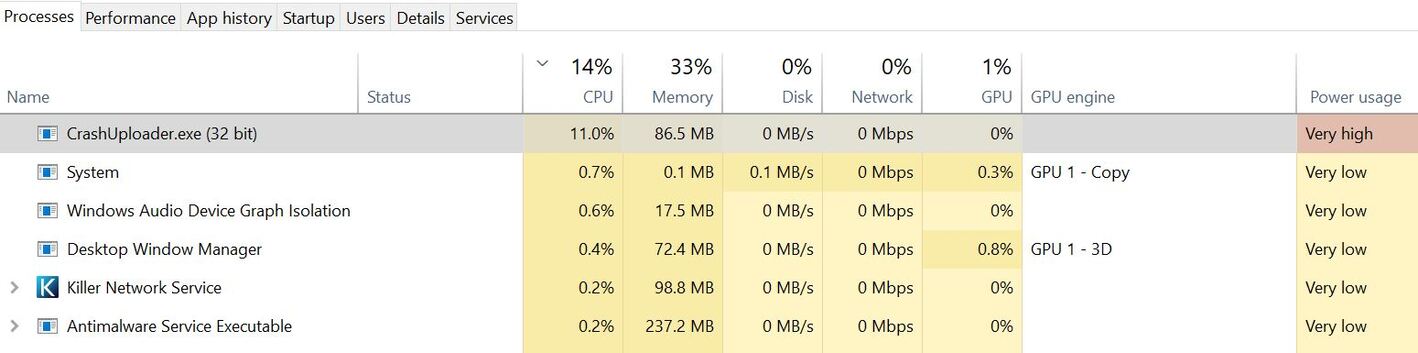
Update (4/17/23): just downloaded and installed 1.32.0.6950, and it seems to have fixed the problem for a short while. However, CrashUploader.exe now shows up in Task Manager as a high use CPU resource again.
First Post:
Ever since the latest update (1.32.0.6918), I’ve noticed that “CrashUploader.exe” (located here: \Program Files (x86)\Plex\Plex Media Server), is constantly using a high amount of CPU. 10%-15%, and is always on the top of the CPU usage list, as shown in the “Task Manager”.
The “Power Usage” column in the Task Manager is always “Very high” for “CrashUploader.exe” as well.
I understand the CPU will “occasionally” go “Very high” on any *.exe or other services, but never for 24/7. This is alarming, as it is now 24/7 the top user of my CPU.
I have exactly the same problem with Version 4.100.1 1.32.1.6999
I have turned the Plex server/computer off as the computer is slowing down to a crawl.
YES!! It’s still a problem for me as well. I thought this post would have gotten the attention of SOMEONE at PLEX but this seems to have gotten NO support.
Not sure if this would be a viable “Band-aid” solution for others, but what I ended up doing is renaming the file CrashUploader.exe to ChrashUploader.exe_BAD. That seems to have cured (at least) the 24/7 “HIGH” CPU usage. I haven’t experience any issues running PLEX with that file being renamed. Did that a few weeks ago and all seems to be running fine. That said, every time I’ve done a test since this happen by renaming the file back to it’s original name, the HIGH CPU issue begins almost instantly.
You might try disabling reporting crashes to Plex, then restarting Plex Media Server. I’ve not seen the problem on my system, so don’t know if disabling crash reporting will help, but it will not hurt anything.
Settings → Server_Name → General → Send Crash Reports to Plex
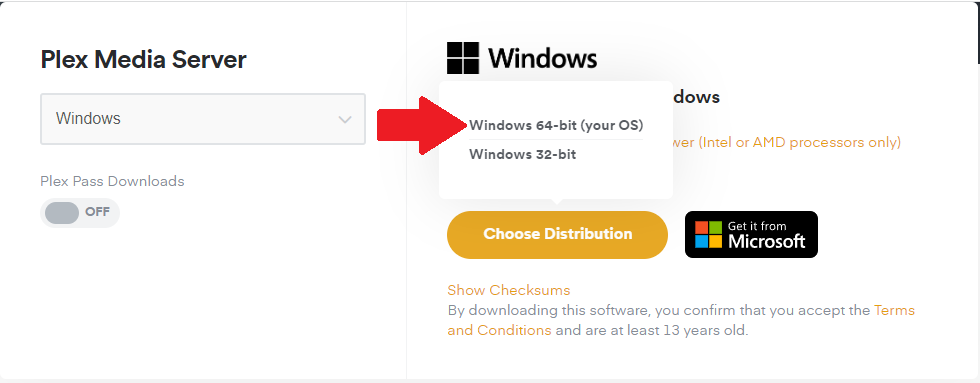
General comment: If running Win10 (v1607 or later) or Win11, consider updating to the 64-bit version of Plex Media Server. The transcoder is more efficient, especially with Nvidia GPUs. It also supports hardware accelerated HDR to SDR tonemapping when using a Nvidia GPU.
Download the 64-bit version from plex.tv. The installer will remove the 32-bit version before installing the 64-bit version.