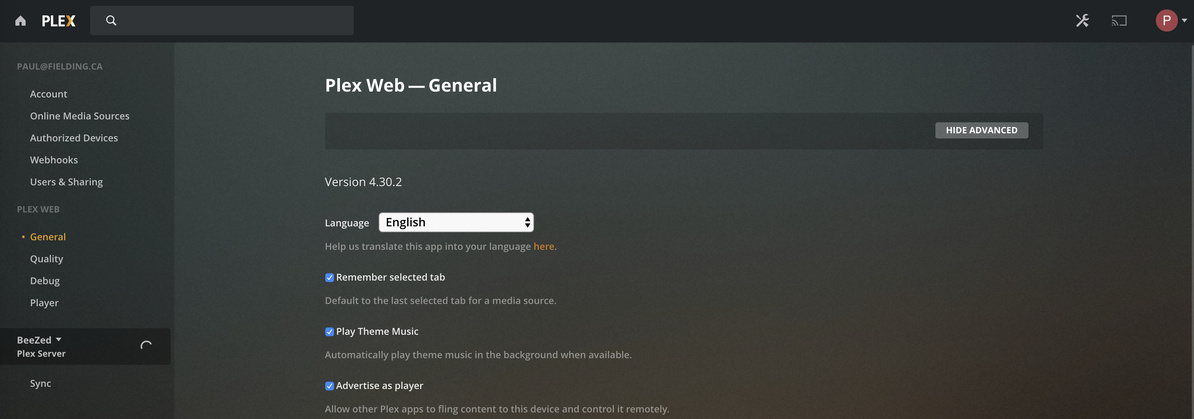
Server Version#: plexmediaserver-1.19.3.2764-ef515a800.x86_64
Player Version#:
I’m new to Plex, so not sure how to most succinctly describe my problem. I decided to create my own Media Server, on CentOS. Configured the repo, installed the package, and plex started running. Cool. I pointed my browser to myserver:32400 and got the request to login. I logged in using my already existing Plex ID. The browser blinked a few times, and ultimately brought me to a Player page. I can see that the web page is being served via my new plex server, the correct hostname is still showing up in the URL.
HOWEVER, I cannot find anyplace to actually configure my server/library. I can see all the typical player stuff, and I can see the content for my buddy’s Plex Server (which I’m subscribed to, and was the impetus for me setting up my own). But can find nothing related to my new plex server, the same server that is presenting me this info. Any idea what I’m missing? What info could I provide to help identify the problem?
In the attached screenshot, you can see my settings page - on the left you can see a Plex Server called BeeZed - that’s my friend’s server - clicking the drop-down only shows me that box, not my own…
regards,
Paul
The server isn’t recognizing you as the admin.
Is it remote or on a different subnet?
First-time setup must be done by opening
-
http://ip.addr.of.host:32400/web, with Plex/web signed out, and the server must be on your LAN
-
http://127.0.0.1:32400/web if your keyboard and server are the same machine
-
ssh -L 8888:127.0.0.1:32400 ip.addr.of.host – if remote host , then opening http://127.0.0.1:8888/web
Server is local network, a linux box.
Ok, I did the following:
- Logged out from Plex/Web
- re-typed in the URL for http://my.local.server:32400/web to make sure I was getting to the right place
- Plex asked me to login, I logged in with my Plex ID (my email address)
- I got “No soup for you!”. Doing some digging has found people with various “No Soup” issues, though the only person I found with this same scenario didn’t get an answer.
I guess the next question is, how do I convince this server to let my account access it? Based on some further digging, I checked the Preferences.xml, and there’s almost nothing in it. Certainly no credentials.
regards,
Paul
Paul,
We can abstract a bit more
- Sign out of plex/web (upper right corner - your avatar)
- Open an incognito window
- In that window: http://LAN.ip.of.server:32400/web
Now, I must ask: Are they both on the same (this is important) RFC-1918 compliant network ?
Hey Chuck,
Ok - That was interesting. To answer your question - both my laptop and the server are on the same compliant lan and subnet. I tried first doing exactly what you asked, except that I used (as I have been using) my local dns name for the server (name resolves to correct IP, both forward and reverse), assuming that that was OK. No success.
So then I went back and did it again, this time sticking 100% to your directions and using the IP instead of the DNS name for the server, and this time it worked, so first, thank you!  Second, I guess it is apparent that when it says IP, it means IP.
Anyways, I’m up and running, (and can now see my server when just using the DNS Name, and from my apps). Many thanks!
Paul
Yes sir, IP means IP
The reason DNS probably is failing is because your DNS name resolves to a WAN IP and not a LAN IP, right? 
Actually no, I have my own local DNS server, the dns name resolves forward and reverse to the local internal LAN address. shrug . Ah well…
Me thinks it needs a few tweaks ?
X-FORWARDED-FOR will flag it as remote automatically.
I have a pfSense local DNS as well on a .lan domain.
It works because .lan is a domain which complies.
No direction implied. Name in → numbers out.
Hmmm… I just looked up X-FORWARDED-FOR, it looks like that has more to do with a web proxy or load balancer than with DNS directly? If Plex is using a proxy or load balancer that I need to tweak that on, then ok. But it doesn’t appear that there’s any configuration for me to do for that in bind… (?)