We need to be able to create custom playlists for our tv shows and movies or even a combination thereof, for those of us that want to ensure we watch something in chronological order.
A great example, I love re-watching the entire Stargate series now and then, but I’d love to have a playlist that when played, will automatically alternate between the various movies and seasons of the tv shows, and jumping between SG-1 and Atlantis in this example, so everything is watched in order and together.
Without editing every movie and tv show manually and creating my own manually created tv show. I want to be able to keep everything original and not have to manually edit hundreds of entries, but simply be able to pick which movies and which seasons/episodes should be watched in what order…then I can play either the movies/shows originally…or play my custom playlist and the server knows what to play and when to play it.
I know plex keeps movies and tv shows separate, totally different libraries, but there is no reason a playlist couldnt know what to play, it doesnt need to be bound to a library at all since the playlist is not an actual file being accessed from my library
The Stargate series and movies is (speaking of them as a group) actually a great example to use where Plex already has you covered.
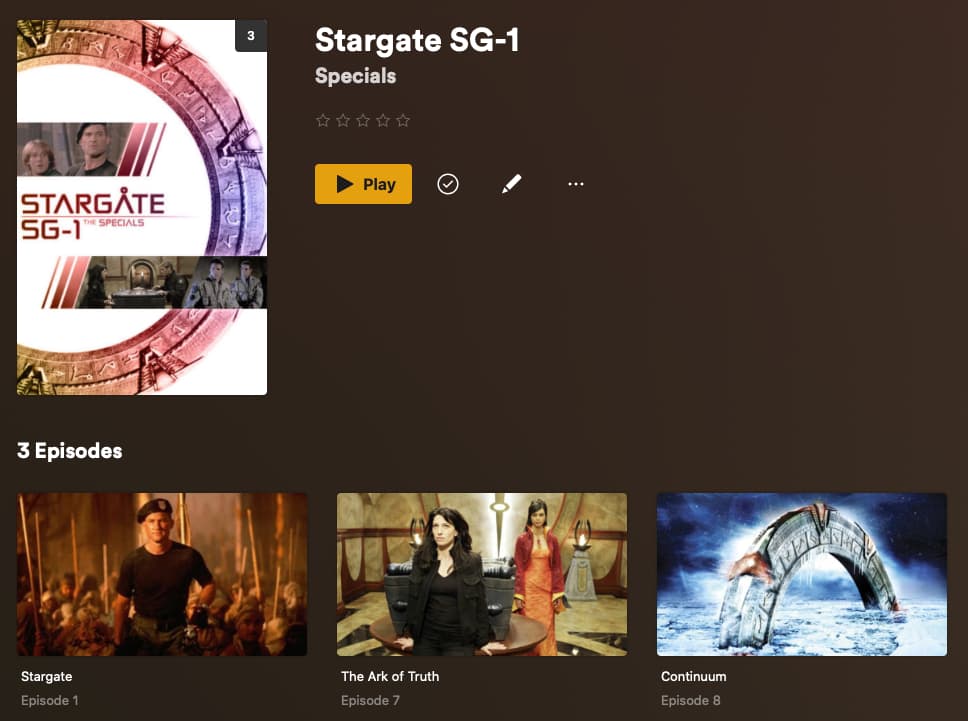
Specifically, for Stargate movies, you can add those to your Stargate SG-1 series as specials:
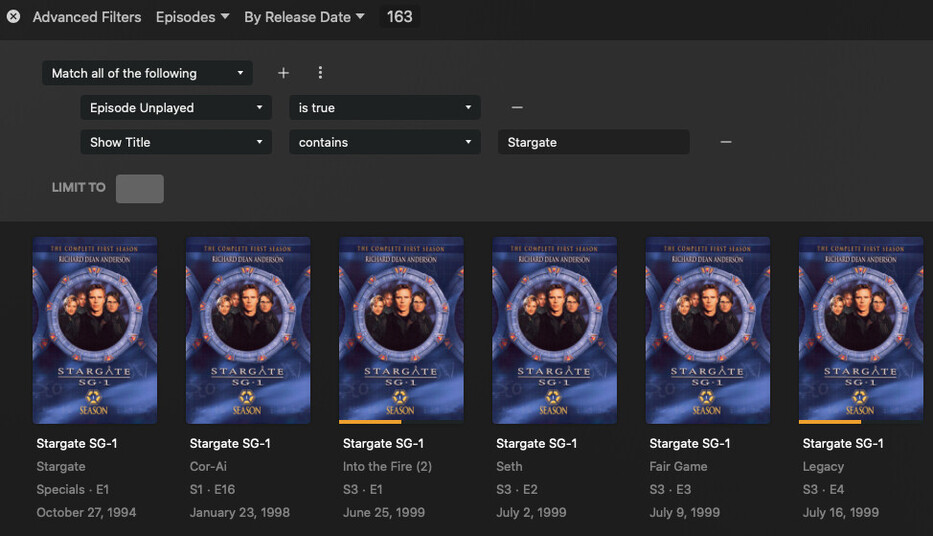
Then, you can create a smart playlist (or smart collection) which includes all show names which contain “Stargate.” (Without the period, obviously, that’s just a grammar thing.). If you sort the episodes by release date (ascending), the resulting collection/playlist will have everything in the proper order, including the movies.
Here’s an example filter, with the results (showing the crossover between SG-1 and Atlantis):
This filter can be saved as either a smart playlist or smart collection by clicking the down arrow next to the Save As… button on the top-right. Either will play the episodes in the correct order.
Plex needs to make the playlist feature more prominent. I shouldn’t have to go through menus to sub-menus to find it in the first place.
But I was able to figure out how to create a smart playlist and order it all correctly. Unfortunately Plex seems to use a different numbering structure for Ark of Truth and Continuum - The episode numbers used on the tvdb is different.
Only issue with the playlist is it does not allow for adding movies, as the original stargate movie and stargate origins is considered a movie and not tv show, plex doesnt understand what it is and the only workaround is to move them to the tv library and manually edit the data to trick it into accepting it, but then there is no artwork of any kind because it’s not a tv show
If you name the file appropriately in your Season 00 folder for Stargate SG-1 (and use TheTVDB aired order as Tom suggested) it should be scanned and added correctly.
Stargate Origins is its own TV series, so you’d need to add it to your library just like any other. Then the filter I show above will include it automatically.
I originally went off of that site but plex does not use that site. S00E01 is actually one of the behind the scenes movies. It doesn’t recognize the actual movie as a tv show at all, since it’s not a tv show - its a movie, in spite of the tvdb listing it as a special episode. the same for origins, it’s a movie. but it wasn’t that big of a deal to me since stargate is first and origins is the very last
Having messed around with the smart playlist though, I’m disappointed in how useless it actually is…
I’m around season 7, but yet in spite of prior episodes being marked as watched already, if i click play on the playlist, it always wants to start at S1E1 no matter what. It’s not possible to pick up where I left off, forcing me to goto the tv show in the library, figure out the last episode i watched, go back to the play list, scroll down till i find it, and play it from there so it plays based on the order of the playlist.
So I’m wondering if I need to instead create a smart collection instead of smart playlist
You just need to ensure you’re using TheTVDB (aired) episode ordering for the series (edit the show, select the advanced tab, set episode ordering).
I generally prefer smart collections and include an extra filter to exclude episodes which have already been watched (though that should work for smart playlists as well). Something like:
Being a smart collection/playlist, with this filter episodes will “fall off” the list once they have been watched.
Smart collections also have a neat feature where they can be pinned to your home screen and then they behave like a hub there. For example, I recently began going through Eureka again; I marked the series as unplayed, created a smart collection containing all unplayed episodes of it (in ascending order by release date), and made it visible on my home screen.
I realized part of the issue was the tv library itself was set to use the movie database for listing information instead of the tvdb. I changed it and then I had to update the special episode file names and they display the same as the tvdb website shows now
I updated the smart collection to include the “episode unplayed” filter, works perfectly now.
Plex still needs to make this a more obvious feature that exists. I never would have guessed that I need to change the display from all to advanced filter, and then which filters to use and create a smart list from there to do this. Great that it already exists but sucks they buried this powerful feature.
I appreciate all the help though, things just got a whole lot better and easier