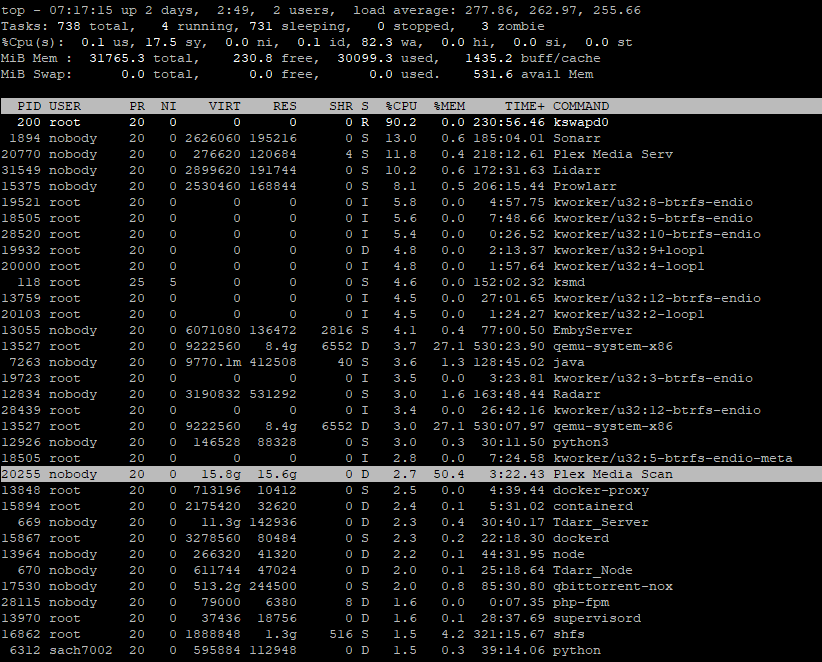
Please see above thread for further details of my broader Unraid server crashing over the last 2-3 weeks. The server was seemingly crashing at night time with full CPU/RAM usage. Last night before bed, i setup a PuTTY instance into server and had TOP command running to see what was using all the resources immediately prior to crashing and it looks like the culprit is Plex Media Scan.
I downloaded the logs of Plex after the crash at ~4:20am and it looks like I’m getting some sort of error with 5 files all filled with the same error message. The only changes immediately prior to my server crashing (which started around Dec 24th) was that I moved my server to a new ISP/location on Dec 23rd, on Dec 5th I updated to 6.12.6 and I believe around Dec 23/24th I also made recommended changes to Unraid’s macvlan vs. ipvlan based on the documentation here. NOTE that i just changed this setting again to have the following: Enable Bonding = Yes, Enable Bridging = No, Docker custom network type = macvlan, Host access to custom networks = Enabled. The server has crashed when those settings were set to Yes / Yes / ipvlan / Disabled.
I have no idea what is causing this and why it is using up all my resources causing my Unraid server to crash. Any help would be very much appreciated as i continue to troubleshoot.
do you know which 5 files its complaining about? If so you can at least test removing them temporarily and making sure Plex stops choking unraid out. If you don’t know them but know when they crashes started you can go back to what media was added at that time frame too check. By this I mean, if it started happening 2-3 weeks ago, remove all media that was added in that window of 1 week. Newer stuff wouldn’t be the culprit, it would be that window of time as it continues to happen from the same files.
Based on your unraid forum post you would want to remove files from 12/22-12/25
I don’t know which files it’s complaining about, i was more so saying that i have 5 log files called “Plex Media Scanner Matcher.1”, 2, 3, 4, 5 which are all 10MB large with this same error message.
I have added hundreds if not thousands of movies/tv shows in the period coming up to 12/25. How would i go about narrowing down what file may be causing this?
Is there a tool for health checks, and is there a tool to figure out add date by library?
you added thousands of files from 12/22 - 12/25 (you mentioned on the unraid forum that it worked fine 3 days prior to the Christmas hence my window)? This is just an idea, it’s not foolproof but if you can temporarily move the files added between those dates it should give you a better understanding if you think its related to the files causing an issue.
Do you know for sure it’s Plex to begin with? As in, have you shut down your Plex docker for the night to see if everything stays fine?
Well i can’t say for sure it was 12/22-12/25 but i added a ton of tv shows, movies and music right before christmas (maybe the week or 2 leading up to it). How would i go back and see what media was added at what specific dates?
I haven’t tested shutting off plex but i just limited the docker container to 8GB max RAM to see if it will crash my unraid server tonight. Based on the Plex Media Scanner log message errors, the fact that Unraid goes responsive right when those log messages error (i stayed up until 4:20a one night and caught Unraid getting responsive just a few mins after that 4:20a Plex Media Scanner logs show thousands of errors every few milliseconds) and the fact that PuTTY is showing the last process using up half my RAM and >100% of CPU being “Plex Media Scanner” all strongly suggest its solely a Plex issue?
Now - i don’t know if the Plex issue was brought about by some other changes to my server (i.e. the macvlan / ipvlan change; updating to 6.12.6, or some rogue update via Linuxserver.io) but I do find it a bit odd that searching for the error message “WARN - [FFMPEG] - Unknown encoding” doesn’t come up with much on the internet.
I also don’t get how a random video file can break my entire server but that’s for a post-mortem. For now i want to entirely fix my broken Plex instance if possible.
Step 1: find out what media was added in the ~2 weeks run up to 12/25/23. What’s the best way to do this given I have media spread out across 5-6 different libraries (Movies, TV Shows, Music, 4K Movies, 4K TV Shows)
Step 2: run some sort of health check on each of the files in step 1 to see if an error is produced (presumably FFMPEG is trying to do something with the video files, maybe generate thumbnails and is causing it to crash?)
Step 3: Fix files in step 2 then re-run Plex server like normal, with no RAM limit, and see if Unraid is daily crashing still.
Any help around Step 1 and 2 would be helpful. I just opened up about 12 movies that i saw imported between 12/22-12/25 and all ran fine in potplayer. The tv shows is a bigger problem because there’s hundreds of episodes that were added.
especially with it happening at a specific time (scanning), I would first just shut down Plex for the night and see if the issue presents itself. That will tell you 100% if its Plex or not and its one night of testing lost only if its not.
As for file dates, unless you have a setting set to make folders based on date aired, any new files should be getting processed with a folder date, so just use windows or file explorer in unraid to check time stamps. As you add more weeks that will definitely make the process tougher to track down.
What I can say is I am using the latest unraid OS, did the macvlan switch and am using the same docker you are and I have not had an issue at all. I wasn’t having a macvlan issue either, I just saw the note in Fix Common Problems so I changed it about a week ago.
Are you re-encoding stuff with tdarr? I scrapped using tdarr with my i7 11th gen because it was corrupting a ton of things when using quick sync to convert. Not crashing unraid, but crashing Plex.
I’ll shut it down tonight, tomorrow and Sunday to see if Unraid crashes any of those days. i actually do have some setting in either sonarr or radarr that changes the date modified to the release date. I can see sonarr/radarr import history but again it’s dozens of pages due to how many tv shows were added.
I am not encoding anything - all my stuff comes from a mix of private/public sources. I downloaded tdarr at some point but didn’t know how to setup the proper settings so didn’t end up using it (my tv library is all HEVC to save space due to sheer amount of shows, my movie library is AVC).
I do find it odd how Plex is somehow crashing because of a rogue video that then is allowed to crash my server. The unraid forums recommended in future to limit Plex memory usage to 8GB which i might do in future. But still want to fix the underlying reason for this FFMPEG error.
Yes i have but i wasnt sure what additional verbosity / debug info is being posted and where.
i have an entire plex log folder but i’m not sure which other files are relevant, i just checked the Plex Media Scanner Matcher log which is the same from last night’s crash. Is there other log files i should check?
Confirmed it is Plex, i have had Plex container turned off for 2 nights and Unraid has not crashed. I’m currently running this command, ffmpeg.exe -v error -i %1 -f null - > "%~1.log" 2>&1, with a set of ~10 movies that were added between 12/22-12/25 to see if ffmpeg outputs any sort of error.
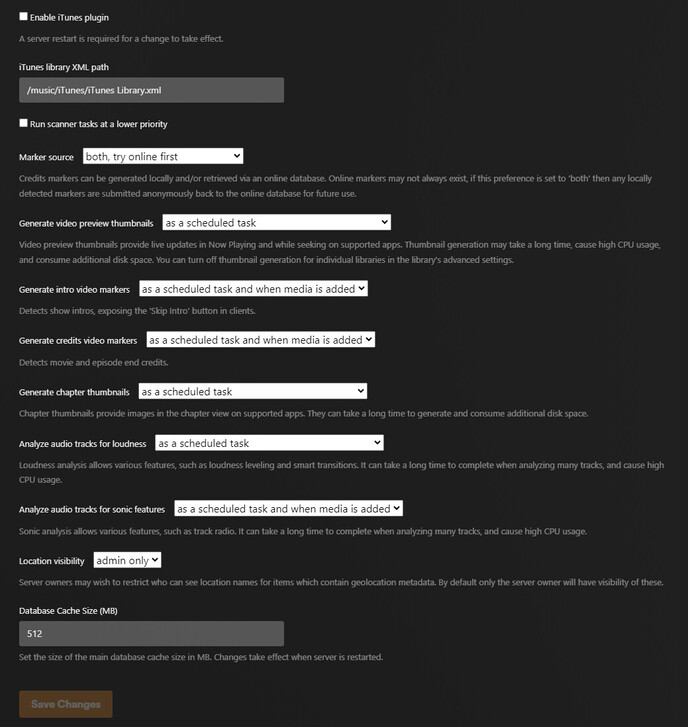
See below for Library and Scheduled Tasks section of Plex settings:
Ran the ffmpeg command and no errors showed up (or at least, the command didn’t output any text inside the resulting log files, they are all 0KB blank files).
this is closest other example i can find of someone with similar issue to me and it seems like the comments advice were geared around (a) macvlan vs. ipvlan (see last paragraph below) or (b) some issue with Plex Meta Manager which drove the OP to completely recreate a new Plex database (this is unfeasible to me because i have THOUSANDS of custom metadata edits amongst other Plex customizations, so i cannot attempt to try a reinstall that introduces letting Plex auto-find metadata / re-link the the shares etc.)
I cannot tell if this is a Plex issue or Unraid issue…but the timing is perplexing. Plex forums are saying this may be related to a video file I added (i.e. Plex is trying to scan a corrupted video file that is causing the error output…which would seem very bizarre…a random video file causing entire Plex to crash, that seems like quite a broken / malicious way for Plex to be exploited?). At same time, Unraid forums saying that try figure out what is causing the crash by turning off things until it stops crashing, then troubleshoot that specific problem child (i.e. Unraid → find out Docker causing crashing → find out Plex container specifically causing crashing).
I just changed my Docker / Network settings…again. It was just previously: Enable Bonding = Yes, Enable Bridging = No, Docker custom network type = macvlan, Host access to custom networks = Enabled. I have now changed this to: Enable Bonding = Yes, Enable Bridging = Yes, Docker custom network type = ipvlan, Host access to custom networks = Disabled. Presumably this current setting is now what people refer to as “switched to ipvlan” (i.e. have to have bridging turned on? if i turn off bridging, then ipvlan option becomes greyed out).
So is all of my server woes entirely driven by a specific issue in BETA v1.40.0.7775? I cannot comment on that top thread so commenting here and tagging some of the Plex members that seem to be responding in those threads (sorry to flag but not sure if my issue is the same or different than the people above given the specific FFmpeg error in my log files). Happy to upload the whole log zip folder if needed.
I saw some notes around database files increasing columns / add’l data being added. I’m about to run ChuckPa’s 1/4/3 tool again on my database (while on 1.40.7775). Then i would like to find a way to fix my Plex crashing. I think it would be prudent for me to move off the BETA channel and back to public stable releases. The odd thing is my lscr.io tag is set to LATEST and Plex->General->Server Update Channel set to PUBLIC, yet I’m on 1.40.7775. What would be the steps to safely revert back to using the stable/public release channels on Unraid/lscr.io container?
I have been having exactly same issue on my Ubuntu server (server crashing, ffmpeg errors in log). Yesterday I downgraded to 1.32 (just installed with dpkg the older version) and this morning there was no issues and server is been running without issues.
Update: per the Plex discord, SwiftyPanda (i think the tautulli dev?) recommended i don’t do anything with downgrading due to the database changes made in 1.40.7775.
I will wait for someone to advise me here on:
(a) how to properly address the current crashing (wait for a fix this week and turn off plex during night when it tries to do the scheduled maintenance tasks?)
(b) how to transition off BETA updates to the stable public release channel (presumably changing the lscr version to Docker from Latest would downgrade me since the PMS PUBLIC/BETA setting doesn’t control that?)
The transcode variable i have kept blank on in the lscr docker template. I have the parameter “–device=/dev/dri” so i assume the transcoding is being done by the intel iGPU, but not sure where it’s being stored. What is the default location of transcoding if the variable is blank?