The dashboard has been out for about 6months now and wanted to get some feedback about it. Are there other things you want the dashboard to display? For the things it already displays is there more details you want from them?
The main thing it’s missing for me, vs. Tautulli, is that the play history doesn’t specify whether a play was transcoded, direct-played, or direct-streamed.
The dashboard being on the server definitely helps administration of Plex but I would like to see an area where Device settings are listed.
Example: iPad, TV, Game consoles.
This would assist in quick admin when issues may occur. From a forum point of view would help many who are newbies to Plex. I’m not requesting that the setting can be administrated from the Dashboard, just viewed. Even though that would be awesome.
Move all the statistics log messages to their own log file.
Look at the top 5 asked questions/problems and include that information i.e. Remote access, a can you see me type response, DNS source.
Maybe a header that can be used to paste into a ticket:
How about some form of metric around connectivity to Plex’s servers for remote access? It will give folks an early warning that there is some form of issue they should look into.
Would like to see some transcodeing information,
by CPU or GPU and what user, how much the load is… are we overloading a system
That way if I have user complaining then I know what is going on,
I know it tells me if he is HW transcoding but doesn’t give me anymore info.
Adding a user color to the CPU graph would be helpful and a new GPU graph
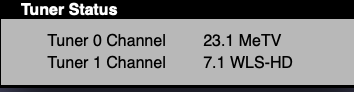
Most definitely adding what channel is being tuned in during LIVE TV sessions. I will be checking on recordings but find myself having to go separately to the HDHomeRun Tuner page to pull up what channel is being tuned in. I wish to see this info and what program is being watched from the EPG guide. And unfortunately not even Tautulli doesn’t do this yet.
Plex’s handling of playcounts can be a little suspect.
I have some files with 100000+ plays, which is inaccurate, and I would like to be able to edit them. Its not widespread, and being able to change a few would “fix” playcounts across my library. This could also be mitigated by being able to select duration over playcount.
I’d also love if the dash was more front facing in that “most watched movies” etc can be accessible from other apps, as in I could view the most popular movies from the week on my TV app and pick something to play
That is not too technical, and would give some parity with for example the Android client which can already show this. It is also very useful for users of all kinds - the non tech savvy ones will at least know why their computer is slowing down, and might find it interesting.
It doesn’t have to be complicated at all, maybe just on hovering the current stream (in detail view) will show a pop-up saying “the video is being converted because the format is not supported by the receiving device” or something like that. When I was a noob with these things, that would have helped me a lot.
Force on and off. For example, now this feature is available only for one thread at a time and only when you hover and hold the mouse cursor. I would like to be able to watch thumbnails for 3-4, etc. movies at the same time. Optionally.
I have 10 family sharing on my media centre, is there (or could there) be a way to see if they are being fair and not letting anyone else use their credentials. I know it has been a problem for some people and we hope they play fair but it is not always the case. I don’t know how this would be achieved other than maybe some form of location indicator.
Had this issue with my daughter. I’ve limited my users to a single stream. She was pretty easy to pick out because I could see the type of device she was playing back from, and if something was odd I’d call her to see what she was doing.
I would really like a stop/ play control on the dashboard for the now playing. Hovering over the User Name only works intermittently and not at all if play is started from alexa.
Thanks