Deleted Movies still displaying placeholder image in Movies library

Server Version#: 1.23.2.4656
Player Version#: Plex for Windows 1.31.1.2262-74fdc6b7

A while ago I deleted a heap of movies from my server. What I hadn’t noticed is that Plex is still displaying a ‘placeholder’ blank image with the movie name. Screenshots below show what I mean, as well as what metadata is still contained:
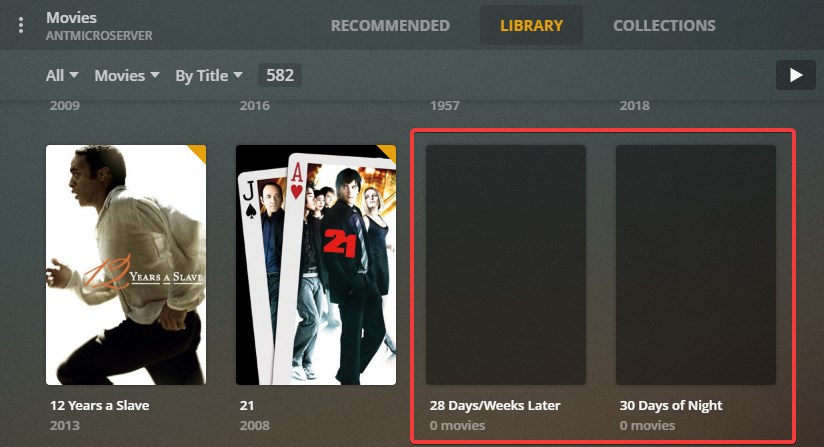

Plex_2021-06-05_17-20-54

All of the movies live in a single directory, so this isn’t an issue with pathing, or loss of access to the directory, or a moved directory.
If I delete a movie today, it does disappear entirely from the Movie library, so I believe this is just a remnant from when I did a mass-deletion.
I’ve tried Optimize Database (Settings ->Troubleshooting ->) a number of times but it hasn’t resolved the issue (but I did see some interesting log errors which I’ve documented below).
I’ve tried ‘Scan Library Files’ a number of times, but also no change.
I can successfully manually delete an item (3 ellipses → Delete > Delete Collection → Delete) but I’d rather not have to go through and do them all manually!

Log Files attached. I captured them after:

  1. Stopping then restarting PMS service
  2. Running ‘Optimize Database’
  3. Running ‘Scan Library Files’

Plex Media Server Logs_2021-06-05_17-11-24.zip (3.1 MB)

Any suggestions on what I might try next to clean up these remnants or ghost placeholders in my Movies library?

These aren’t movies, but Collections.
You can recognize a collection by the grey subtitle x Movies.
It is intended that collections are being retained when you delete the movies in them.

Switch to the Collections tab and delete the collections if you don’t want them anymore. But you could also keep them if you plan to add the movies again (maybe in a better quality version).

1 Like

Thanks @OttoKerner

I had considered that, but then wondered why I was seeing Collections in the Library view, given there is a dedicated Collections view. That seemed counter-intuitive to me. Oh well, I now know otherwise!

So is there no automated clean-up of empty collections, or a way to mass-remove them?

thanks again!

When you edit your library and go to the Advanced tab there’s an option to hide movies and show the collection only, maybe that’s the reason.

Thanks @CostaHT !

While that doesn’t solve my clean-up problem, that led me to the setting (Manage → Libraries → Movies → Settings → Advanced → Collections, then change from default of ‘Show collections and their items’ to ‘Disabled’) to remove Collections from the main Library view.

This topic was automatically closed 90 days after the last reply. New replies are no longer allowed.