I have the latest version PMS on my DSM7 Synology. Playback works fine on my Nvidia Shield.
On my other TV there are constant problems. Both on the Sony X900F via the installed player, or the Amazon 4k Firestick. Both have the latest version of Plex Media Player installed.
Starting a video either results in a spinning yellow circle, or a black screen. Sometimes it magically works, but more often than not it doesn’t. It used to work perfectly fine until a few months ago. The internet connection is fine, so it’s some new Plex issue. Other streaming services work without issue.
What has changed that’s caused this to stop working?
I have the exact same issue. with my Sony X750. It started about 2 months ago and has gotten progressively worse. I have gotten to the point where I hate using Plex because it only works a few times out of 10.
I’m experiencing this exact issue. The same videos then work flawlessly if I Chromecast to the same TV using it’s built-in Chromecast functionality (X900F).
Happy to provide logging and work with someone from Plex around this as it’s getting highly frustrating.
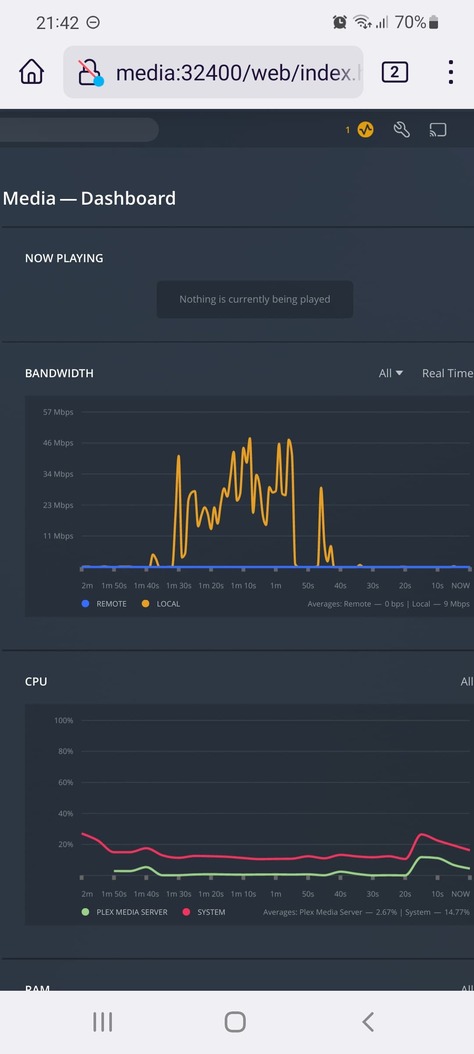
Saying that, looking at the logs myself it’s like the app just forgets to start the video? Logging is all normal looking, and I can see the spike in network traffic where it has cached the first chunk, it just doesn’t start playback.
I have a Sony Android TV and the exact same thing happens, it has also been getting worse over the last few months. Some media files play fine, then just stop if you skip forward or back, and will never play again. The only fix in that case is to create an optimised version, and that plays.
Like you, I see the spike in traffic - but the dashboard never shows that something is being played, then the activity dies away and the TV is still showing a spinning disc
I believe we’ll need a Plex dev to look into this properly but super happy to provide logs. I’m pretty sure it’s the Android app itself on the TV as it runs flawlessly on my phone.
Is there an option in the app to increase the logging levels? As the logs I have already looked into from the TV don’t have anything in them (from what I can see).