Server Version#: 1.9.4.2902
Player Version#: 6.8.3.7132
Tuner Make/Model: Tablo
Guide/Lineup name:
Using XMLTV?:
Channel number/Name:
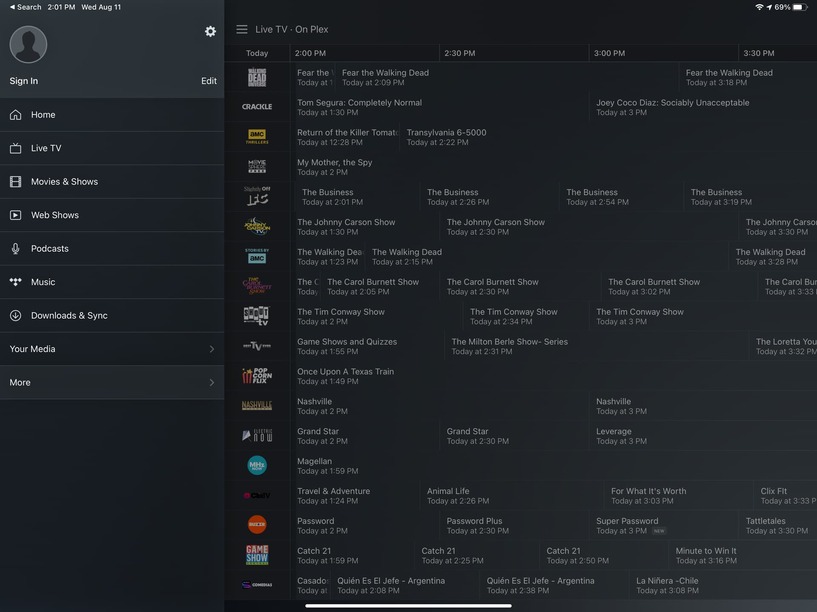
I have set up my Home Run / Tablo / Plex configuration and now the Guide shows up and so on. In that guide, I want ONLY to see stuff that I can retrieve off of my antenna, I am not at all interested in other addons such as the Plex Channels (which dominate the gude and make it nearly impossible to find my OTA programming).
In the server settings, I have disabled ALL the Online Media Sources, and I would have hoped that Plex could take a hint from that. But alas!
What is the recommended approach that allows the guide to show ONLY my own OTA programs, so that I can search the channels for the programming that I want… and remove the stuff that others think should interest me?
From all I remember the guide is only showing content from your DVR. Any other media offered via the online media sources of Plex is listed in its own sections.
Sure, here you are. Last I knew, AMC, Crackle and all these others were network-only, subscription-only services, not avaiable from an antenna. I’m very confused since the setup is as I described.
By the way, this screenshot is from iOS Plex, not sgned in, as you can tell. But it is representive of what I see on Roku, for which a screen shot is not available (or I don’t know how). The Roku differs in that on the top left rather than saying, “Sign in,” it shows delovelady.
hmm. you don’t have Live TV listed there to turn off on the Online Media Sources page for some reason which is the Plex streaming channels. Gonna try to get someone to look at your account to see why that is.