Server Version#:1.18.2.2029
Player Version#:
Plex server has always been avaialbe to the Dish Home Media Player and the LG TV media Player. Now they no longer show up. What do I need to do to get them back?
Thanks
Server Version#:1.18.2.2029
Player Version#:
Plex server has always been avaialbe to the Dish Home Media Player and the LG TV media Player. Now they no longer show up. What do I need to do to get them back?
Thanks
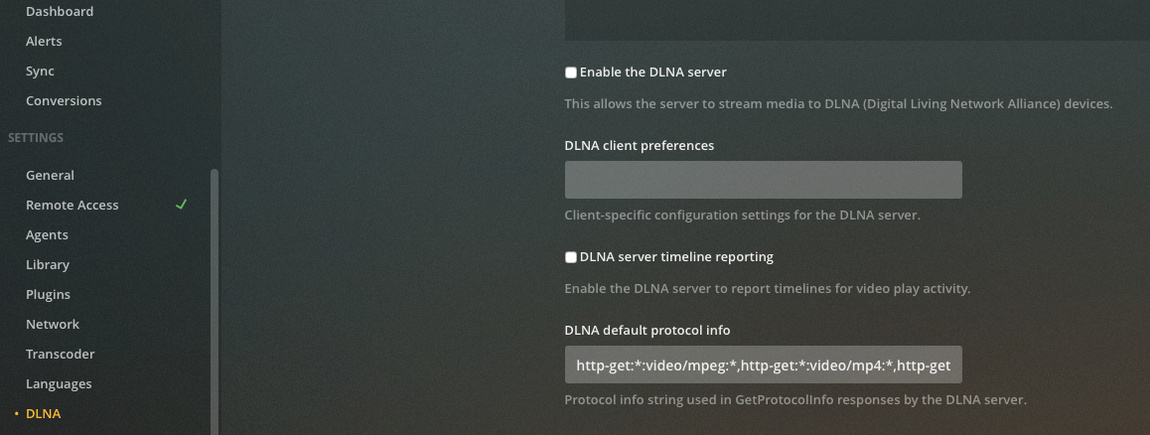
Do they use DLNA to communicate with media servers? If so, do you have DLNA enabled in PMS (Settings → DLNA):
Check the box for “Enabled the DLNA server,” if necessary (mine is disabled).
Yes it is using DLNA. It has been working just fine. I’ve had some network issues which have been resolved but now the Plex server isn’t showing up
Ah, I didn’t notice your post was tagged as “server-dlna.”
I just tested on my Mac (macOS 10.15.1, PMS 1.18.22029). I don’t normally use DLNA, but I enabled it and tested with a DLNA client (Windows Media Player was all I had handy) to ensure it could be seen; it was.
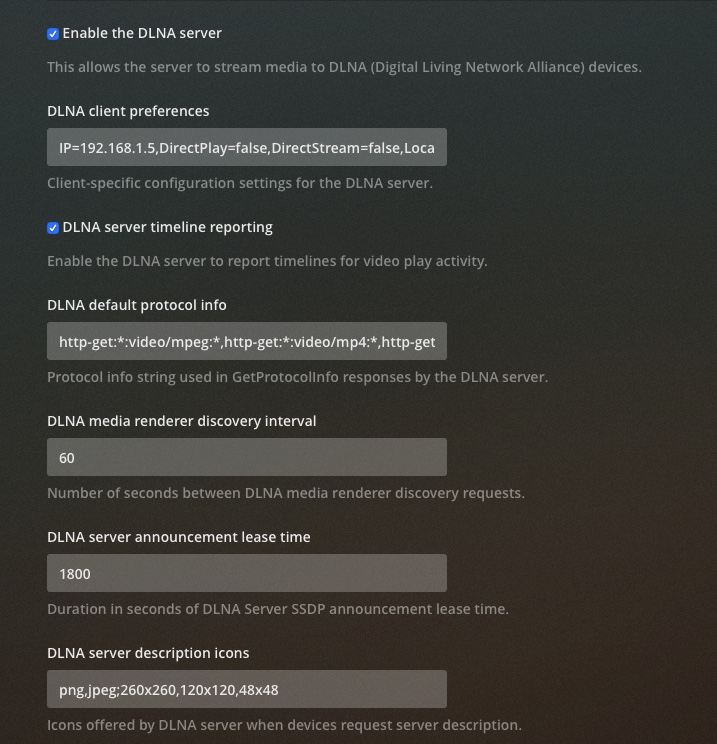
Maybe try deleting your DLNA client preferences; copy them somewhere if you want, but they should be automatically recreated when a client successfully connects. Then stop and restart the server to ensure the DLNA server gets restarted. I’m not sure how your clients work, but when I used DLNA on my PS3 years ago I had to have it scan for servers.
Aside from that, perhaps someone with more DLNA experience will have some ideas.
I uncheck the enable DLNA setting and deleted the client preferences. I shut down the server, then restarted it, re checked the enable DLNA server, saved changes, stopped the server then restarted. No joy, nothing got rewritten in the client preferences and server does not show. On the Dish Home Media Player there is a refresh button which brings no joy. Earlier I noticed the IP address in the client preferences wasn’t the IP address of the computer the server is on. I normally have a static IP address on this computer. Because of some network issues I had changed to DHCP but have changed it back to static IP. I’m assuming that the IP address should be that of the computer that the server is on. Does anyone know if this is correct? or does it create it’s own IP address. I didn’t know how client preferences were generated, I was hoping to see what IP address it came up with. It still has not generated any new client preferences. I did save the old ones. I also tried going back in the Time Machine to a day that everything was working (Last Thursday) with no joy. Both the LG TV and Dish Home Media player see my 2 HD Homerun Tuners so they are seeing DLNA devices. Any suggestions will be appreciated.
Do have the firewall enabled on macOS?
Settings -> Security & Privacy - > Firewall
No, firewall is turned off
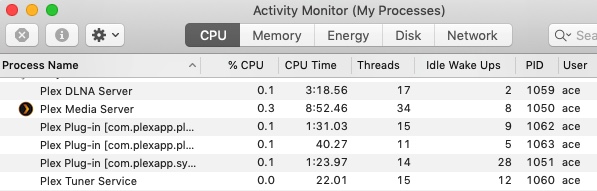
Maybe verify that the Plex DLNA Server process is actually running on the system. If it is, maybe a look at the logs will help:
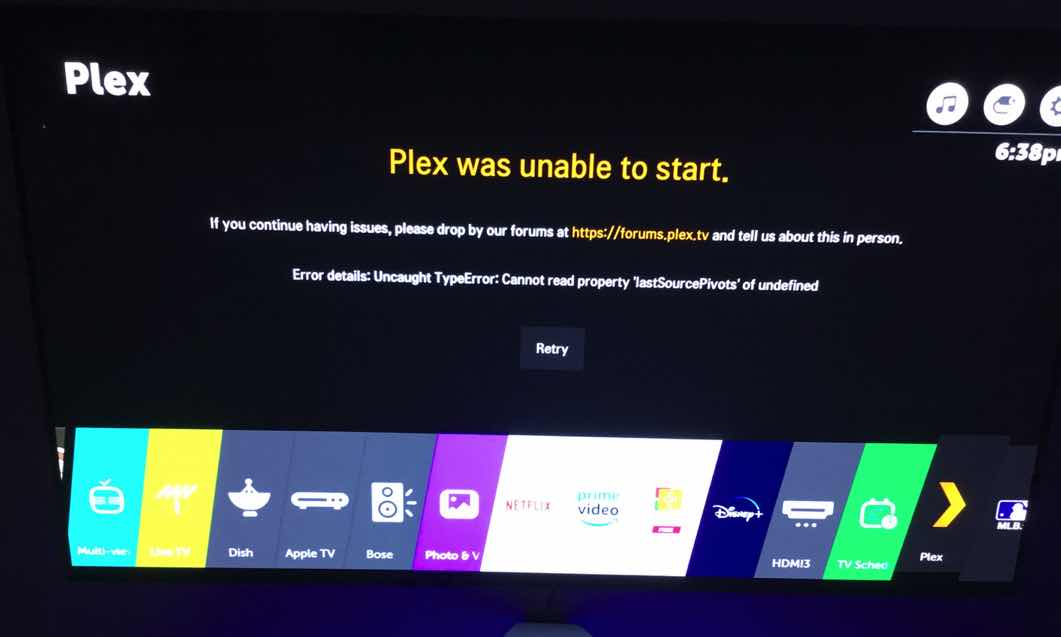
I’m not sure how to verify that it is running. Last night, wanting to watch a program I had on the server I tried to use the Plex App on the LG TV. When I launched the app it wanted to update which I did. Then relaunching brought on this error. “Uncaught Type Error? Can not ready property ‘lastSourcePivots’ of undefined” So it would seem I can’t use DLNA or the app.
You can check in Activity Monitor in macOS:

I’m not sure what to make of the application error. You may want to start a new thread to discuss that.
OK, I had seen that on the activity monitor and yes the Plex DLNA server was running. Actually I had checked the activity monitor to make sure everything shut down when I was shutting down the server.  Looks like the problem was, when I was messing with my router because of the network issues, I’d done a few router resets, I clicked on the Enable IPv6 button. Apparently PLEX doesn’t like IPv6 because when I took it off the server showed back up. Go figure!
Yeah, there are forum posts about Plex’s implementation of IPv6 not being fully-baked yet. I didn’t even think to check that as I’ve got it enabled on my PMS.
At any rate, glad you got it working.
Welllllll I spoke too soon. Plex showed up fine in the Dish Hopper and I was able to watch a few shows last night. It wasn’t showing up in the LG TV media player which was puzzling because it usually shows up there before it shows up on the Hopper. This morning it’s a no show AGAIN. I’m not sure what’s happening here. It is showing up in the activity monitor so it is definitely running.
I might be getting too old for this crap This is becoming a complete mystery to me. I started playing around with other DLNA servers. I installed Servio which looks kind of cool, if I weren’t married to Plex i might consider it. No joy, a no show on the Hopper. Interestingly, still showing up are 2 HD Homerun tuners and a DirectTV Genie, my neighbor shares my network so his system shows up. So the Hooper is seeing other DLNA devices just nothing from my computer.
Just for grins I installed Servio on my MacBookPro. Voila! it shows up on the Hopper (what the hell??) Difference between the MBP (10.13.6) and my computer (MacMini 10.14.6) other than different OS’s is the MBP is using DHCP, Mini has a static IP. Changed the Mini to DHCP and low and behold there it is, the long lost Plex server is on the Hopper.
Here’s what I don’t understand. The Mini has AWAYS been set to a static IP, (192.168.1.5) Until recently Plex has always worked (well pretty much always ) In DHCP the IP is now 192.168.1.174. Why does .174 work but .5 which has worked in the past not work? The Mini is the heart and soul of my home automation system, there’s lots of port forwarding going on to the .5 address so I really need to keep a static IP. It was working with a static IP last week, not working this week??
The first instance of the Plex server not working was 11/10 when I updated to V 1.18.1.1973. After updating it was no longer visible on the Hopper. Using Time Machine I went back to the previous version and all in the world was good again until it wasn’t. This past weekend 11/16 everything went to hell and nothing would bring it back. My router shot craps, it has since been replace and will be replaced again at the end of this week. Long story / short, I have an Amplifi Mesh system, can’t just replace the router and re-pair mesh points, they are hard coded to the old router which is BS so I’m replacing with a different brand. I will be returning the replacement Amplifi router. Thinking OK must be the router but, it worked before, .174 works now but .5 doesn’t??? Also there was a one night stand on 11/18, I turned off the Enable IPv6 on the router and Plex reappeared on the static IP. I had a night of fun but it left in the morning (story of my life) I’ve re-enabled IPv6 and I’m running the server version prior to 1.18.1.1973, because,. . . well it’s working at the moment but will update to the current version as soon as I get adventurous again. Sooooo
Any suggestions as to how I can get the static IP working again would be appreciated. So far so good with the DHCP but with all the port forwarding something is going to screw up pretty soon. As I said at the beginning I’m getting too old for this crap. The system has been so stable for so many years I don’t remember everything that I have going on with it.
Are you manually setting the static IP on the Mini, or are you using a DHCP reservation on the router? If setting manually, you could be giving different values for the default gateway or DNS servers than what is handed out via DHCP. I’m not sure that those (potential) differences would matter.
If you are setting the static IP manually, it may be worth a try to use a DHCP reservation instead:
It will behave otherwise the same as DHCP but will provide the Mini with the IP address you designate every time. I use Ubiquiti’s Unifi product line for my own network and use reservations for everything I want to have at a fix IP address; it works well.
I’m manually setting on the Mini which until this weekend worked fine for decades. Suddenly it stopped working. Subnet Mask and Gateway are both correctly set. I use the static lease for devices that I can’t set a manual IP address. Most devices on my network have assigned IP address by either static lease or manually set IP address. Only things not assigned are iPhones, iPads and a device or 2 that the MAC address are flakey.
I’d try assigning a static lease to the mini but Amplifi will go away once my TP-Link Deco M9 system comes in. I’ve had the Amplifi for 2 years 1 month. Made the mistake of buying the kit. I realize components go bad, I expect hardware to last longer than 2 years but stuff happens. However I don’t expect to have to throw away $230 of good components because they hard code the Mesh Points to the router in the kits. The Amplifi router for some reason stopped passing speeds above 100 MBPS through the WAN port. Straight through the modem I get 156 MBPS, through the Amplifi it’s 93 MBPS. They trouble shot it and said the WAN port was wanky, sorry for the inconvenience, you need to buy a new router which I did and found out that I couldn’t pair my Mesh Points to the new router because they are from a kit. I guess you are suppose to know that when you buy a kit. Rep said they needed to do a better job of getting the word out, no can help with getting the system back up and running, need to buy a new system, no exceptions to the policy.
True, need to by a new system, but it won’t be an Amplifi. Really port company policy. An example of a good company is Ring. My doorbell cam just want south. They are giving me 50% off an out of warranty purchase. Amplifi could learn from that. Ring still has me as a customer, Amplifi doesn’t. Sorry, just need to rant.
It wouldn’t surprise me if the router has something to do with it. I’m not using the old router, it’s the replacement that is going back to Amazon when it’s replacement comes in hopefully tomorrow. I’ll report back when I get the new system setup, see if the problem goes away or if I need to create a static lease for the mini vs a mini assigned IP.
This topic was automatically closed 90 days after the last reply. New replies are no longer allowed.