My download “succesfully” finish but numerous ones fail tonplay with check your connection error. Deleting the download and redownloading the exact same file usually works 99% of the time.
Found this thread because I’ve been having this same issue.
No clue if this helps, but when I’m connected to my guest-wifi, the whole file will transcode, but my download speed never goes above 80Kbps, but when I’m connected to my main wifi, the download speed is fine, but the transcode fails after about 10-25%.
I Have also issues with Downloads. I have put the IP To DNS rebind. It works one time.
And now nothing.
Also the Server crash when i try More then one time To Download items on my Android Tablets.
The solution i was able to find is here:
Its still ■■■■■■. Downloads need a resume function and improvement on speed. I spend way too much cellular data on downloads which dont work in the end.
3 Likes
Latest issue with DLs for me seems to coincide with this in the logs:
SSDP: Error parsing device schema for http://0.0.0.0:80/description.xml
Seems there’s a bug with the server failing to resolve the client IP address. It’s specific to downloading. Streaming is fine.
Any estimate on when this might get looked at? (it’s both movies and tv)
Downloads still dont work. The circle gets to 90’ish% and then just restarts. My server is on the same subnet as my clients. I left it running for 3 days… posting this from the airport where I’ll take out without any of my media for the 4….5th? year straight.
+1 for downloads not working for me. If I set video quality to orgional, then Plex will not attempt to transcode and the video will dowload just fine. If Plex needs to transcode the video while downloading it, the download will always fail. If I stream the video with a decreased bitrate,Plex will transcode and stream just fine.
PMS on Ubuntu 18.04 - 1.29.2.6364
Plex on Android 9.11.1.36576
Downloads doesn’t work for me either… Hasn’t ever. Sync worked great compared to this abomination that replaced it…
2 Likes
Same thing I am noticing - how has Plex not fixed this issue yet??? It’s literally been years I think.
I am once again posting to keep it known that “Downloads” still doesn’t work
1 Like
I was able to get downloads to work by changing my temp directory. Plex USED to let me select my external as my temp storage location. Recent builds force me to use /tmp.
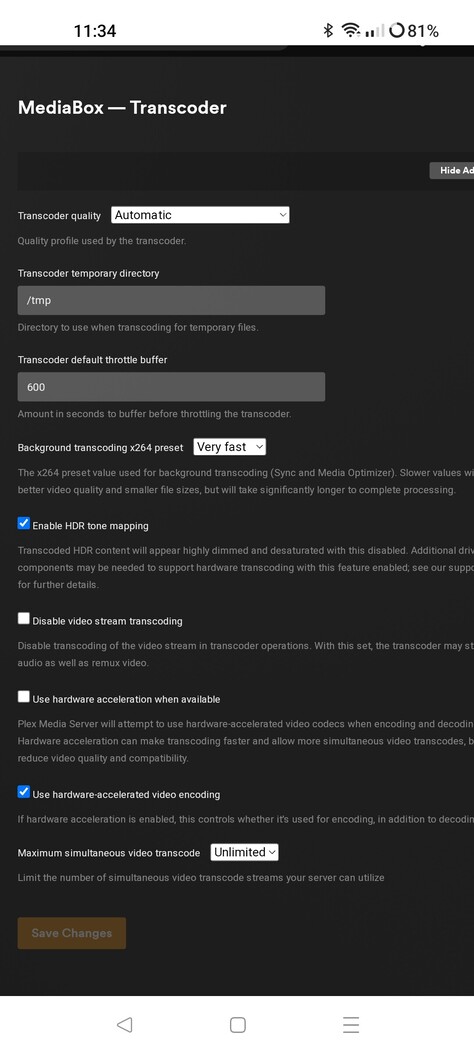
Hi All,
For those of you who are having problems downloading on iphones and ipads, please see this feature request and vote:
The reason your downloads are failing is because the iphone/ipad apps do not support backgroud downloading, even though it is supported by iOS. To keep your download you have to keep PLEX open in the foreground and your device has to stay awake/unlocked for the duration. Sad but true.
Vote if this matters to you.
2 Likes
Hi,
I’ve been a Plex user for years and love it. However I’ve just bought a new iPad mini, loaded PLEX on it and whilst I can play movies/tv etc, I can’t download anything. When it tries to it comes up with “Download Scheduled”, but when you look at Downloads it says Data Transfer failed with the Yellow “!”.
My old iPad Mini running IOS 15.7.3 woks no problem.
I’m using Plex on QNAP details below
Server
PLEX version 1.31.3.6868
QNAP running QTS 5.0.1.2346
Client
iPad Mini 6th Gen IOS 16.4
Any help would be appreciated.
Dave
I have the same problem since the IOS16.4 update on an Ipad pro and mini.
I start the download and get all downloads in error.
Plex is open and in main application
I have the same concern with series that was already downloaded and waiting for a new episode.
And after 10 min the Plex application stops
I have noticed that this issues started with for me with IOS 16.4 update, working fine before update on iPhone 12 Max Pro I could download any item and it would download very quickly any size but did not put this together, I was then using iPad Pro and the same thing then I noticed the change after an update. Now I cannot get any files to download to any of my devices with Wifi, I then tried and switched the wifi off and used Mobile Data and it will download to the device however very very very slowly. Anyone have any ideas, this was working fine before the iOS 16 updates or does anyone think that it maybe Wifi related and if so what has happened?
Many Thanks in advance…
Hi all,
I have tried this and that without success. Downloads always fail (Android). I kind of got one episode by letting the phone open a whole day, and it downloaded one I already had seen by the time 
Any chance something moves on the dev side? Acknowledging removing sync was a mistake and bring it back?
I’ve had to resort to using the iOS VLC to pull media from my plex server and use VLC to store and play my downloaded content - this has worked pretty flawlessly for me.
Seems odd to cripple a previously working system (sync), replace with a flakey system (downloads) and then seemingly not respond very clearly to various complaints about it - and drive people away from your product?
To be fair - plex downloads has worked at times for me fairly well, but then at other times it simply refuses to and there’s little to no client side debug info as why its failing. Sifting the server logs isn’t something I ideally want to do in my downtime.
I’ve tried everything suggested here and am still getting error while Downloading errors .
I’m on an iPhone and my server is a Synology NAS running DSM.
Anyone used this setup before?
What’s the trick?
