Dune player

I tested it only on Dune HD Duo, 101, 301, 303. For other models need to try.

Now description only on russian, later I'll translate to english

But l think it easy to understand just try use plugin

Спасибо!

Настроил без проблем на Dune 303 по NFS c NAS Netgear, буду тестировать.

Интересует, автообновление фильмотеки на Dune при добавлении новых фильмов на NAS.

Thanks! Has adjusted without problems on NFS c NAS Netgear, I shall test. Interests, autoupdating of a film library on Dune at addition of new films on NAS.

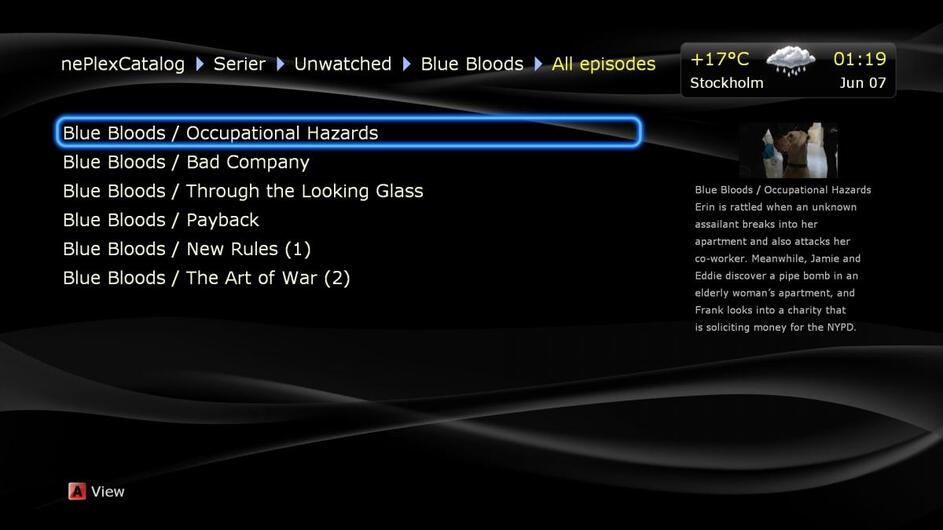
jmper, I have taken your PLEX client for a test drive and it works fine. Can’t see anything in your client that emplexer v1 can’t do but i guess your client is supported so eventually it will get a lot more functions. :slight_smile:


I have a few initial suggestions. Hope you don’t mind…

  1. Don’t show the name of the show, just the episode name. I have selected a specific show so I know the name of that show.


  2. Could you add a badge to the show image that let us know how many unseen episodes that show has?

    As you can see I have no clue how many unseen episode each show has.


  3. Can you make a view without the big pic to the right and show more movies/show icons instead?

    Here is a pic of emplexer. Compare this picture to the one above and you can see the difference.

Спасибо,

заметил баг, после выключения-простоя-включения на Dune HD Connect WE (с истемной флешкой) слетает Plex Server IP.

Просьба, т.к. медиатекой на дуне пользуется и ребёнок, сделайте пожалуйста возможность прямого перехода к "мультам" с главного экрана, после отключения всех фильтров, т.к. сейчас - пусто.

Thank you, noticed a bug, after switching off-idle-inclusions Dune HD Connect WE (Your system with stick) flies Plex Server IP.

I ask, because media library for use and tung child, please go directly to the ability to 'multi' from the main screen, then turn off all filters, as now - empty.

hi evrybody,

could someone just write a little "operational guide" to install this new client + configure it please ?

I just fear to forget smthg important...

I just installed the client on my Dune Smart B1, but the launch failed

how can I configure it ?

thank you very

much in advance !

regards

EDIT :

here is a little installation guide

- download the client ad put it on a place accessible by your Dune (on local storage, or network storage)

- In Dune file explorer, hit enter on the file

- after a few seconds, you should have a message "OK" (--> client installed on Dune)

- Go to Set Up > Applications > DPCand press enter

- then you at least have to configure the IP address

- then go to Sources, you should have the DPC client at the bottom of the screen

- 'don't forget to update "connections settings" in setup screen' ; yes indeed you can click on the paths you see (the ones configured on PMS) to modify them (ex : on Windows, you'll have smthg like V:\... but the Dune doesn't know V:\ --> so you can choose between SMB, NFS, network storage or local storage

[EDIT]

here are some explanations for connection setup :

- "server --> the @ip of the final equipment where the files are (not necessarily where PMS is)

- "folder" --> the folder known by your Dune to access these files (NOTA : you should try to access your files BEFORE configuring DPC, and configure this parameter the same way)

these parameters depend on the type of access you have chosen (smb, etc)

I give you here my example :

without speeaking of DPC, I configured my Dune to access my NAS via smb (I was able to do it alone, so it's very easy ; start with "network connections" under "Sources")

so I can see under "Sources" :

- "music"

- "video"

and when I choose one of them (say "video"), I browse directly the content of "/volume1/NAS/video" which is on my NAS, so i can watch with Dune movies stored on my NAS

so let's say I go to "video/etrangers (foreign)/" : i see all my foreign movies

ok ?

Now with PMS & DPC :

in PMS, I configured a "movies" type library with the path "/media/NAS/video/etrangers" (which is linked via smb to "NAS_@ip/NAS/video" on my NAS in a config file)

then in DPC, under "connection settings", I already have the path "/media/NAS/video/etrangers" given by PMS (to DPC)

when I click on it, I can configure :

- protocol : smb

- server : @ip of my NAS

- folder : "video/etrangers" <-- "video" is the folder I have under "Sources", remember ?

so when DPC has to read a movie, let's say "casino royale", PMS gives to it the path "/media/NAS/video/etrangers/casino royale" and DPC tranforms it to "@ip of my NAS/video/etrangers/casino royale"

I hope it helps !

hi evrybody,

could someone just write a little "operational guide" to install this new client + configure it please ?

I just fear to forget smthg important...

I just installed the client on my Dune Smart B1, but the launch failed

how can I configure it ?

thank you very

much in advance !

regards

EDIT :

here is a little installation guide

- download the client ad put it on a place accessible by your Dune (on local storage, or network storage)

- In Dune file explorer, hit enter on the file

- after a few seconds, you should have a message "OK" (--> client installed on Dune)

- Go to Set Up > Applications > DPCand press enter

- then you at least have to configure the IP address

- then go to Sources, you should have the DPC client at the bottom of the screen

cheers !

But don't forget make connection settings in setup screen.

hi again,

can I make some suggestions ?

I'd like (as a start) :

- to be able to listen to ALL albums of a selected artist (I can't find how to do it - if it's already available) ; indeed, each time I press the "play" button a my remote, it goes "inside" & lists all artist's albums I have, and it's the same result when you press "ENTER"

- to be able to listen to music randomly (I can't find how to do it - if it's already available)

- then randomly to listen to ALL songs I have (and not IN ONE album only)

regards

hi again,

can I make some suggestions ?

I'd like (as a start) :

- to be able to listen to ALL albums of a selected artist (I can't find how to do it - if it's already available) ; indeed, each time I press the "play" button a my remote, it goes "inside" & lists all artist's albums I have, and it's the same result when you press "ENTER"

- to be able to listen to music randomly (I can't find how to do it - if it's already available)

- then randomly to listen to ALL songs I have (and not IN ONE album only)

regards

Ok. Good Ideas. I'll try to realize it

Спасибо, отличная работа! Эмплексеру явно не хватало конкуренции!

На железках в подписи всё работает.

Есть пожелания (в основном фичи из emplexer, которых не хватает):

– возможность установки дефолтных фильтров на каждай раздел (чтобы при входе в раздел видеть не список фильтров, а сразу отфильтрованые фильмы/сериалы)

– обратная связь с сервером (для запоминания текущей позиции и синхронизации между клиентами, автоматической отметки просмотреных серий, скробблинга в trakt.tv и т. д.)

– воспроизведение в режиме VOD Playback

– просмотр содержимого разделов в режиме "сетка", без поля превью справа.

Thanks, great job! Emplexer definitely was lacking some competition.

Everything is working fine on the hardware setup from my signature.

I have some ideas for the new features (mostly some things, that explexer can do):

– default filters for each library section (so when you entering the section you will see already filtered content, not the list of filters)

– syncronize playback with the server (for syncing current position between clients, auto marking watched movies/episodes, track.tv scrobbling etc.)

– VOD Playback mode

– simple grid view for libraries, without right "preview" pane.

My hardware:

PMS on the QNAP TS-219p

Dune HD Smart D1 (wired)

Hune HD Connect (wireless)

Ok. Good Ideas. I'll try to realize it

Hi

I forgot t say : BRAVOOOOO !!!

GREAT job indeed !!!

jmper, do you have plans to add support for myPlex?

That would be great.

But don't forget make connection settings in setup screen.

hi again,

I didn't have to do anything i set up > Applications > DPC > connections setup, because the paths were already configured :

I have configured 2 paths in PMS on my PC, 1 with Z:\movies and 1 with V:\My collection

Z:\ and V:\ are paths to my Synology NAS

so I saw these 2 paths in "connections setup"... and of course I can't play neither a movie, either a song because DPC doesn't know what is Z:\ or V:\ (which are parameters for my PC in PMS)

what should I do ?

in PMS on my windows PC, I can't choose anything else than Z:\ (there's nothg like smb://...)

regards

hi again,

maybe this is a bug ?

when  I go to "DPC > music > By Album", DPC crashes

regards

jmper, do you have plans to add support for myPlex?
That would be great.

Sorry, but I don't know what it is.

hi again,

maybe this is a bug ?

when  I go to "DPC > music > By Album", DPC crashes

regards

could you send me log file?

Sorry, but I don't know what it is.


MyPlex is when you login with your account. You will ex. then be able to access remote servers, Plex will know what you are plying and how far into a movie/show you are more exactly etc.

MyPlex is when you login with your account. You will ex. then be able to access remote servers, Plex will know what you are plying and how far into a movie/show you are more exactly etc.

ok. I'll see on it.

jmper, I have taken your PLEX client for a test drive and it works fine. Can't see anything in your client that emplexer v1 can't do but i guess your client is supported so eventually it will get a lot more functions. :)

I have a few initial suggestions. Hope you don't mind...

1. Don't show the name of the show, just the episode name. I have selected a specific show so I know the name of that show.


2. Could you add a badge to the show image that let us know how many unseen episodes that show has?
As you can see I have no clue how many unseen episode each show has.


3. Can you make a view without the big pic to the right and show more movies/show icons instead?
Here is a pic of emplexer. Compare this picture to the one above and you can see the difference.
 

1. You are lucky if your favorit serials have unique episodes name. But sometimes it just episod 1, episode 2 and etc. In this case would be useful to see the season number

2. Yes it's really good idea, but I plan add such kind functionality later.

3. Done. last update https://dl.dropboxusercontent.com/u/8488718/dune_plugin_dpc_b1_01.zip

could you send me log file?

hi again,

where is it ? on the Dune ? where ? how can I get it ?

I can see "Dune" on my PC in the explorer, but there's nothing in it

regards

hi again,

where is it ? on the Dune ? where ? how can I get it ?

I can see "Dune" on my PC in the explorer, but there's nothing in it

regards

Connect any usb stick to your dune and create dune_plugin_logs folder on it. Next start the plugin, try play something. after inside this folder you can find dpc.log file

Спасибо, отличная работа! Эмплексеру явно не хватало конкуренции!

На железках в подписи всё работает.

Есть пожелания (в основном фичи из emplexer, которых не хватает):

– возможность установки дефолтных фильтров на каждай раздел (чтобы при входе в раздел видеть не список фильтров, а сразу отфильтрованые фильмы/сериалы)

– обратная связь с сервером (для запоминания текущей позиции и синхронизации между клиентами, автоматической отметки просмотреных серий, скробблинга в trakt.tv и т. д.)

– воспроизведение в режиме VOD Playback

– просмотр содержимого разделов в режиме "сетка", без поля превью справа.

Thanks, great job! Emplexer definitely was lacking some competition.

Everything is working fine on the hardware setup from my signature.

I have some ideas for the new features (mostly some things, that explexer can do):

– default filters for each library section (so when you entering the section you will see already filtered content, not the list of filters)

– syncronize playback with the server (for syncing current position between clients, auto marking watched movies/episodes, track.tv scrobbling etc.)

– VOD Playback mode

– simple grid view for libraries, without right "preview" pane.

My hardware:

PMS on the QNAP TS-219p

Dune HD Smart D1 (wired)

Hune HD Connect (wireless)

– default filters for each library section (so when you entering the section you will see already filtered content, not the list of filters)

done in new update

– syncronize playback with the server (for syncing current position between clients, auto marking watched movies/episodes, track.tv scrobbling etc.)

big task. In my plan

– VOD Playback mode

what do you mean?

– simple grid view for libraries, without right "preview" pane.

done in new update