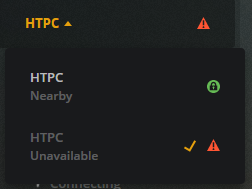
I keep getting duplicate / multiple servers showing up. I delete the one which is “unavailable” and it’s ok for a little while, but then a duplicate shows up again, without any user input.
This has been happening for a while, at least all year if I remember right. So it’s not something isolated to the latest version of PMS.
This duplicate server seems to be messing up the DVR recording, because Plex keeps missing recording a scheduled show. Seems like it gets “confused” when faced with two identical server names, one of which is “unavailable.”
Are you sometimes logging in to a different Windows user account?
If you do, verify that the Plex icon in the task tray does not appear, when logging into that “other” user account.
If it does, disable the autostart of Plex with a right-click on it.
Yes, I always login to a different Windows user account. PMS was installed under the admin account, but we use different accounts, with normal user permissions, for watching Netflix and browsing the internet.
A while back I had put PMS on autostart in the Startup folder, because Windows has a nasty habit of forcing updates which restart the computer, which then stops Plex. If I didn’t login to the Admin account then Plex wouldn’t run in the background.
Except now, I notice there are two instances of PMS in the Startup section of Task Manager.
Basically, what I was trying to do was make so PMS would auto-start after a forced Windows reboot, without me having to login to the admin account. Looks like I need to find that magic combination of settings for this to happen…
Remove one of them.
Check the tray area icon in your regular user account.
The clean solution would be to run Plex server as a Windows system service. PMS as a service
It then doesn’t depend on which user is logged in (or if there is a user logged in at all).
However, this means hardware transcoding is not usable.