Server Version#: 1.22.2 and 1.22.3
Player Version#: Mac 1.31.0
I think this is a Plex Web issue (as Plex for Mac just updated itself to Web client 4.56.3) and I see this problem in both Plex for Mac and Plex Web…
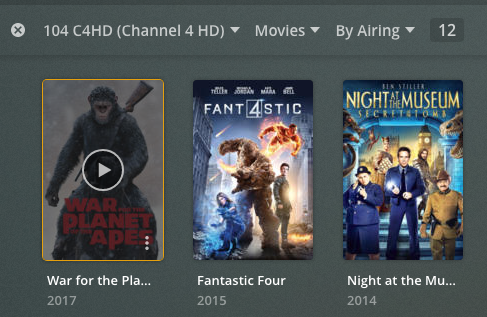
Ignoring the sort/filter no longer sticking for a minute, the DVR browse screen also no longer shows something has been scheduled for recording (rendering it almost useless).
Browse screen (Fantastic 4 has been scheduled for recording):
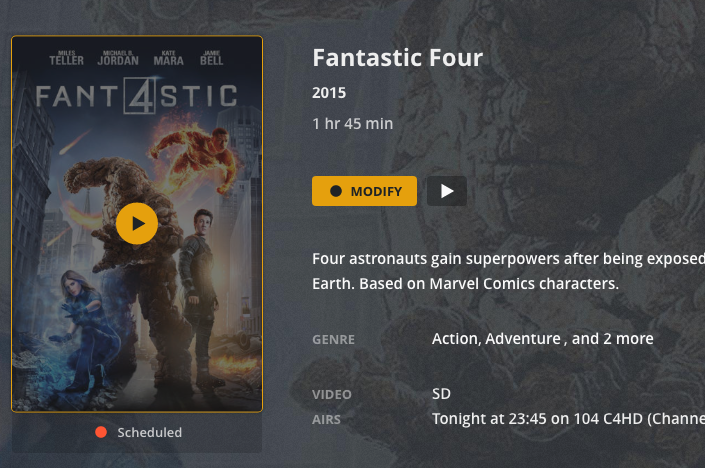
Click on Fantastic 4 and you can see it has been scheduled:
Plex for Mac v1.31.1 (with Plex for Web 4.56.4) has fixed the problem saving the view settings per library, but not the view scheduled indicator in Live TV browsing.
Is this issue recognised and is anyone looking at it?
Didn’t know this thread existed, would have been helpful for someone to point the other threads at it.
Can the Record indicator be made bigger? It’s barely noticeable. Also , for those marked as to be recorded, the central button used to default to a Record Icon instead of Play which would open the Record dialogue. Can this be returned?
Actually, it would be better if it was just reverted to the format it was before it was broken,
This solution has been released in Plex Web for a month now, but Plex for Mac/Windows hasn’t been updated to incorporate the latest/late-enough Web client. Could someone please push that update out?
I also notice that the recording badge is different in movies than it is in TV Shows:
TV Show (less visible):
Movie (more visible):
I appreciate the multiple dots in TV shows probably means series recording, but I am referring to the diameter of the dots. Could the TV show diameter be as large as the Movie one is?