DVR Recording Issues: Stuttering, Skipping, Pixelating, Audio Popping and Scrambling

It has been behaving relatively well. Unfortunately a couple days after I set up the team, Windows updated and now teaming NIC’s is no longer functional. I still have both NIC’s set up with separate IP addresses. One into the switch the HDHomeruns connect to and one directly into the router.

I still some times get occasional dropouts for a few seconds but I haven’t experienced the eventual audio de-sync that was prevalent with only one NIC.

Other observational troubleshooting seems to indicate that some sort of interaction with the Media Server might be part of the issue. We record a news show between 5:30 and 6 every night and usually end up turning on the Apple TV at some point during that show. This is also the show we most frequently see the dropouts. Once we settle in we either watch something on Plex or Amazon Prime.

Also, I did take a look at the logs during the time the issues were happening and it indicates corrupted video packets:

Feb 15, 2019 17:36:37.655 [31024] ERROR - [Transcoder] [mpeg2video @ 03211d40] ac-tex damaged at 26 53
Feb 15, 2019 17:36:37.655 [31044] ERROR - [Transcoder] [mpeg2video @ 03211d40] ac-tex damaged at 11 60
Feb 15, 2019 17:36:37.655 [22888] ERROR - [Transcoder] [mpeg2video @ 03211d40] invalid cbp -1 at 41 52
Feb 15, 2019 17:36:37.655 [30852] ERROR - [Transcoder] [mpeg2video @ 03211d40] invalid cbp -1 at 19 54
Feb 15, 2019 17:36:37.655 [23868] ERROR - [Transcoder] [mpeg2video @ 03211d40] ac-tex damaged at 0 61
Feb 15, 2019 17:36:37.655 [32304] ERROR - [Transcoder] [mpeg2video @ 03211d40] 00 motion_type at 22 50
Feb 15, 2019 17:36:37.655 [27628] ERROR - [Transcoder] [mpeg2video @ 03211d40] ac-tex damaged at 15 55
Feb 15, 2019 17:36:37.655 [16640] ERROR - [Transcoder] [mpeg2video @ 03211d40] 00 motion_type at 17 62
Feb 15, 2019 17:36:37.655 [25156] ERROR - [Transcoder] [mpeg2video @ 03211d40] 00 motion_type at 16 51
Feb 15, 2019 17:36:37.655 [32228] ERROR - [Transcoder] [mpeg2video @ 03211d40] ac-tex damaged at 1 56
Feb 15, 2019 17:36:37.655 [31788] ERROR - [Transcoder] [mpeg2video @ 03211d40] 00 motion_type at 3 63
Feb 15, 2019 17:36:37.655 [31024] ERROR - [Transcoder] [mpeg2video @ 03211d40] ac-tex damaged at 12 52
Feb 15, 2019 17:36:37.655 [8100] ERROR - [Transcoder] [mpeg2video @ 03211d40] ac-tex damaged at 15 57
Feb 15, 2019 17:36:37.655 [22888] ERROR - [Transcoder] [mpeg2video @ 03211d40] 00 motion_type at 15 64
Feb 15, 2019 17:36:37.655 [31044] ERROR - [Transcoder] [mpeg2video @ 03211d40] ac-tex damaged at 6 58
Feb 15, 2019 17:36:37.655 [23868] ERROR - [Transcoder] [mpeg2video @ 03211d40] ac-tex damaged at 15 65
Feb 15, 2019 17:36:37.655 [32304] ERROR - [Transcoder] [mpeg2video @ 03211d40] 00 motion_type at 7 59
Feb 15, 2019 17:36:37.655 [30852] ERROR - [Transcoder] [mpeg2video @ 03211d40] ac-tex damaged at 1 67
Feb 15, 2019 17:36:37.671 [16640] ERROR - [Transcoder] [mpeg2video @ 03211d40] Warning MVs not available
Feb 15, 2019 17:36:37.671 [25156] ERROR - [Transcoder] [mpeg2video @ 03211d40] Invalid mb type in B-frame at 67 9
Feb 15, 2019 17:36:37.671 [31788] ERROR - [Transcoder] [mpeg2video @ 03211d40] 00 motion_type at 0 4
Feb 15, 2019 17:36:37.671 [32228] ERROR - [Transcoder] [mpeg2video @ 03211d40] 00 motion_type at 0 5
Feb 15, 2019 17:36:37.671 [31024] ERROR - [Transcoder] [mpeg2video @ 03211d40] ac-tex damaged at 3 6
Feb 15, 2019 17:36:37.687 [22888] ERROR - [Transcoder] [mpeg2video @ 03211d40] 00 motion_type at 4 7
Feb 15, 2019 17:36:37.687 [8100] ERROR - [Transcoder] [mpeg2video @ 03211d40] Invalid mb type in B-frame at 3 8
Feb 15, 2019 17:36:37.687 [31044] ERROR - [Transcoder] [mpeg2video @ 03211d40] Warning MVs not available
Feb 15, 2019 17:36:37.733 [32304] ERROR - [Transcoder] [mpeg2video @ 03211d40] 00 motion_type at 0 38
Feb 15, 2019 17:36:37.733 [16640] ERROR - [Transcoder] [mpeg2video @ 03211d40] 00 motion_type at 0 60
Feb 15, 2019 17:36:37.733 [27628] ERROR - [Transcoder] [mpeg2video @ 03211d40] 00 motion_type at 0 30
Feb 15, 2019 17:36:37.733 [25156] ERROR - [Transcoder] [mpeg2video @ 03211d40] 00 motion_type at 0 45
Feb 15, 2019 17:36:37.749 [32228] ERROR - [Transcoder] [mpeg2video @ 03211d40] 00 motion_type at 17 53
Feb 15, 2019 17:36:37.749 [31788] ERROR - [Transcoder] [mpeg2video @ 03211d40] 00 motion_type at 0 23
Feb 15, 2019 17:36:37.749 [31024] ERROR - [Transcoder] [mpeg2video @ 03211d40] ac-tex damaged at 23 20
Feb 15, 2019 17:36:37.749 [22888] ERROR - [Transcoder] [mpeg2video @ 03211d40] 00 motion_type at 1 39
Feb 15, 2019 17:36:37.749 [8100] ERROR - [Transcoder] [mpeg2video @ 03211d40] ac-tex damaged at 5 61
Feb 15, 2019 17:36:37.749 [31044] ERROR - [Transcoder] [mpeg2video @ 03211d40] 00 motion_type at 1 31
Feb 15, 2019 17:36:37.749 [23868] ERROR - [Transcoder] [mpeg2video @ 03211d40] ac-tex damaged at 10 46
Feb 15, 2019 17:36:37.749 [30852] ERROR - [Transcoder] [mpeg2video @ 03211d40] 00 motion_type at 0 54
Feb 15, 2019 17:36:37.749 [32304] ERROR - [Transcoder] [mpeg2video @ 03211d40] 00 motion_type at 0 24
Feb 15, 2019 17:36:37.749 [16640] ERROR - [Transcoder] [mpeg2video @ 03211d40] 00 motion_type at 0 5
Feb 15, 2019 17:36:37.749 [27628] ERROR - [Transcoder] [mpeg2video @ 03211d40] 00 motion_type at 0 40
Feb 15, 2019 17:36:37.749 [25156] ERROR - [Transcoder] [mpeg2video @ 03211d40] 00 motion_type at 4 62
Feb 15, 2019 17:36:37.749 [32228] ERROR - [Transcoder] [mpeg2video @ 03211d40] 00 motion_type at 0 32
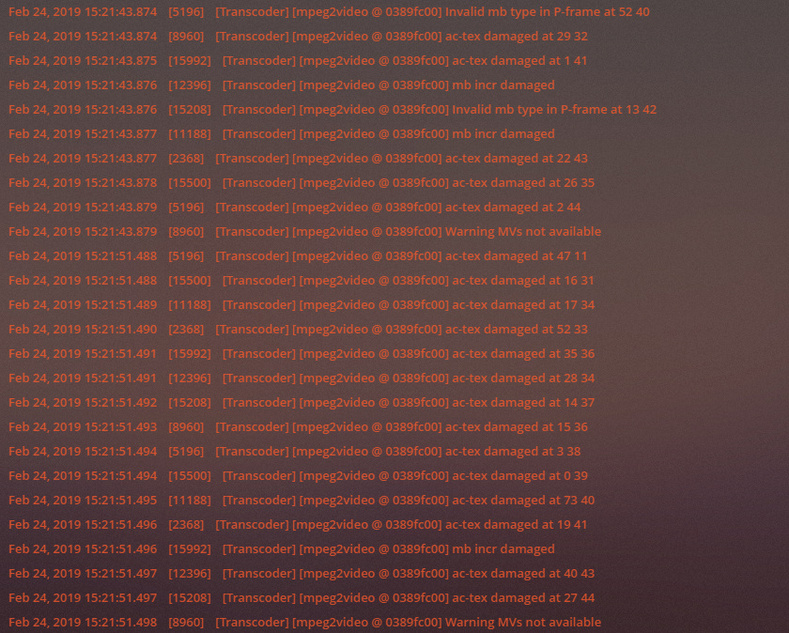

I’ve recently been running 1.15.0.659 for a few weeks and it had some pretty crappy stuttering etc that “looked” like signal issues, however i have constant 29-32 SNR on my channels. Wasn’t happening on the 480 resolution channels, only on the HD ones. I think it was more an issue with plex and my pci express quad tuner hauppauge card. I reverted just now to 1.14.1.5488 and its now perfect again no issues. Neither time was my cpu maxed out, usually around 30% with a live tv show on with my quad core i5.
Windows 10 server, Hauppauge driver 1.59.36248.0

1 Like

I have the same issue. Will downgrading to an older version of the server cause any issues?

Because this thread is kind of old, I started a current one once the most recent beta just dropped for PMS. I did this when I realized my problem is a “new” problem since I didn’t have it until 1.15 versions. Yes you can downgrade to 1.14, and then report your success here:

This has started with me also. Not sure when exactly but I think it was the most recent update. I tried the beta channel also but the problem persists.

The console is full of this while watching live TV. Watching it directly with the HDHomeRun app shows no issues.

This also seems to be affecting my recordings starting Friday night.

Worked
Feb 22, 2019 12:22:34.378 [3684] INFO - Plex Update Service v1.13.8.5395-10d48da0d

Fails
Feb 22, 2019 12:25:50.225 [17032] INFO - Plex Update Service v1.14.1.5488-cc260c476
Feb 24, 2019 15:05:34.171 [14444] INFO - Plex Update Service v1.15.1.707-d893009fb

I’m having the same issue, does anyone found what was the cause of this problem?
I also have hauppauge quad tuner.

Thanks

I have the same issue with Nvidia shield.

Same here. Posted a thread that got no real response. Not feeling like Plex cares at all about this.

I have my doubts that a double NIC is the solution to the problem because I’m using a 10GB card/network and I’m experiencing the pixelation problem.

You don’t actually get 2GB of throughput to one send/receive stream. It will give 1GB to two streams, so you’re still running a 1GB throughput. I am on a 10GB network (no teaming) and I have still have pixelation, so this isn’t the cause of the issue. I am going to try to reboot my router and switch once a day to see if this fixes the problem.

I’m not certain what hooking up both hard wired NIC ports accomplished, but I haven’t had a glitchy recording since enabling it.

It seemed, during my testing, that Plex used network style ports to do a lot of its operations, even for stuff like removing commercials and on the fly transcoding (though disabling those didn’t help). It may be that with a second outlet available, whatever is bottlenecking the recordings gets offloaded better.

As for now, this a lot like an experimental drug, I have no idea how it solves the symptom, but it does.

I think something else fixed it. Did you happen to reboot your router somewhere around that same time or get a different IP address after adding the 2nd NIC? I used to have my router reboot every night automatically while I was asleep because that can fix many problems. After installing Plex and my DVR- I had to turn that off because I never knew when it might be recording something. I just manually rebooted it (only the router and not my managed switch) and I can notice my download speeds already improved. I’m going to keep doing this every day and see if it fixes the glitches. Also- I know some people are saying it’s the later versions of Plex and to downgrade, but mine worked great for weeks without glitches on the 2nd to last version. It wasn’t until recently it started and I haven’t upgraded it to the latest. We’ll get to the bottom of this- I’ll report back on my experience after some time goes by.

I’m having this problem on every platforms I use ( Nvidia Shield tv, android and web client)

I’m having the problem even when I’m trying to watch live tv directly on the pms where it is installed. Also the errors I get are [transcoder] related. Is there a list of all the possible errors and the solution?

I had glitches. Dual NIC with intel management, no glitches.
Windows update ate intel dual nic, then glitches returned. Re-enabled dual nic (no intel magic) glitches stopped again. No glitching for 6 months.

Might as well try it (if you have the hardware) even if you don’t think it will work. Worst that can happen is your recordings keep sucking.

So far since rebooting my router every day I have not had any more glitches on recordings. Just to be clear- I pull the power out for about 10 to 30 seconds and plug it back in. Just simply rebooting it may do the trick too and only once a week (or more) may be all that’s needed. I’ll report back if any more glitches show up.

I don’t really watch live TV with my Plex and I rarely transcode because I’m usually watching a recorded program at home. My bandwidth/processors are powerful enough to watch the maximum video quality each time/on each device (without transcoding), so I can’t attest to those issues. Besides the glitch issue, which seems to okay now from daily router rebooting, the only other issue I had was the DVR “Refreshing guide data” stuck in “Initializing” for days. I managed to fix that by first upgrading the firmware on my HDhomerun Prime and changing a couple of settings in my router. I posted a detailed solution at this link DVR "Refreshing guide data" stuck in "Initializing" for days (scroll down near the bottom username NerdPants with picture attachment). There’s a possibility these changes will fix the errors you’re having as well even if you don’t have a HDhomerun device.

Can you tell me what where the errors your were getting before ?

Only the recording glitches and the “DVR refreshing guide data stuck in initializing for days” were a problem for me- no other errors or issues.

I’m pretty sure it doesn’t have anything to do with specific plex server hardware or even networking equipment, as I’ve replaced my plex server (including video card), router, switch with completely different hardware during the time-frame I have been experiencing this issue.

Old Plex server (also used as HTPC for Plex Media Player):
AMD Phenom II x6 1055T
8GB RAM
Radeon HD6850
Onboard Gigabit ethernet
SATA SSD for OS / apps
SATA 3TB HD for plex content
Windows 10 Pro

New Plex server (also used as HTPC for Plex Media Player):
AMD Ryzen 2600X
16GB RAM
NVIDIA GTX 1050TI
Onboard gigabit ethernet
NVME SSD for OS / apps
SATA 3TB HD for plex content
Windows 10 Pro

Old networking equipment:
ASUS RT-AC66U

New networking equipment:
Ubiquiti EdgeRouter-X
TP-Link TL-SG116 (16 port gigabit router - all tuners, and plex server are directly connected)
Ubiquiti UniFi AP-AC Lite (wireless access point - not used for any plex tasks)

Tuners (common among both)
HDHomeRun PRIME
HDHomeRun DUAL (I’ve tried 3, 6, and 10db attenuators - no effect)