A hot fix beta was released today and should resolve this - it is 1.15.8.1198
With regards to Guide data there was an issue with bad cached data in past couple of days and this has now been addressed. So you can try to setup / refresh the guide
A hot fix beta was released today and should resolve this - it is 1.15.8.1198
With regards to Guide data there was an issue with bad cached data in past couple of days and this has now been addressed. So you can try to setup / refresh the guide
Looks like most of my issues are fixed after the hot fix.
I know this is probably unrelated but now my only issue is that I still can’t record shows due to errors referencing not having enough space in “/storage/emulated/0/Android/data/com.plexapp.mediaserver.smb/cache/Transcode/Sessions." The thing is, I have recordings set to save to a network drive and I also changed the PMS storage to save to a USB stick, so I have no idea why it’s still trying to use internal storage…
Go to server settings in Plex web and select Transcoder setting. Set the path for the Transcoder Temporary files directory to be within an area that has more space
The default for the transcoder is internal storage
I am discussing this with the development team to see if it should have moved when you moved app data to external storage
I was able to fix it. I have a HDHomerun Prime, but it probably doesn’t matter what you have. If you do have a HDHomerun product- first update the firmware. After- make sure you are receiving UPnP discovery announcement packets from the network. Problems can occur by third-party firewall software on the PC, a home router blocking multicast communication, or a managed switch blocking multicast communication. Some home routers block multicast traffic by default and need to be configured to allow multicast communication within the LAN. This is common with DLink GigE routers. A managed switch that supports IGMPv2 but not IGMPv3 may fail to track multicast paths correctly.
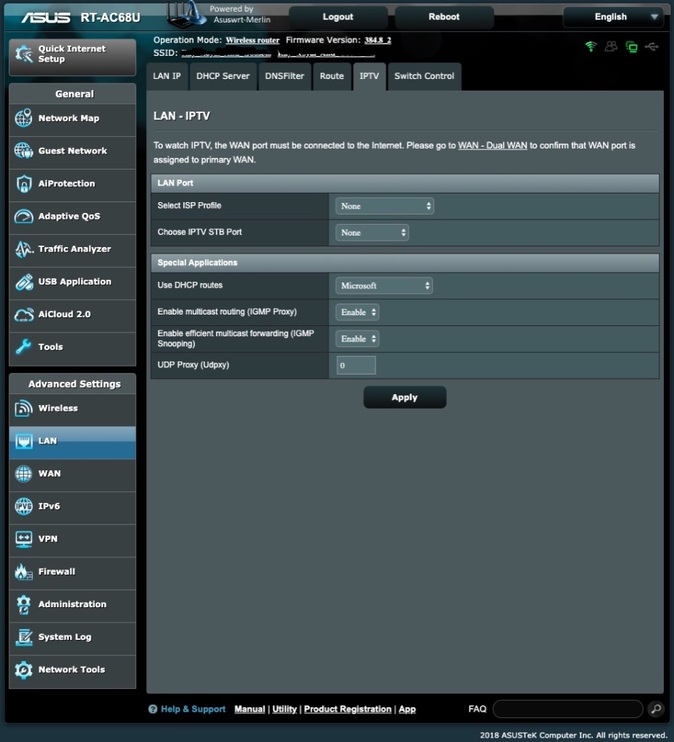
On my FreeNAS - I stopped the Plex Jail plugin and on my Asus WRT Merlin flashed router- under Advanced Settings - LAN - IPTV - Special Applications - I enabled multicast routing (IGMP Proxy) as well as Enabling efficient multicast forwarding (IGMP Snooping) (see attached photo). I rebooted my router for good measure and after started the Plex Jail Plugin on my FreeNAS. The guide data refreshed without a problem afterwards.
This is the diagnostic procedure if you’re using a HDHomerun Prime:
The test can be repeated by clicking the Rescan button on the Tuners tab in HDHomeRun Setup. It is recommended that the test be repeated after each configuration change until the cause of the problem has been identified and the error is no longer reported.
My server has 16gb of ram to begin with. Going up to 24gb didn’t help either.
So far I’ve forced 5 reboots and the guide isn’t getting stuck refreshing. I’ll see what happens in a few days after it reboots on it’s own…
So this is new. I’ve decided to just leave my server on 24/7 to deal with this issue. Now if I manually refresh the guide data it is getting stuck as well. I have to restart plex and then it will pick up the data and finish.
Is this just permanently going to be an issue with Plex? I’ve “solved” this at least half a dozen times and it just keeps coming back. I guess it was a mistake thinking Plex could handle OTA TV.
Anyone have a permanent fix to this? Is this even on the roadmap to solve? You can tell me it’s issues with corrupted db’s over and over, and I can remove those over and over… but eventually you guys should stop this from occurring.
There are no known current issues of EPG refresh getting stuck when using current versions and you have already migrated to the new EPG which came in on first of july
Let me have server logs with debug logging enabled after starting a refresh and i will have a look. Please include screenshot
https://support.plex.tv/articles/201643703-reporting-issues-with-plex-media-server/
https://support.plex.tv/articles/200250417-plex-media-server-log-files/
All previous paths aren’t working. Killing Plex, deleting the prefs, restarting… still can’t actually turn live tv off (kicks back on after restart), still stuck on the db.
I can see a problem at 12:03 where an attempt to Delete the DVR hung and you restarted the server at 12:08. I will be referring this to the development team.
Try not to delete soon after launch and let it do its automatic refresh. It seems to be busy doing it when you try to stop it
It is looks like there is a bug - so until it is found and fixed, don’t get in to delete the DVR whilst it is doing it is automatic refresh. The guide refresh was going and acive / in progress when you took the logs at 12:16:38. - see logs
Sep 05, 2019 12:14:48.279 [0x70000b332000] DEBUG - Activity: registered new activity 5ee34c70-debe-48ab-b00a-7307d8d1c2d4 - Refreshing guide data
Sep 05, 2019 12:14:48.280 [0x70000b332000] DEBUG - Activity: updated activity 5ee34c70-debe-48ab-b00a-7307d8d1c2d4 - completed 0.000000% - Refreshing guide data
Sep 05, 2019 12:15:02.168 [0x70000bdf1000] DEBUG - Activity: updated activity 5ee34c70-debe-48ab-b00a-7307d8d1c2d4 - completed 1.000000% - Refreshing guide data
Sep 05, 2019 12:15:03.239 [0x70000bdf1000] DEBUG - Activity: updated activity 5ee34c70-debe-48ab-b00a-7307d8d1c2d4 - completed 2.000000% - Refreshing guide data
Sep 05, 2019 12:15:04.798 [0x70000bdf1000] DEBUG - Activity: updated activity 5ee34c70-debe-48ab-b00a-7307d8d1c2d4 - completed 3.000000% - Refreshing guide data
Sep 05, 2019 12:15:08.813 [0x70000bdf1000] DEBUG - Activity: updated activity 5ee34c70-debe-48ab-b00a-7307d8d1c2d4 - completed 4.000000% - Refreshing guide data
Sep 05, 2019 12:15:16.593 [0x70000bdf1000] DEBUG - Activity: updated activity 5ee34c70-debe-48ab-b00a-7307d8d1c2d4 - completed 5.000000% - Refreshing guide data
Sep 05, 2019 12:15:23.472 [0x70000bdf1000] DEBUG - Activity: updated activity 5ee34c70-debe-48ab-b00a-7307d8d1c2d4 - completed 6.000000% - Refreshing guide data
Sep 05, 2019 12:15:29.073 [0x70000bdf1000] DEBUG - Activity: updated activity 5ee34c70-debe-48ab-b00a-7307d8d1c2d4 - completed 7.000000% - Refreshing guide data
Sep 05, 2019 12:15:32.351 [0x70000bdf1000] DEBUG - Activity: updated activity 5ee34c70-debe-48ab-b00a-7307d8d1c2d4 - completed 8.000000% - Refreshing guide data
Sep 05, 2019 12:15:41.495 [0x70000bdf1000] DEBUG - Activity: updated activity 5ee34c70-debe-48ab-b00a-7307d8d1c2d4 - completed 9.000000% - Refreshing guide data
Sep 05, 2019 12:15:46.640 [0x70000bdf1000] DEBUG - Activity: updated activity 5ee34c70-debe-48ab-b00a-7307d8d1c2d4 - completed 10.000000% - Refreshing guide data
Sep 05, 2019 12:15:50.149 [0x70000bdf1000] DEBUG - Activity: updated activity 5ee34c70-debe-48ab-b00a-7307d8d1c2d4 - completed 11.000000% - Refreshing guide data
Sep 05, 2019 12:16:00.477 [0x70000bdf1000] DEBUG - Activity: updated activity 5ee34c70-debe-48ab-b00a-7307d8d1c2d4 - completed 12.000000% - Refreshing guide data
Sep 05, 2019 12:16:03.427 [0x70000bdf1000] DEBUG - Activity: updated activity 5ee34c70-debe-48ab-b00a-7307d8d1c2d4 - completed 13.000000% - Refreshing guide data
Sep 05, 2019 12:16:08.322 [0x70000bdf1000] DEBUG - Activity: updated activity 5ee34c70-debe-48ab-b00a-7307d8d1c2d4 - completed 14.000000% - Refreshing guide data
Sep 05, 2019 12:16:11.809 [0x70000bdf1000] DEBUG - Activity: updated activity 5ee34c70-debe-48ab-b00a-7307d8d1c2d4 - completed 15.000000% - Refreshing guide data
Sep 05, 2019 12:16:22.637 [0x70000bdf1000] DEBUG - Activity: updated activity 5ee34c70-debe-48ab-b00a-7307d8d1c2d4 - completed 16.000000% - Refreshing guide data
Sep 05, 2019 12:16:30.152 [0x70000bdf1000] DEBUG - Activity: updated activity 5ee34c70-debe-48ab-b00a-7307d8d1c2d4 - completed 17.000000% - Refreshing guide data
Was the percentage progress not showing on Plex Web screen?
It is done through async events to Plex Web and I have come across a case where Plex Web was not getting these events and so not displaying progress. It was going through some reverse proxy.
What was the server settings Live TV & DVR screen showing at 12:36 - just before you took the logs?
And before this, again you shutdown whilst it was doing the refresh - again it hung because a DELETE came in.
I would like to see what happens if you do not touch it and let it complete the refresh
Sep 05, 2019 12:09:30.324 [0x700004227000] DEBUG - Activity: updated activity 77cf7334-caac-4222-bf4f-69d58dece9d7 - completed 1.000000% - Refreshing guide data
Sep 05, 2019 12:09:33.450 [0x700004227000] DEBUG - Activity: updated activity 77cf7334-caac-4222-bf4f-69d58dece9d7 - completed 2.000000% - Refreshing guide data
Sep 05, 2019 12:09:37.047 [0x7fffa0b13380] DEBUG - Shutting down with signal 0 (Unknown signal: 0)
Sep 05, 2019 12:09:37.047 [0x7fffa0b13380] DEBUG - Ordered to stop server.
and the earlier one I mentioned at 12:03, it was busy doing the refresh when you deleted the DVR - and it hung which looks like a bug
Sep 05, 2019 12:01:47.177 [0x700004dd7000] DEBUG - Activity: updated activity 1e9267be-c5bf-4f36-b63a-f580fe9deb47 - completed 0.000000% - Refreshing guide data
. . .
Sep 05, 2019 12:03:43.151 [0x700003e7d000] DEBUG - EPG[cloud]: Matched channel 22.1 (IND) with grabber channel, adding.
Sep 05, 2019 12:03:43.258 [0x700003e7d000] DEBUG - EPG[cloud]: Matched channel 22.2 (IND) with grabber channel, adding.
Sep 05, 2019 12:03:43.456 [0x700003e7d000] DEBUG - EPG[cloud]: Matched channel 22.3 (IND) with grabber channel, adding.
Sep 05, 2019 12:03:43.638 [0x700003e7d000] DEBUG - EPG[cloud]: Matched channel 22.4 (IND) with grabber channel, adding.
Sep 05, 2019 12:03:44.164 [0x700003e7d000] DEBUG - EPG[cloud]: Matched channel 22.5 (IND) with grabber channel, adding.
Sep 05, 2019 12:03:44.261 [0x700003e7d000] DEBUG - EPG[cloud]: Matched channel 22.6 (IND) with grabber channel, adding.
Sep 05, 2019 12:03:46.945 [0x700003f83000] DEBUG - Request: [10.0.0.171:63842 (Subnet)] OPTIONS /livetv/dvrs/2 (8 live) TLS GZIP Signed-in Token ()
Sep 05, 2019 12:03:46.945 [0x7000044a1000] DEBUG - Completed: [10.0.0.171:63842] 200 OPTIONS /livetv/dvrs/2 (8 live) TLS GZIP 0ms 301 bytes

Sep 05, 2019 12:03:46.954 [0x700003f00000] DEBUG - Request: [10.0.0.171:63843 (Subnet)] DELETE /livetv/dvrs/2 (8 live) TLS GZIP Signed-in Token (randallpjenkins)
It was hanging on Initializing, the same problem I and others have had for months. Before I pulled these logs I was busy trying to free up my Server so it could actually be used (this hanging on initializing, seems to hog resources too, remote streaming was SEVERELY delayed).
Because this was hanging I was taking the steps I had previously to try to free things up. Including removing the pref files while I had quit. This wasn’t doing anything so I was also trying to kill the Live TV, which wasn’t stopping. Why I was quitting the server in the middle of processes is because it would tell me there was an issue removing my tuner.
None of those things are the issue. They are all AFTER the issue. I finally got the damn tuner to be removed and actually stick, and I’m fairly sure I’ll never turn it back on.
Please look at the logs before all those things as none of them are my concern. The concern is using the Live TV and having it enabled without the guide date being stuck at 0% OFTEN.
But when you relaunch Plex Media Server, as you did at Sep 05, 2019 12:14:33, we are starting from scratch again. There would be no hung initialize / guide refresh at that time. It was setting up the DVR EPG.
It started at 12:14:47
Sep 05, 2019 12:14:47.542 [0x70000b332000] DEBUG - DVR: Starting up.
Sep 05, 2019 12:14:47.547 [0x70000b332000] DEBUG - EPG[cloud]: Starting.
It installed a new empty EPG database to populate
Sep 05, 2019 12:14:47.547 [0x70000b332000] DEBUG - Installing Library Database from ["/Applications/Plex Media Server.app/Contents/Resources/com.plexapp.plugins.library.db"] to ["/Users/mediaserver/Library/Application Support/Plex Media Server/Plug-in Support/Databases/tv.plex.providers.epg.cloud-b9874d38-5c18-4728-a88f-68444cedbda5.db"]
Sep 05, 2019 12:14:47.604 [0x70000b332000] DEBUG - Running migrations. (EPG 1)
It was at 0% at 12:14:48
Sep 05, 2019 12:14:48.280 [0x70000b332000] DEBUG - Activity: updated activity 5ee34c70-debe-48ab-b00a-7307d8d1c2d4 - completed 0.000000% - Refreshing guide data
Sep 05, 2019 12:14:48.280 [0x70000bdf1000] DEBUG - EPG[cloud]: starting incremental refresh for lineup lineup://tv.plex.providers.epg.cloud/5cc83d73fffce8001e87c8d0#Broadcast%20TV%20Van%20Nuys%20OTA%20Broadcast
and 3 seconds later you decided it must have hung and you got in to delete the DVR at 12:15:01 whilst it was actually updating the EPG - we probably have a bug here where the DELETE request got stuck. But the DVR EPG setup was continuing and by 12:16:30 it got to 17% - The EPG setup is not instantanuous and it does take a number of minutes
Between 12:15:08 and 12:16:30 it moved from 4% progress to 17%
You captured the logs at 12:16:38
Apart from the DELETE hang which is an issue, i cannot see the Guide Refresh stuck - it is progressing slowly and took from 12:14:48 to 12;16:30 to get to 17% from 0%
I will refer the issue with the DELETE hanging - that could be because it is being done whilst it is busy setting up the DVR.
I would like to see evidence where there is no attempt to DELETE the DVR and for the guide refresh stuck at 0%. I do not see that in the logs. The logs show it is progressing beyond 0%
and looking at the log before the re-start of Plex Media Server at 12:14:33, in this session, the server was launched afresh at 12:08:27 and again being a fresh launch we are starting from 0 position - so there would be no hung DVR setup at that moment.
At 12:08:44 we started the setup. You have over 200 channels on the lineup
So we start the setup
Sep 05, 2019 12:08:44.844 [0x7000038f1000] DEBUG - EPG[cloud]: Starting.
Sep 05, 2019 12:08:44.844 [0x7000038f1000] DEBUG - Opening 10 database sessions to library (tv.plex.providers.epg.cloud:2), SQLite 3.26.0, threadsafe=1
Sep 05, 2019 12:08:44.844 [0x7000038f1000] DEBUG - Installing Library Database from ["/Applications/Plex Media Server.app/Contents/Resources/com.plexapp.plugins.library.db"] to ["/Users/mediaserver/Library/Application Support/Plex Media Server/Plug-in Support/Databases/tv.plex.providers.epg.cloud-b9874d38-5c18-4728-a88f-68444cedbda5.db"]
Sep 05, 2019 12:08:45.418 [0x7000038f1000] DEBUG - Media Provider: Registering provider tv.plex.providers.epg.cloud:2
Sep 05, 2019 12:08:45.451 [0x70000401b000] DEBUG - EPG[cloud]: Purging 0 airings which completed in the past.
Sep 05, 2019 12:08:45.464 [0x700004227000] DEBUG - EPG[cloud]: starting incremental refresh for lineup lineup://tv.plex.providers.epg.cloud/5cc83d73fffce8001e87c8d0#Broadcast%20TV%20Van%20Nuys%20OTA%20Broadcast
Sep 05, 2019 12:08:45.468 [0x7000038f1000] DEBUG - EPG[cloud]: Scheduling next refresh for 2019-09-05 16:08:45.
Sep 05, 2019 12:08:50.400 [0x700004227000] DEBUG - EPG[cloud]: Matched channel 2.1 (CBS) with grabber channel, adding.
Sep 05, 2019 12:08:50.412 [0x700004227000] DEBUG - EPG[cloud]: Matched channel 4.1 (NBC) with grabber channel, adding.
and we have 200+ channels to map
after getting through 142 channels, we got to channel 64.1 at 12:08:56
Sep 05, 2019 12:08:56.704 [0x700004227000] DEBUG - EPG[cloud]: Matched channel 64.1 (IONP) with grabber channel, adding.
you decided that 32 seconds after this was too long to wait and attempted to delete the DVR - during setup
Sep 05, 2019 12:09:28.243 [0x700004e6f000] DEBUG - Request: [10.0.0.171:64124 (Subnet)] DELETE /livetv/dvrs/2 (16 live) TLS GZIP Signed-in Token (randallpjenkins)
but during this 32 second, it was actually busy downloading program info for the 142 channels it started to deal with from the 220+ list
when you gave up after 32 seconds, it was busy downloading program metadata
Sep 05, 2019 12:09:27.657 [0x700004227000] DEBUG - HTTP requesting GET https://epg.provider.plex.tv/library/metadata/5cffa4b4d5c642001dd59282?X-Plex-Api-Token=xxxxxxxxxxxxxxxxxxxx
Sep 05, 2019 12:09:28.148 [0x700004227000] DEBUG - HTTP 200 response from GET https://epg.provider.plex.tv/library/metadata/5cffa4b4d5c642001dd59282?X-Plex-Api-Token=xxxxxxxxxxxxxxxxxxxx

Sep 05, 2019 12:09:28.243 [0x700004e6f000] DEBUG - Request: [10.0.0.171:64124 (Subnet)] DELETE /livetv/dvrs/2 (16 live) TLS GZIP Signed-in Token (randallpjenkins)
and then whilst it was downloading guide data
Sep 05, 2019 12:09:36.687 [0x700004227000] DEBUG - HTTP requesting GET https://epg.provider.plex.tv/library/metadata/5cffa18ae76c04001e7b32a0?X-Plex-Api-Token=xxxxxxxxxxxxxxxxxxxx
you shut the server down
Sep 05, 2019 12:09:37.047 [0x7fffa0b13380] DEBUG - Shutting down with signal 0 (Unknown signal: 0)
Sep 05, 2019 12:09:37.047 [0x7fffa0b13380] DEBUG - Ordered to stop server.
So this is the issue you are trying to address. During the DVR setup which may take a few minutes, it is impacting other server operation - like the remote access availability. It was actually not hanging - just taking a while. I will follow this aspect up to see if we are not allowing remote access related events to be processed.
No it absolutely shows initializing 0% for hours/days. It took me a ton of tries of deleting the setup and restarting (and waiting sometimes for a while without it ever showing progress) and then trying to delete the dvr setup again. It never once when I was hitting Delete had any progress shown. If it was making ANY progress, shouldn’t it have been reflected here?
What made me realize the DVR EPG was having issues again was that remote streaming was taking so long. It was the symptom not the cause. It shouldn’t have been needing to take a while as nothing new should have been being setup. The app had been running for days, though I’m not educated on if/when Plex triggers it to update. I assume even that progress doesn’t take hours, and should show more than 0% if I check on it over several minutes to an hour?
I’d turn it all back on to show that eventually it goes back to just hanging forever on 0%, but these logs should show how much of a pain it is to be able to actually turn it back off. I’m just not sure it’s worth it for me.
may be the asynchronous events to Plex Web from the server are not getting there. These events provide the percentage progress information. May be there is some firewall block on them. i have seen this happen before in a setup where there was a reverse proxy.
I am not sure if we can capture what Plex Web is receiving during the refresh through the Browser Dev console (F12) - if it is possible, please save the log and send me by Private Message together with the server log.
Are you able to get to the server setting for Live TV and DVR and start a manual refresh ?
This topic was automatically closed 90 days after the last reply. New replies are no longer allowed.