I just now restarted Plex. 4:45 pm CDT
Sorry. Previously, last time i restarted the app after.waiting 30 minutes, was 3:30 pm CDT
NOTHING showing up
Time to get ugly.
- Stop Plex
- Using your graphical file tool. (sorry I don’t know MacOS well enough)
- Navigate into the PlexMediaServer area (Application Support/Plex Media Server)
- Under there, find the Cache folder
- In
Cacheyou’ll findcert-v2.dat(might also find the new certificate name) - DELETE IT.
- Now start PMS.
- It will be forced to get a new certificate
I did not do a lost password request yesterday. Instead I changed it under my Account in Plex. Server tie was lost (I have a desktop/W10 machine and Synology DS720 6.2.4). Through this forum I was able to get my servers claimed again with new password. I didn’t edit preferences.XML file. I didn’t get a new certificate (or request one). Is that necessary? Should I redo my password as explained in the email? I confess I just saw the news about the need to change PW. I didn’t realize until later than I was to do so in Incognito browser and request link. All my media is there. The playlists are there. The only thing I’m having issue with on both servers is the audio delay between tracks is up to 6-7 seconds and it sounds as though the very beginning (hardly perceptible) of the songs is clipped off. What should I do? Thank you.
Please confirm you have an otherwise working server and playback devices with, at this moment in time, a playback issue?
If this is true, Please create a new thread.
We will do our best to get to you soon but we are very very overloaded dealing with the security / password problems of yesterday
I understand being overwhelmed with issue (I struggled for a full day myself).
Can you answer whether I should:
A) get a certificate and import into Plex on NAS
B) request a lost password per Plex email yesterday - or should I consider myself lucky that my severs are back?
Please, please let me know.
I will post a new thread, but here is something odd on the logs. I don’t have a device at .112. And let me know if you see anything else here if you could please? And yes, I am playing music from both servers. The library and playlists are there.
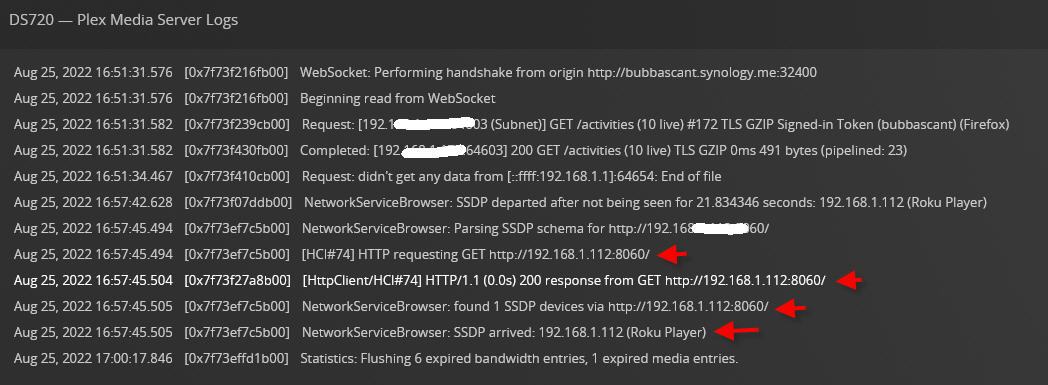

Since you manually set your passwords under your account settings, that action qualifies the same as a requested reset.
You’re good to go now.
Regarding the device at .122 SSDP is a UDP discovery.
That said, there must be something on the LAN.
Have you run nmap to see what it is?
How about this from Terminal?
cd "~/Library/Application Support/Plex Media Server"
find . -name \*cert\* -print
If it’s stored in a file, that will find it
Ya know, we could just go scorched earth, uninstall and reinstall! I’ve saved my videos offline and could put them back after.
If you scorch the earth, The videos will be fine.
You’re only removing the server software and its data.
True?

Sounds right to me, but i have backups just in case. Sounds like a project for tomorrow.
Chuck, if you think uninstall/reinstall will fix it, im OK with that.
You’ll know the moment you uninstall the app
If you look under Application Support and there’s no Plex Media Server anymore, then you’re all set for it to start fresh.
Huh. Whaddya know. I’m looking at the uninstall directions, and stumbled on the cert.
~/Library/Caches/PlexMediaServer/
is where it is. I deleted it, restarted the server, waited for a new cert to appear, tried to log in, and still unauthorized. cert-v2.p12 is its name
So, I have to go somewhere in 15 minutes. Looks like scorched earth might be the way to go.
That’s an Araknis POE switch - AN-210-SW-8-POE.
Is that causing a problem? What should I do? We’re having some significant Sonos/Plex issues over the past many months. Can’t figure out what’s causing the broadcast flooding leading to drops.
On the capture I sent, I see a Roku device (3 are authorized - but I don’t need to see the one as it’s just a bedroom TV that I wouldn’t use Plex with) that is showing some log mention (and the Samsung TV is now too since I reauthorized that Plex on the Samsung Roku in question).
It’s not causing a problem. It’s simply responding to the SSDP and Plex is looking at it.
Please remember, SSDP (Simple Service Discovery Protocol) finds EVERYTHING whether it’s Plex related or not.
I have several switches on my LAN… Plex sees them in the NMAP / SSDP scan.
It’s nothing to worry about unless it suddenly starts signing in and streaming
I successfully changed my username and password but its not linked to my lifetime pass , this is a cluster since the hack
Buongiorno Chuck,
dopo aver reimpostato la password non ho più accesso al server…
1:sì
2.sì
3.sì
4.marmotta,Qnap TS251+
puoi aiutarmi?
Grazie
You deleted both servers from your account
How would you like to proceed?
Hai eliminato entrambi i server dal tuo account.
Come vorresti procedere ?
